84.4.5.29 STANDARD > PEBBLE BEACH XML
Import Scope
The Pebble Beach import allows importing the programming playlist of a certain television day from an XML file. Among the tags managed for each imported event, the following can be mentioned:
<event type> - Starts an "event" tag to be imported, by indicating its transmission type (e.g. Media, Live).
<stream> - Specifies if the imported event is either or not a streaming event, that is, playable while recording.
<onairtime> - Indicates the exact date and time at which the imported event is intended to be transmitted (e.g. 2011-11-28T06:44:00;00).
<reconcilekey> - A numeric string used to reconcile the imported event with an Etere asset (e.g. 39980496).
<title> - The alphanumeric title that briefly describes the imported event.
<category> - Indicates the event's program type (e.g. commercial, seasons, news).
Please note that in case no type within the database corresponds to the imported <category>, a new type will be automatically created using the <category> value (e.g. BR-SPOTS) as description and its first 4 characters as code (e.g. description=BR_SPOTS and code=BR-S).
<source> - In case of live events, where the <event type> value must be set as “Live”, this tag indicates the channel (of the Etere's routing table) from which they will be feed. Moreover, it's worthy mentioning that in case the specified <source> (e.g. satellite) is missing on the database, it will be automatically generated as "LIVE_<source>" (e.g. live_satellite).
<notok> - If the tag exists on the xml, and its value is "1", then the asset will be set as "Not Ok to be Broadcasted". If the tag is not existing, or it has a different value, asset will follow Etere default rules.
During import, the following scenarios would be managed:
•For multiple import within the same day from different channels, the "EXTERSTRID" field in the XML file can be the same when importing from single workstation.
•During import, if there is Live event without a description presented among the channel routers, the import would not be interrupted, an error message highlighted in red would be logged in schedule to identify the event.
•The asset code would be imported from the <houseid> tab (instead of <mediaid> tab) in the XML file. If the <houseid> tab contain no value, the asset would be created with asset code = asset ID.
•The import time is based on 24 hours basis to import playlists for current day, e.g. if the system “Rollover time” is set at “06:00:00”, the playlists scheduled from “06:00:00” hours to next day “05:59:59” hours would be imported for current day.
Import Parameters
Under the Parameters section, other settings that can be configured are:
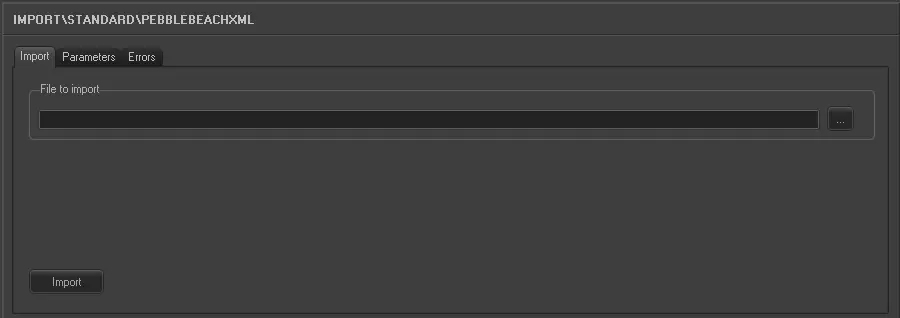
Import_standard_pebble_beach_xml
•File to import: Select the file to be imported and its file path.
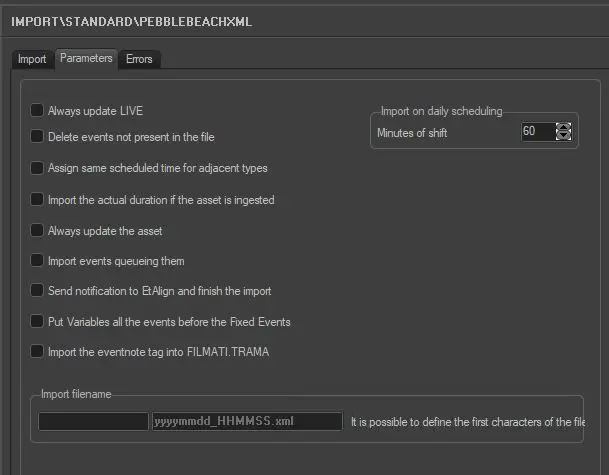
Import_standard_pebble_beach_xml_1
•Always update Live: Allows you to always update the Live events, even if they already exist in the archive.
•Delete events not present in the file: Allows you to delete all events scheduled on the imported day but not present in the imported file.
•Assign same scheduled time for adjacent types: For events that have the same typology and fall adjacent to each other in the schedule (e.g. commercials in a cluster) this parameter allows you to assign the same scheduled time to these events. In the 'Data' to import under the previous tab the field HOUR must not be activated for this parameter to work.
•Import the actual duration if the asset is ingested: Allows you to import the real duration of the asset form in a situation where it has been recorded, even if the scheduled duration is present and different in the imported file.
•Always update the Asset Form: Allows you to always update the asset forms even if they already exist in the Archive. Elements that will be updated are Duration, Mark in/Mark out, Type, Description and Insertion points. This parameter also refers to LIVE events.
•Import events queuing them: If enabled, non-consecutive timings will be imported placing them into the schedule consecutively, that is, queuing them.
•Send notification to EtAlign and finish the import: Send a notification to EtAlign at the end of the import so that EtAlign can publish the schedule in automation (and eventually restore required files).
•Put Variables all the events before the Fixed events: With this option enabled, events with variable duration would be place before the Fixed time events.
•Import the eventnote tag into FILMATI.TRAMA: imports the related tag into FILMATI.TRAMA instead of FILMATI.NOTE_AMM
•Import file name: Details the exact format of the XML filename to be imported, the format is: [custom]yyyymmdd_hhmmss.XML where:
- [custom]: A user-defined alphanumeric prefix.
- yyyymmdd: The year, month and date (e.g. exported date) of the file to be imported.
- hhmmss: The hour, minutes and seconds (e.g. exported time) of the file to be imported.
•Import on daily scheduling - Minutes of shift: If you are importing the schedule for the current day, this parameter defines what time on the schedule the import should starts. The import start time is calculated as "Current time + Time shift value". For example, if the current time is 9.00am and you plan to start the import at 10.40am, enter the value “100” (minutes) in the parameter to start the import at 10.40am. Please note that events with a start time before the current time will not be imported.
Once the import has been configured, it can be started just by pressing the <Import> button, once the import has finished, it will be possible to display the schedule of the related day to check/approve the operation.
Sample imported file
<?xml version="1.0" encoding="ISO-8859-1" standalone="yes"?>
<playlist>
<eventlist>
<event type="MEDIA">
<stream>0</stream>
<onairtime>2011-11-28T06:44:00;00</onairtime>
<starttype>SEQ</starttype>
<endtype>NORM</endtype>
<mediaid>0000</mediaid>
<houseid>Nacional</houseid>
<reconcilekey>39980496</reconcilekey>
<title>IGREJA MUNDIAL AB / ENC</title>
<category>Vinheta</category>
<som>00:00:00;00</som>
<duration>00:00:20;00</duration>
<source>
</source>
<effect>Take</effect>
<rate>Fast</rate>
<eventnote>TESTANDO PLAY LIST</eventnote>
</event>
<event type="MEDIA">
<stream>0</stream>
<onairtime>2011-11-28T06:44:20;00</onairtime>
<starttype>SEQ</starttype>
<endtype>NORM</endtype>
<mediaid>0000</mediaid>
<houseid>Nacional</houseid>
<reconcilekey>40132459</reconcilekey>
<title>FASHION - AM 29/10</title>
<category>Chamada</category>
<som>00:00:00;00</som>
<duration>00:00:30;00</duration>
<source>
</source>
<effect>Take</effect>
<rate>Fast</rate>
<eventnote>TESTANDO PLAY LIST</eventnote>
</event>
<event type="COMMENT">
<eventnote>***** Bloco 01 - Evento LIVE: PRIMEIRO JORNAL *****</eventnote>
</event>
<event type="LIVE">
<stream>0</stream>
<onairtime>2011-11-28T06:45:00;00</onairtime>
<starttype>SEQ</starttype>
<endtype>UNDEF</endtype>
<mediaid>P-BA-JO-PJEB-BL01--</mediaid>
<houseid>Nacional</houseid>
<reconcilekey>8826791</reconcilekey>
<title>BLOCO 01 PRIMEIRO JORNAL </title>
<category>Programa</category>
<som>00:00:00;00</som>
<duration>00:01:00;00</duration>
<source>SAT-SD</source>
<effect>Take</effect>
<rate>Fast</rate>
<eventnote>TESTANDO PLAY LIST</eventnote>
</event>
</eventlist>
</playlist>
 5238_Import_standard_pebble_beach_xml
 parameters