59.2.19 Passwords
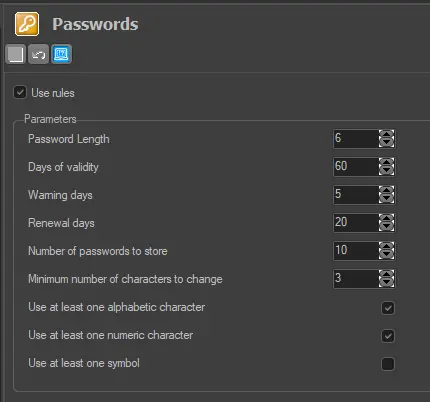
The "Passwords" section allows configuring various rules for managing passwords within ETERE. Available parameters include:
Passwords
Use Rules: If enabled, the password management will be based on the criteria defined below. - Default: enabled
Password length: Minimum length that passwords must-have. - Default: 6
Days of validity: Number of days the password will be valid. - Default: 365
Warning days: Number of days to notify users before the password expiration date. - Default: 5
Renewal days: Number of days users can change their password after the password expiry date. - Default: 20
Number of passwords to store: The number of the last changed passwords to be kept by the system. - Default: 10
Minimum numbers of characters to change: Minimum number of characters in the password. - Default: 3
Use at least one alphabetic character: Password must contain at least one letter (a b c d...). - Default: enabled
Use at least one numeric character: Password must contain at least one number (0 1 2 3...). - Default: enabled
Use at least one symbol character: Password must contain at least one special character (- _ + ...). - Default: disabled
 Passwords