59.3.13.1 External Digital Archive
A digital archive is a library in which media content is stored in digital formats and is made accessible (for consultation and retrieval) to other systems; in case media content is accessed remotely via computer networks, we talk about an external digital archive.
Remote access to external digital archives is possible due to the use of a SOAP-based web service made available by the digital library; this web service allows the automated retrieval of media content into the local Etere system.
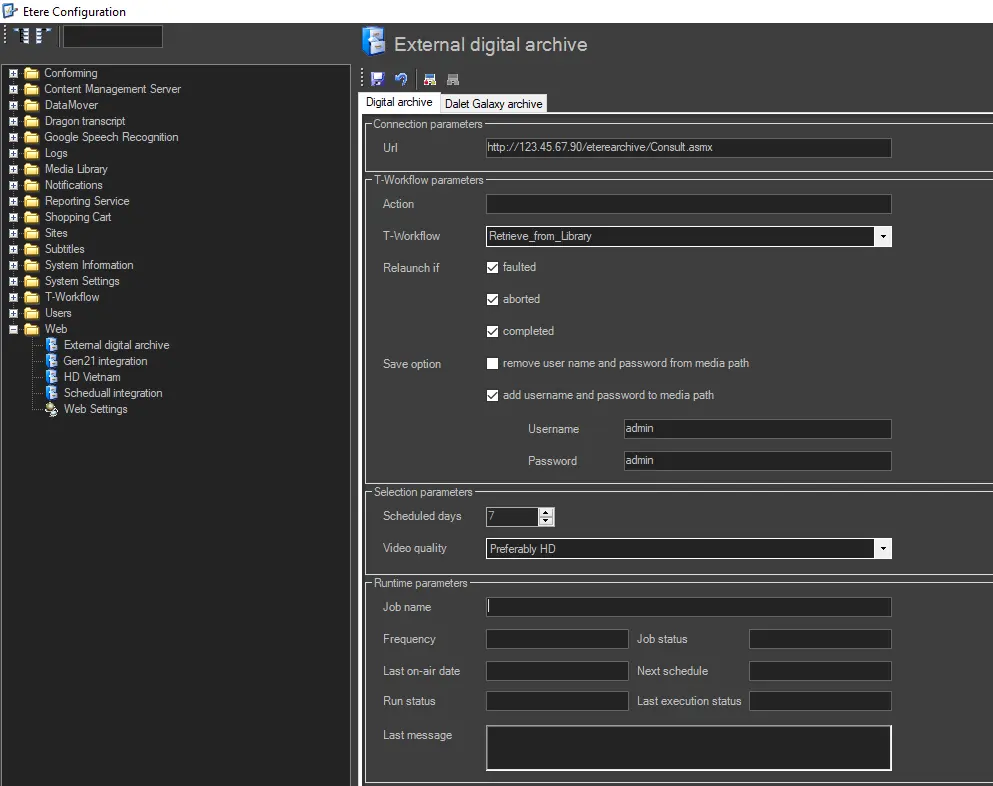
The External Digital Archive section allows the configuration of the parameters that will permit Etere to connect to the web service provided by the digital library, as well as allows the configuration of the T-workflow action in charge of retrieving media content stored in the library automatically (i.e. each time the broadcast schedule requires them):
External_Digital_Archive
NB: Please note that before inserting new archived media in the database, it will be checked that related assets don't have a linked media, thus avoiding re-inserting the same media (e.g. in case it's currently being ingested).
Configuring the T-workflow action
To configure this action is enough to set the parameters which are available below:
Connection parameters
(create or modify the action for retrieval from the library)
URL
Set here the URL of the library's web service for consulting the digital archive.
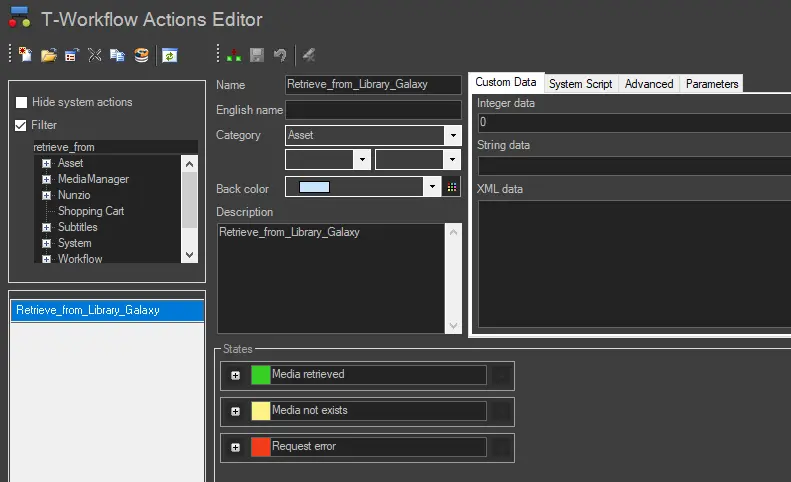
Once the URL is entered (and the parameters below defined), press the [ConfEd_ExternalDigitalArchive03 Create action] button to create a new action block into the actions list ready to be used in a T-workflow (see sample T-workflow):
sample_T-workflow
The newly created action will provide three different results depending on its success:
Media retrieved - The requested media has been found in the digital library, and it will be associated with the asset form, updating the video format
media not exist -The requested media was not found in the digital library.
Request error - It was not possible to determine if the requested media is present in the library or not (e.g. due to connection problems).
T-Workflow parameters
(configure the action for each T-workflow on which it was included)
Action - It details the name of the action created.
T-Workflow - Select the T-workflow containing the created action; this T-workflow will be attached to all those assets which doesn't have a media file associated and which have been scheduled in the following 'n' schedule days (a value that is configured below).
NB: Only assets with asset codes up to 16 characters would be considered.
Relaunch if - In case an instance of the selected T-workflow already exists, but it is faulted, aborted or completed, it will be possible to indicate in which of these cases the T-workflow should be relaunched.
Save option - Specify how the media path will be saved into the system:
•Remove username and password from media path: Enable this option to remove the username and password from the media path (see the media path format section).
•Add username and password to media path: Enable this option to add the username and password specified here to the media path (see the media path format section).
Selection parameters
(define here the parameters for determining if an asset should be retrieved or not)
Schedule days - Dictate here the number of days onwards on which the schedule will be analyzed (i.e., searching assets without associated media files to which attach the T-workflow selected above).
Video Quality
Indicate the video quality to be selected in case more than one is available; it can be:
Preferably HD - If an HD quality exists, the system will use it. Otherwise, the SD quality will be used.
Only HD - If an HD quality exists, the system will use it. Otherwise, no other quality (e.g. SD) will be used.
Preferably SD - If an SD quality exists, the system will use it. Otherwise, the HD quality will be used.
Only SD - If an SD quality exists, the system will use it. Otherwise, no other quality (e.g. HD) will be used.
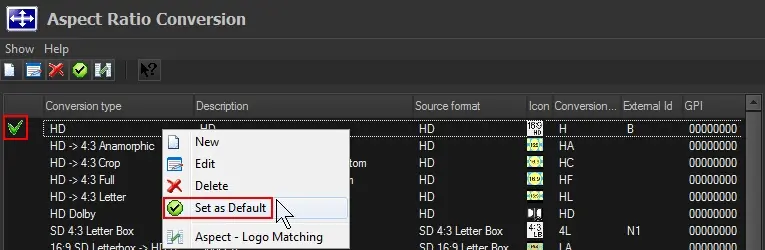
Please note that to allow the T-workflow action to update the aspect ratio of retrieved assets, the selected video quality (e.g. Only HD) must count with a default conversion type (e.g. HD) set in "Etere Configuration > Settings > Basic > Aspect Ratio Conversions":
Set_as_default
Runtime parameters
(consult the job execution parameters of the SQL agent, which checks all schedules and launches the T-workflow job when required)
Job name - The name of the scheduled job.
Frequency - The time interval between two consecutive executions of the job.
Job-status - The current status of the pending job. The options are not enabled or enabled.
Last run - The date and time the job has been running by the last time.
Next schedule - The date and time of the next scheduled run.
Run status - The status of the job execution. The run status can be idle, failed, succeeded, retry, cancelled or in progress.
Last execution status -The last time the job was run.
Last message - The last message associated with that step in the job.
Note:
Please note that the "external digital archive" requires a special license for retrieving media files from a library; in case this license is missing, it won't be possible to create the T-workflow action on which this operation is based.
 External_Digital_Archive
 sample_T-workflow
 Set_as_default