67.6 Changing the Preview Window
You can rearrange the preview layout using one of the following methods:
•Select the input type from the Source pane and change the preview monitor number in the Settings tab.
•From the Control tab, right-click on a preview window and change the preview monitor number.
•From the Control tab, drag and drop the preview window into another preview window.
From the Preview window, you can modify the Clock properties available in the Clock tab:
Clock properties
•Set the font style for the Primary and Secondary clock in the Preview.
•Select the colour to differentiate the Primary clock from the Secondary clock.
•Set the time zone for the Primary and Secondary clocks in the Preview.
•Hide or display the Secondary clock in the Preview.
You are not allowed to select a preview monitor already assigned to an input source; you must first reassign the input source to another inactive preview monitor before setting the new input source to the vacant preview monitor.
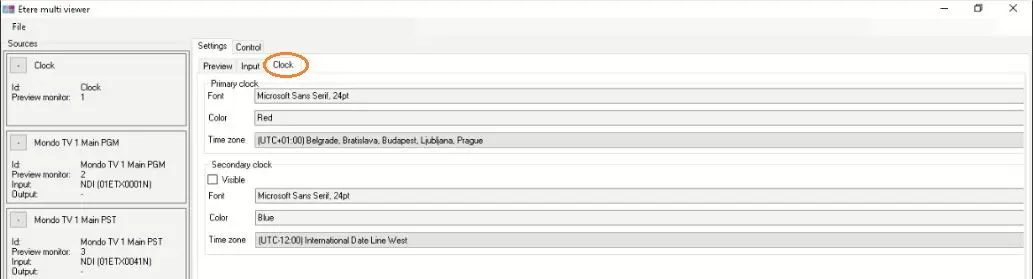 Clock_properties