65.6.4 Preview and encoding details
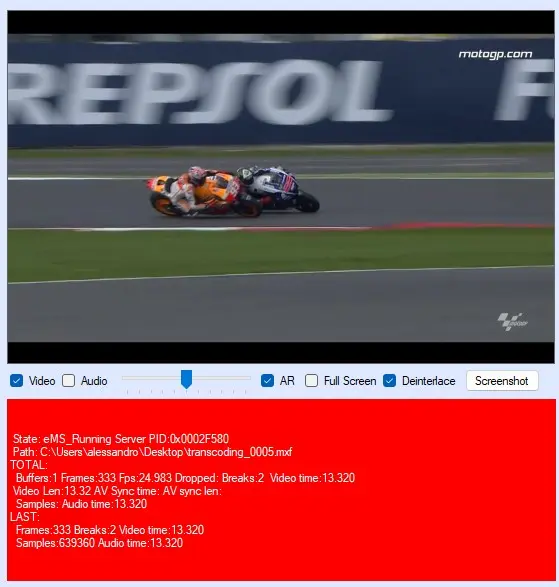
The right side of the module, contains the preview area and a panel where the details of the encoding process are displayed.
preview_and_details
Preview
This window allow to see the file (or files) ETX Toolbox Transcoding is playing. Right below there are options that allow to control the preview:
Video/Audio: Enable or disable the video or the audio of the preview. Beside the Audio flag, a slider allows to control the volume.
AR: Enable or disable the Aspect Ratio visualization. When disabled, the frame of the video covers the whole preview window, otherwise black bars are applied, according to the source video format chosen.
Full Screen: Allows to display the preview in full screen. In order to exit the full screen mode, simply click any point on the screen or press the spacebar key.
Deinterlace: If enabled (default) allows to set the preview player with a progressive scan type. Otherwise, the preview player is set to be interlaced.
Screenshot: Allows to capture a screenshot of the preview window and save it in .png, .jpg or .tiff file format.
Encoding details
This area contains information about the recording process, such as the encoder state, recording path and filename, video and audio time of recording, audio and video sync time and so on.
The background of this area, changes to red when the recording is in process and dark red when the recording is paused. For any other encoder state, the background is blue.
This allows to immediately see when the encoder is actually processing a file and when instead is idle.
 preview_and_details