59.2.5 Audio Configuration
The "Audio Configuration" section allows to set all parameters regarding the audio types supported by the station and how they are managed within the system; the display is mainly divided into two areas:
Audio Parameters
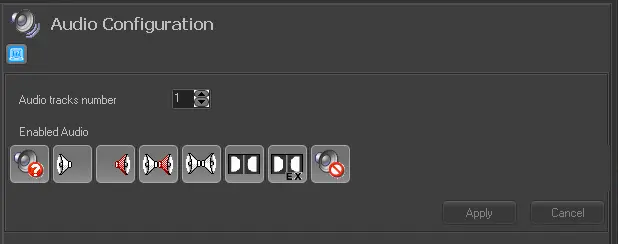
Enabled audio
Audio track number - Set the number of audio tracks the station manages. For instance, set 4 indicates that four channels will be managed (left, centre, right, and surround).
Enabled audio - Enable the audio formats to be managed across the station (e.g. for being set after ingest operations). Available formats include:
Unknown, Mono left, Mono right, Bi-mono, Stereo, Dual mono, Dolby AC3, Dolby E, No audio.
Default - Enable the audio formats to be assigned by default to each pair of channels (e.g. 1-2, 3-4, 5-6, etc):
Default_audio_formats
Audio shuffling - If the device used for routing channels supports "audio shuffling", create and modify the profiles for moving audio tracks between outputs. To create a profile, click the [New] button and set its description and routing table:
Audio_shuffling
Audio shuffling profiles can be set in "audio transformations" to include this information in the automation playlist and subsequently in routing devices.
Audio Transformation
Audio_transformation
In the "Audio transformation" area, it is possible to delete, modify, and add the "transformation rules". Rules set here allow to indicate the audio format (or audio shuffling) to be used for replacing (into the schedule) the one set for assets. This feature allows, for instance, to replace the mono audio tracks of scheduled assets using a stereo format.
Add_or_Edit_in_audio_transformation
Creating or modifying rules is an easy task which can be performed by right-clicking on the list of transformations and selecting the [Add] or [Edit] function. The user will be prompted to compile the following form containing the four key fields:
Track - Choose the pair of channels (e.g. 1-2, 3-4, 5-6, 7-8) to which the transformation is related.
Audio - Specify the audio format (e.g. unknown, left mono, right mono, stereo, bi-mono, double c, double e, not present).
Language - Set the language information to transmit assets, indicate:
•If tracks have the same language as channels 1 and 2,
•If tracks have a different language than channels 1 and 2,
•If the difference between languages is irrelevant.
Result - Select the resulting output to be applied to scheduled assets. It is possible to select:
•Audio format (e.g. no audio change, left mono, suitable mono, stereo, etc)
•Audio shuffling (e.g. shuffling profile A, shuffling profile B, etc)
NB: Rules in the list can be moved up or down using the relative arrow buttons.
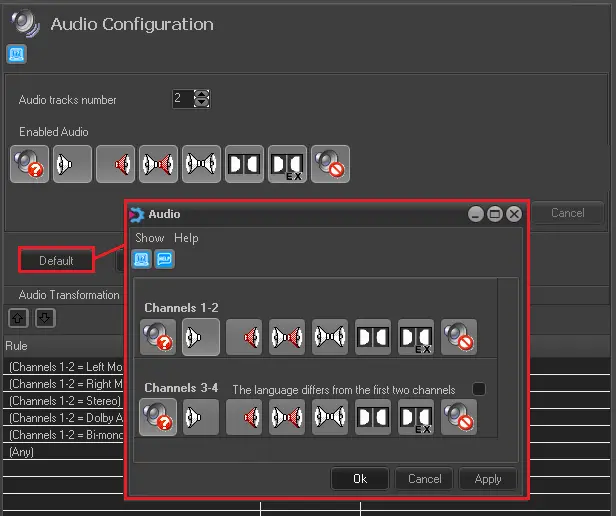 Default_audio_formats
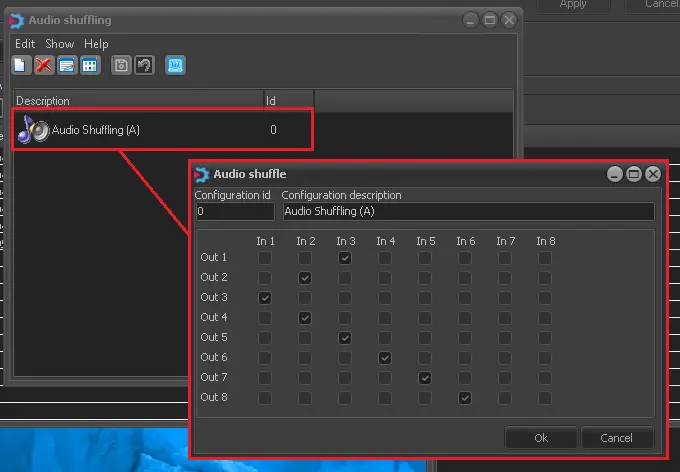 Audio_shuffling
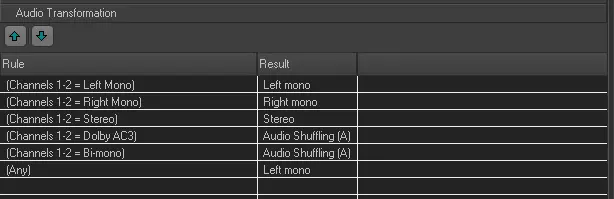 Audio_transformation
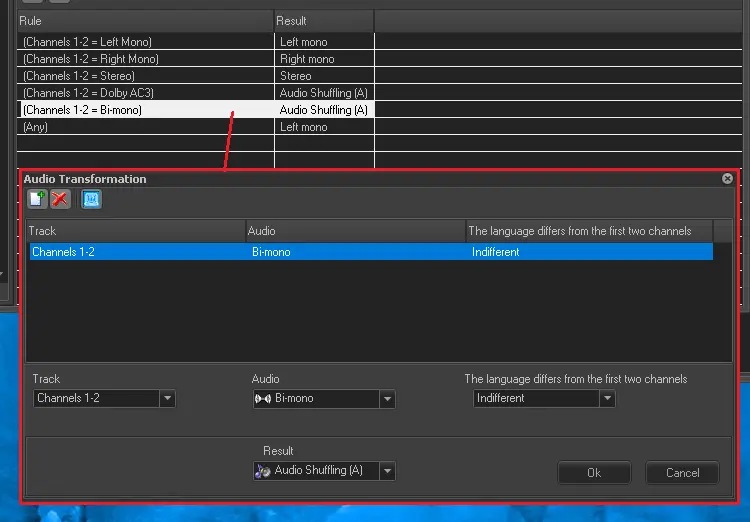 Add_or_Edit_in_audio_transformation
 Enabled_audio