Tape Library
87.1.1.4 How to manage tapes
The toolbar present in the top part of the window provides access to all the operations available by the application which are explained below:
Create new - Create a certain number of new blank tapes, requesting for each one of them only the tape code.
Save - Save all changes to the current open tape.
Undo - Takes back the last performed modifications.
Delete tape - Removes the current tape (and all its associations) from the Tape Library.
Depending on whether the "virtual deletion" is disabled or not under the Etere Configuration > Settings > Basic > Media format section, the deletion will be either:
•Definitive: If disabled (default), deleted tapes will be definitively removed from the database.
•Virtual: If enabled, deleted tapes will remain in the database for consultation only, that is, they will be accessible only from the Tape Library through the "search also deleted" search filter.
NB: When a tape is "virtually deleted", its code is renamed by appending to it the "delete" prefix.
Delete content - Removes all associations to assets (also from the asset form).
Create tape with the same info - Create a new tape featuring the same information (i.e. description, timecodes, etc) of the current open tape.
Create tape with the same info and content - Copy all current tape's information (i.e. description, timecodes, etc) to a user-selected existing destination tape.
NB: Please note that in case the "Tape Library" module has been launched from the "Media Library", the system will prompt the operator to link (or not) the asset in question also to the destination tape.
Report - Prints -without previewing- a report featuring the tape's main information and content.
Tape loan - Opens the Tape Loan module which provides an advanced interface for detailed tape loan operations.
Fast loan - Set the tape as loaned just by selecting the unit/contact to which the tape will be loaned.
Fast return - Set the tape -with just one click- as returned from a loan.
Tape info - Shows the Tape Info window for exploring the content of a certain tape under a detailed view.
View operations - List all operations performed for the tape (in case there exists at least one).
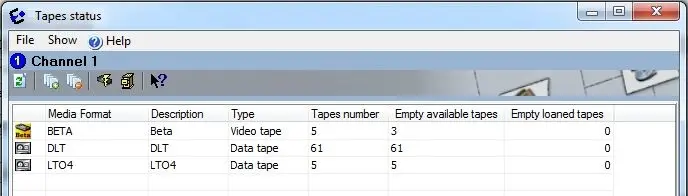
Tape situation - Shows the current situation of each tape media format managed by the system (i.e. tapes number, empty available number, empty loaned number):
Tapearchive_tapesituation
Tapearchive_tapesituation
Under this form it is also possible to use recall the 'Quick creation', 'Quick elimination' as well as the 'Fast loan' and 'Fast return' functions.
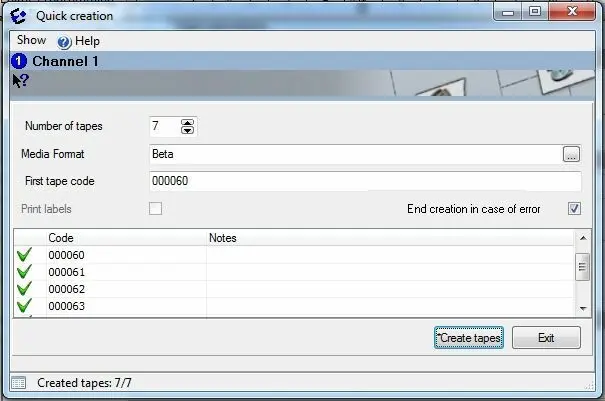
Quick creation - Create a series of new blank tapes just by entering the number of tapes to be created, their media format and their single codes:
Tapearchive_quickcreation
Tapearchive_quickcreation
The "End creation in case of error'" parameter will allow to automatically interrupt the creation in case any error is encountered (e.g. existing code), where as the "print labels" option will print a list containing the just created tapes.
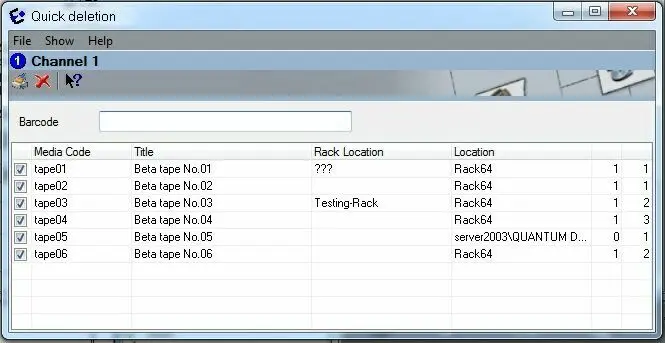
Quick deletion - This function opens a form which allows, by manually inserting the barcode of a VIDEO tape(s), to either 'delete their contents' (i.e. remove all asset associations) or 'delete the tapes themselves' (i.e. remove them from the database):
Tapearchive_quickdeletion
Tapearchive_quickdeletion
 Tapearchive_quickcreation
 Tapearchive_quickdeletion
 Tapearchive_tapesituation