69.2.1.9 MEDIAGENIX ASRUN
Import Scope
The MediaGeniX AsRun import has been developed to help MTV Italy on importing playlists transmitted by MTV UK regarding MTV Italian stations (i.e. Nick, Nick jr, Comedy and related shifted stations).
This import allows importing a .TXT file containing the broadcast schedule of a certain period (one or more days) based on the following criteria:
- The first line of the imported file must contain the station name, the year, the time period and other data.
- A line containing a date indicates the day to which below events belongs to.
- Each line represents an event, which fields are separated by "tab spaces" (i.e. [CHR(9)]).
- The 3rd field of each London event (i.e. line) contains the link to the related Italian asset. Before the import, it must be specified the Italian asset's SMPTE metadata holding said link:
• LBN (London Broadcasting Number)
• ABN (Amsterdam Broadcasting Number)
In case the link between the London event and a Italian asset doesn't exist, a new asset is created with a new code (IdNumber_LBN).
In order to avoid the station to enter the Id Number of each asset, a function allows to automatically import all links between Italian and London assets.
NB: The structure of the imported file is similar to the one exported through the Export Standard EPG TXT.
Import Parameters
Import - Standard - MEDIAGENIX ASRUN
Import path - Specify the folder where the files to be imported would be stored. Once successfully imported, files would be deleted from the specified path.
Filename - Set the station code (e.g. NJIT for Nick Junior, CCIT for Comedy Central, etc) to which imported assets would be assigned.
ASR-[StationCode]-ddmmyyyy.txt
Import data - Opens the Configure Import window to specify the days and the frequency to be imported.
NB: In case of any issue encountered during the import process, it is possible to consult the "Errors" tab.
Scheduling related import
Set the required parameters in Etere Scheduling > Import/Export > IMPORT\STANDARD\MEDIAGENIXASRUN, then click on SAVE button to confirm the changes.
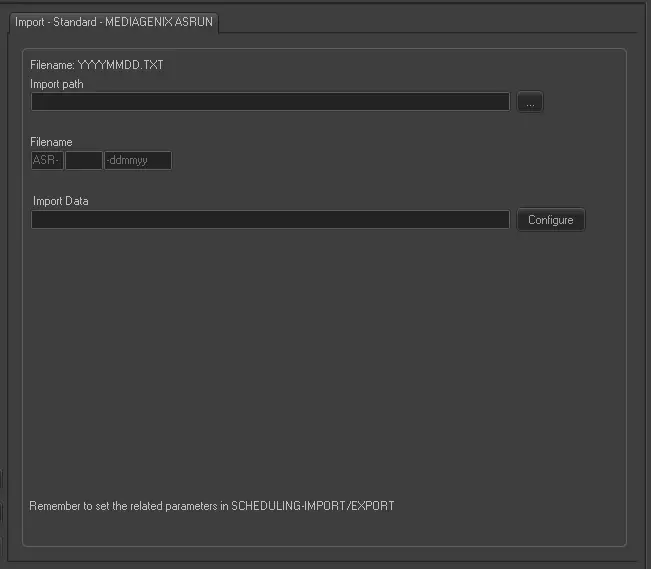 Import_-_Standard_-_MEDIAGENIX_ASRUN