87.1.3.3 Search Loan
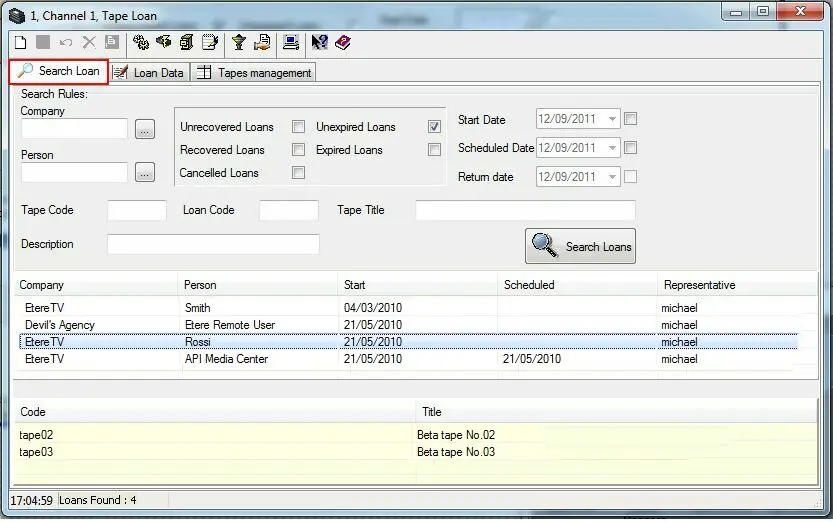
Through the Search Loan tab you will be able to perform search in the archive (loans) with the results being displayed in the first table. In the 'reading only' table (yellow strings) the media related to the selected loan is displayed:
Loan_24
Filter By Loan Status
•Unrecovered Loans: all loans still out,
•Recovered Loans: all returned loans; once you have selected this voice you will be able to select a potential return date,
•Canceled Loans: all deleted loans,
•Unexpired Loans: all loans returned before the scheduled date. For the loans that are still out, the date to be referred to is the current date,
•Expired Loans: all loans that have not been returned before the scheduled date. For the loans that are still out, the date to be referred to is the current date.
Filter By Dates
•Start Date: all loans with the start date the same as the selected date,
•Scheduled Date: all loans with the scheduled date the same as the selected date,
•Date of Return (for returned loans only): all loans that have been returned on the selected date.
Filter By Loan Data
•Company: agency that requested the loan,
•Person: person in charge for the loan who collected the tape for the agency,
•Tape Code: code of the loaned tape,
•Loan Code: the loan is searched for by reading the loan bar code (placed on the receipt),
•Tape Title: title of the loaned tape,
•Description: description inserted by the person in charge (loaner) when creating a new loan.
In order to search for a loan, just compile all relevant filters and click on the 'Search Loans' button, after which, all loans matching the specifications will be displayed in the results list. To load a specific loan just make double-click on it and all its data will be displayed on the Loan Data tab.
 Loan_24