65.6.2 Breaks panel
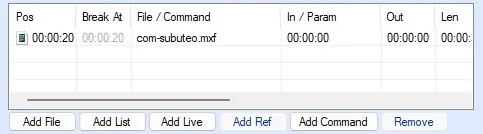
The Breaks panel contains a list of files which allows to interrupt the source playlist, reproducing a different one.
breaks_panel
In order to define a break, follow these steps:
1. Select the element in the source playlist which will be interrupted by the break.
2. Add an element through the dedicated buttons.
3. Under the Pos column, set the start timecode of the break. It must be a timecode greater than the "Pos" value of the selected element in the playlist.
For example:
In the playlist there is a file which starts at 00:00:00 and which will be played for its entire duration of 00:01:00.
A file has been inserted as a break, which starts at 00:00:20 and lasts 00:00:30.
The player will:
- Start reproducing the playlist file for 20 seconds
- Switch to the break file and play it for 30 seconds
- Resume playing the playlist file for the remaining 40 seconds
The timeline of the recorded file will be:
00:00:00 - 00:00:20 -----> Playlist file
00:00:20 - 00:00:50 -----> Break
00:00:50 - 00:01:30 -----> Playlist file
resulting in a recorded file with a duration of 1 minute and 30 seconds (file of 1 minute + break of 30 seconds).
For additional information about the breaks, refer to chapter 65.2.2.0 Breaks Playlist Toolbox.
 breaks_panel