84.4.4.32 STANDARD > RCS > TV
Export Scope
The RCS TV Export allows you to export a schedule with defined types to an RCS Linker in a readable format.
Export Parameters
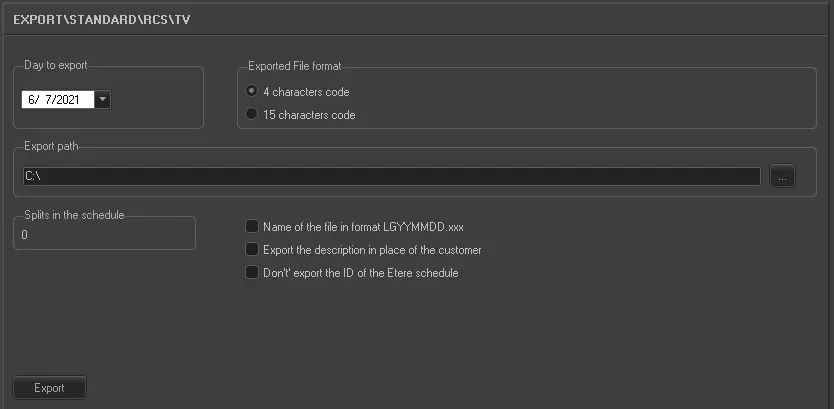
Export_standard_rcs_tv
Select the date you wish to export and the path in which you want to create the export file (this should be the same path specified in the RCS Linker as the import path). The export file will include all information relating to the selected day's schedule and the types enabled for the export.
Considering that events exported to RCS Linker quite often don't belong to the same type (and this was the reason why, in the past, one had to decide which events to export), we decided to add a specific property for this operation.
All the types to be exported with RCS Export must have "Export - Type A = A1" property enabled.
To enable this property for types you just have to open Configuration (in Etere Scheduling), select the type you want, then enter Type Modify. In the Modify window, enable the "Type A" check and select the value "A1" in "scrolling menu". By doing this you have enabled the corresponding type to be exported with RCS Export.
C1156:00ABIL 00016090000000000080105
C1212:00ARII 00001270000000000080106
C2256:00ABIL 00016090000000000080107
Other parameters that can be set are:
•Exported file format: There are two formats for RCS files, one with 4 characters and one with 15. In the case of TV export as a code, the code of the asset form will be taken. All events typed with Property Export standards = RCS will be exported.
•Name of the file in format LGYYMMDD.xxx: Allows you to have the name of the files exported in the format indicated where xxx stands for the number of splits (001 split =1, 002 split =2 etc)
•Export the description in place of the customer: Allows you to export the commercial description instead of that of the customer.
•Don't export the ID of the Etere schedule: Allows you to omit writing the Etere ID to the exported schedule.
Launch the export
Once the export has been configured, it can be started just by pressing the <Export> button.
 5097_Export_standard_rcs_tv