72.13.2.1 Creating Worksheets
Worksheets are T-workflow actions created from special templates, the creation of these kind of actions has been illustrated in the figure below and explained in the current chapter through the following procedure:
Worksheets creation
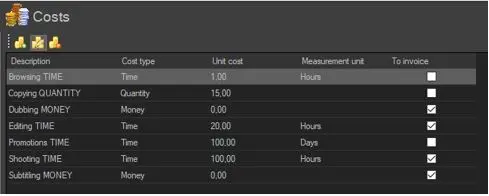
1.Define a costs structure
Before start creating worksheets, it is first required to define a costs structure formed by various cost templates featuring specific types (e.g. time, money, items, etc), values, measurement units and invoicing status. For detailed information on this topic please refer to the Etere Configuration > Costs templates chapter.
Define a costs structure
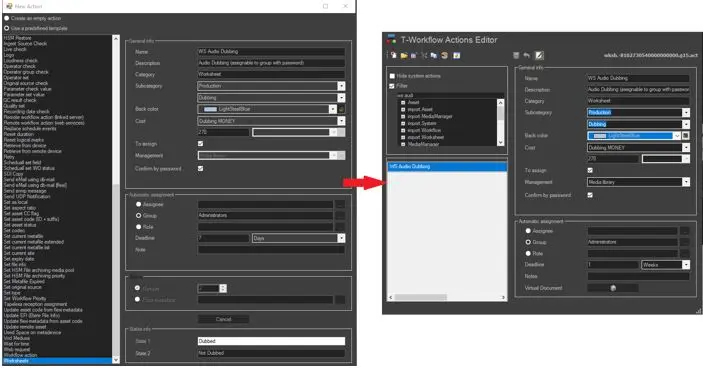
2.Create a worksheet action
Create the worksheet action specifying all its required parameters. Once done, it will be available under the Actions Editor section as a worksheet classified according to its category and subcategory:
Create a worksheet action
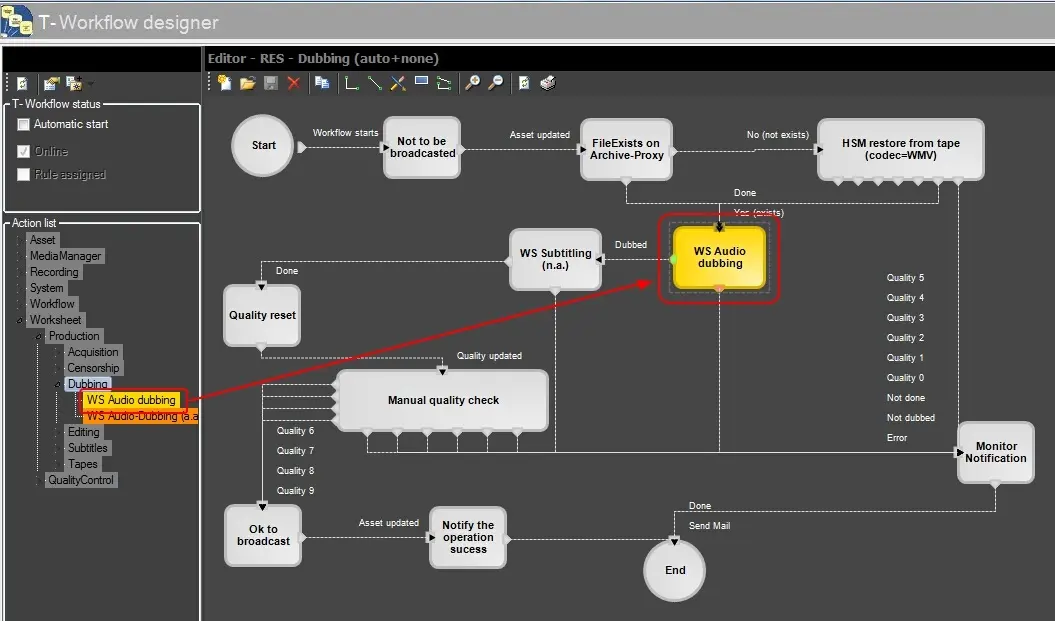
3.Add the worksheet to a T-workflow
Worksheet actions can be easily inserted within T-workflows under the T-Workflow Designer, a friendly design environment to freely create T-workflows by using a robust repository of actions:
Add the worksheet to a T-workflow
4.Add and start the T-workflow
Attach the T-workflow containing the worksheet action to one or more assets and launch it. Please note that the worksheet will become available for being performed only when the T-workflow arrives to its related block.
 Worksheets_creation
 Add_the_worksheet_to_a_T-workflow
 Create_a_worksheet_action
 Define_a_costs_structure