70.3.1 Common usage scenarios
Before start using Etere HSM, it needs to be configured how the HSM is to be used by the station. Etere HSM supports different configuration scenarios based on the approach and equipment connected to the station. Possible configuration scenarios Etere HSM includes:
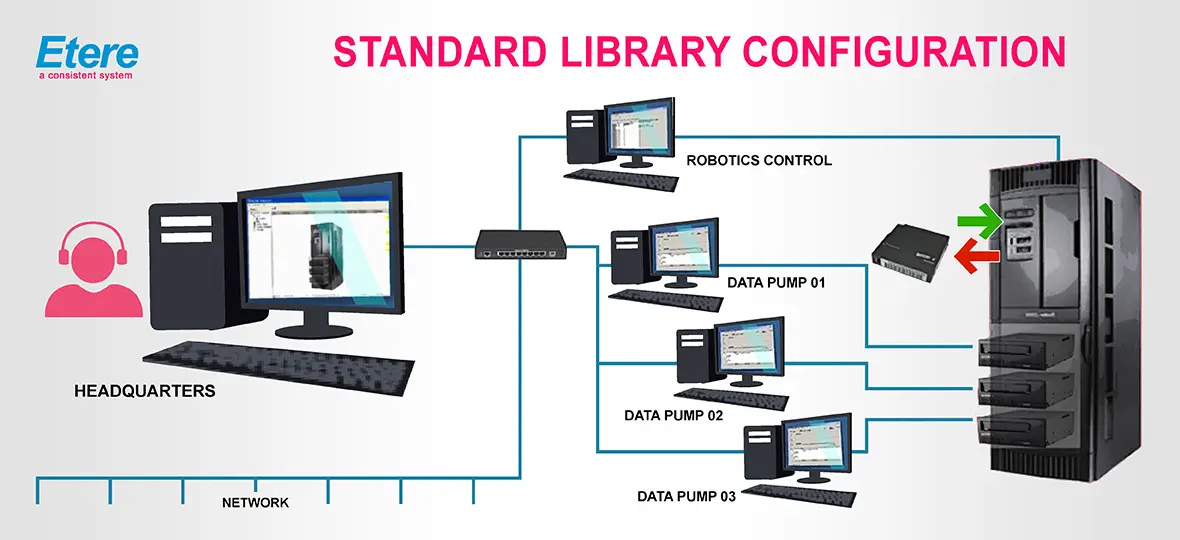
Scenario 01: Use a tape library
The first configuration scenario (see figure below) comprehends the management of a tape library and all tape drives. In this case, it is required to install and configure the hardware components to be used as described in the following procedure:
Standard library configuration
1. Install the Windows drivers for the media equipment (i.e. libraries and tape drives)
2. Configure the tape library as an Etere library resource (one HSM license is required) and all library's drives as Etere drive resources
3. Add to the HSM Headquarters the server related to the configured tape library
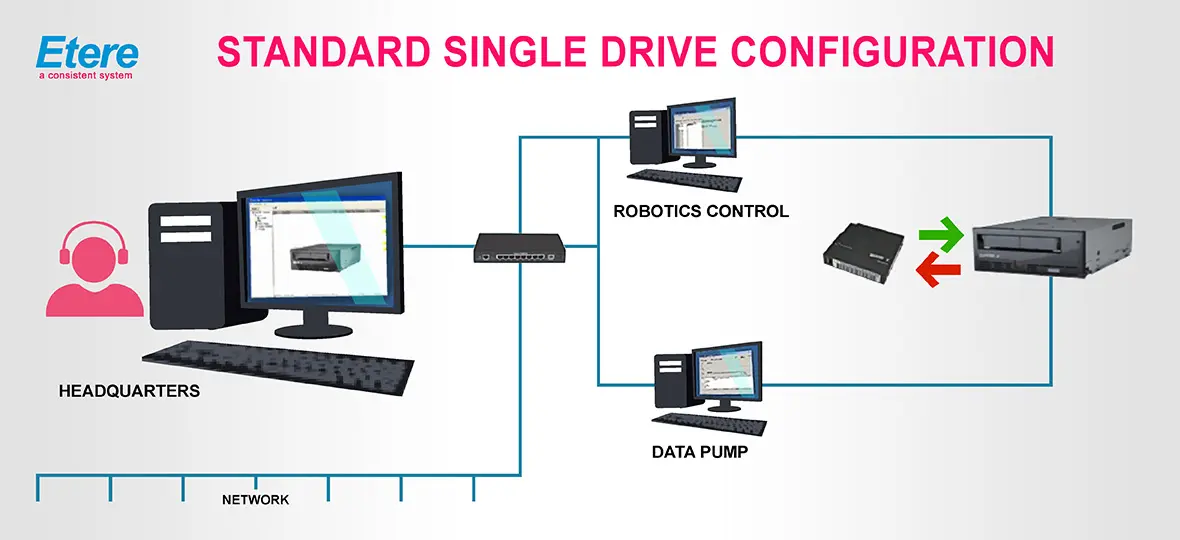
Scenario 02: Use a standalone tape drive
A second scenario consists of the management of a single-drive (e.g. for manual emergency management). This scenario require the installation and configuration of the hardware components as described in the procedure below:
Standard single drive configuration
1. Install the Windows drivers for the media equipment (i.e. libraries and tape drives)
2. Configure the single-drive as an Etere library resource (one HSM license is required)
3. Add to the HSM Headquarters the server related to the configured single-drive
Note: A single-drive configuration requires the manual insertion of cartridges (and their related barcode) each time a "restore" operation is requested for an offline cartridge, allowing the Etere Data Pump to start the restore from the inserted cartridge.
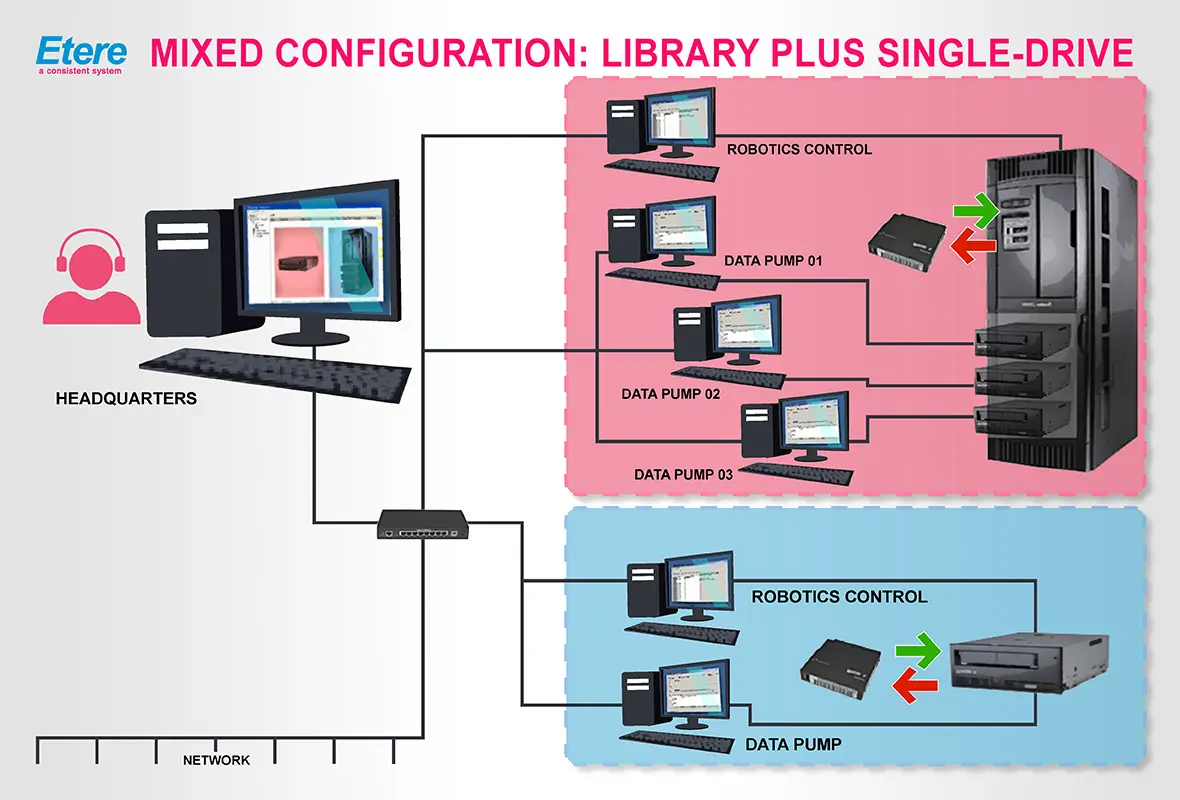
Scenario 03: Mixed use of a tape library and a standalone tape drive The third scenario is based on the simultaneous management (from different servers) of a tape library (and all its contained drives) and a single-drive, as illustrated in the figure below. This scenario can be implemented by installing and configuring the hardware components as following described:
Mixed configuration Library plus single-drive
1. Install the Windows drivers for the media equipment (i.e. libraries and tape drives)
2. Configure the tape library as an Etere library resource (one HSM license is required) and all the library's drives as Etere drive resources.
3. Next, configure the single-drive as an Etere library resource (a second HSM license is required)
4. Add to the HSM Headquarters the servers related to the configured library and single-drive
Note: In case a "restore" operation is requested for an offline cartridge on the single-drive, manually insert the offline cartridge (and their related barcode) into the tape drive to allow the Etere Data Pump to start the restore from the inserted cartridge.
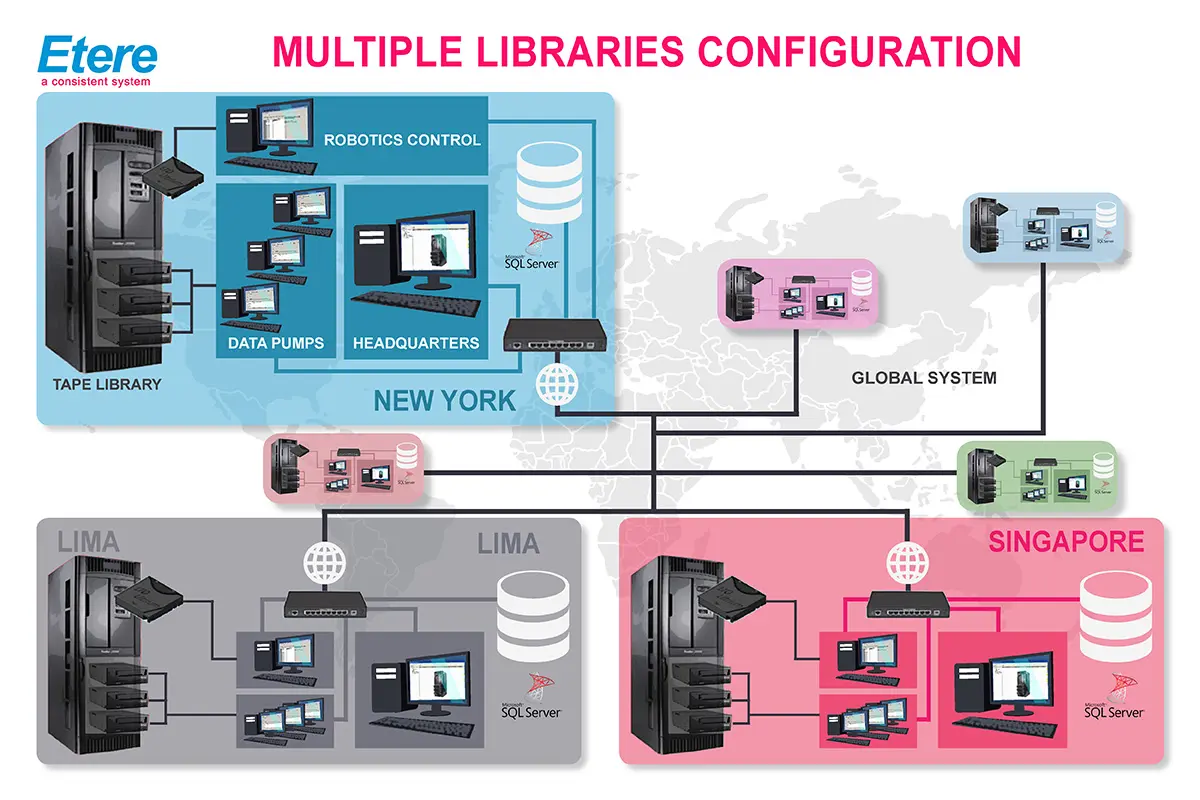
Scenario 04: Multiple tape libraries
The last scenario consists of a deployment based on the use of multiple tape libraries across the same or different geographical locations. This scenario can be implemented by installing and configuring the hardware components as described below:
Multiple libraries configuration
1. In each location (e.g. Miami, Sydney, etc.), install the Windows drivers by the robotics servers to control the libraries.
2. In Etere Configuration, configure the tape libraries as Etere library resources (one HSM license is required for each library) and all the libraries' drives as Etere drive resources.
3. In Etere HSM Headquarters, add the servers related to the configured libraries.
Note: Refer to the chapter "Multiple Libraries" for detailed information on archive/restore T-workflows.
Note
In order to use Etere HSM (Headquarters, DataPump and Robotics, as according to the Etere installation policies), users must have local administrator permissions and the Windows UAC must be disabled, otherwise, the software may not work properly.
 Multiple_libraries__configuration
 Standard_single_drive_configuration
 Mixed_configuration_Library_plus_single-drive
 Standard_library_configuration