87.1.5.4 Tape Info
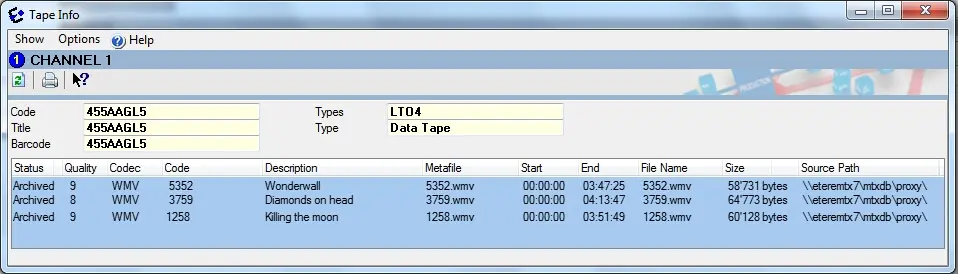
The Tape Info tool provides a detailed list of all media contained on a certain Tape/Cartridge (or VTR/Drive). For each stored metafile here will be displayed the most relevant information regarding the stored asset (e.g. status, quality, codec, codec, description, etc):
Librarystatus02
It's worth mentioning that in case the "Tape Info" tool is called from the Etere HSM Headquarters module a tape storage summary will be displayed in the bottom part.:
NB: Please note that "metafile", "filename", "size" and "source path" information is displayed only for data tapes (e.g. LTO5).
Available functions
Functions provided by this tool for the management of metafiles stored within tapes include the following ones:
Function - Delete
Description : Removes the logical link (not the physical file) between the archived metafile and the tape.
NB: A warning will be displayed in case the metafile is linked to more than one asset.
Function - Re-enable
Description : Undelete a previously deleted metafile, that is, recreates the metafile in the database and link it to one asset selected by the user.
In case it is found that the deleted metafile is formed by multiple files (e.g. video clip and subtitles), it will be displayed a list to confirm the deleted files to be re-enabled.
NB: Re-enabling metafiles deleted from an Etere version lower than 22.5 will required to specify the codec with which the metafile should be re-enabled.
Function - Refresh
Description : Updates the list of assets by consulting the database.
Function - Print
Description : Generates and print the HSM Archived Content report for the content of the selected tape.
Function - Options > Show
Description : Tell the application to display further tape information including deleted media, archiving date and the last reading date.
NB: Please note that deleted metafiles (i.e. not linked to an asset) and incongruent metafiles (i.e. linked to an asset but not present among its media) are shown with different icons.
 Librarystatus02