59.3.12.10 Active Directory Integration - Available Functions
The toolbar located in the top part of the window provides a set of functions to manage the structure to be imported into Etere:
Functions
Scan and import AD groups - Open a new window for scanning the Active Directory structure and selecting groups:
Scan AD structure - Scan the Active Directory structure, displaying all forests and groups matching the criteria set in the parameters.
Import selected Groups to SQL - Import all selected groups into the Groups and Users tabs to allow their subsequent synchronization.
Undo - Unselect all groups to cancel the current selection of groups.
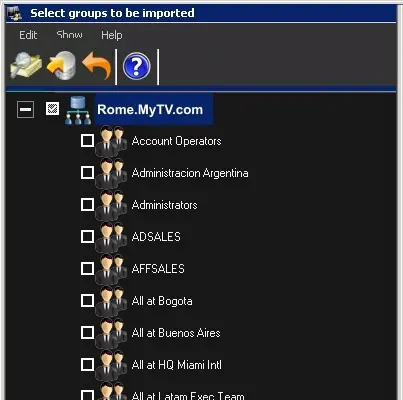
To retrieve groups, just scan the active directory. Forests and groups will be displayed in the bottom area, allowing you to select (tick off) the groups and then import them into the database:
Select_groups_to_be_imported
NB: The LDAP (Lightweight Directory Access Protocol) standard protocol would return the groups list with a limitation of 1000 groups in a single search result. If you need to add a user group to the bottom of the list, you would need to change the "MaxPageSize" value in the LDAP policy to do so. Please refer to the internet page for information on changing the "MaxPageSize" value.
Sync Etere with AD changes - Updates the Etere Permissions structure by comparing it against the selected groups from the MS Active Directory. Groups and users will be displayed along with an icon to indicate their mapping status:
The group/user will be added to the Etere Permission since it is present in the MS Active Directory.
The group/user will be removed from the Etere Permission since it is missing in the MS Active Directory.
The group has users that will be added/removed from the Etere Permission since they are either present or missing on the MS Active Directory.
The updated structure displayed after the [Import] is illustrative and won't be applied until the [Save] button is selected.
Please note that the first time a scan and Import is performed, the synchronization is automatically executed. On later imports, the synchronization will be required to be managed manually.
NB: Importing the active directory structure is a sensitive operation since it will definitively replace any existing structure in the Etere Permissions.
Save Groups & Users in Etere - Saves all changes (e.g. imported groups) performed to the Permission Structure into the Etere database, thus making them take effect in the system.
NB: Saving is available only for administrators (i.e. users with "System Admin" rights) authenticated using the "Windows authentication". This function is not allowed for "SQL authentication".
Refresh - Reloads all displayed users and groups from the Etere database. Please note that performing this action will cause unsaved imported groups to be lost.
 Select_groups_to_be_imported