73.3.7 Recording Check
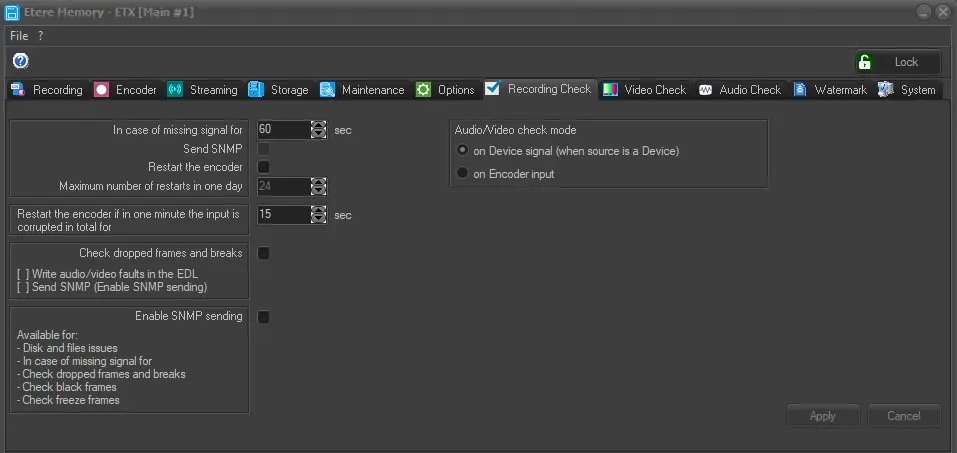
The "Recording Check" tab allows to configure the checking of breaks and dropped frames during recording and send SNMP messages to alert the operator.
Memory_RecordingCheck
In case of missing signal for: During recording, if the video input signal has been lost for the specific duration defined (defaulted to 60 seconds) Memory would perform a reset to the initial state to receive the video signal.
When recording via RTSP (Real Time Streaming Protocol) the recording process would restart itself when input signal is lost and re-initiate despite if the “Restart the encoder” option is disabled.
Send SNMP: Enable this option to send a SNMP message if the recorded file is smaller than the defined dimension. This option is editable only if the "Enable SNMP sending" option is enabled.
Restart the encoder: Enable this option to restart the encoder when necessary.
Maximum number of restarts in one day: Set the maximum number of times that the encoder can be restarted daily. This parameter is editable only if the "Restart the encoder" option is enabled.
Check dropped frames and breaks: Enable this option to monitor the dropped frames and breaks during recording. When dropped frames or breaks is detected in recording, the following actions would be triggered:
· Write the audio/video faults in asset EDL
· Send SNMP message to alert user (the "Enable SNMP sending" option must be enabled.)
NB: When defects are detected in asset, the asset would be marked as “Not OK to broadcast”. Only defects in asset from the current station would be archived.
Enable SNMP sending: If enabled, notification message would be sent to SNMP Console if any of the following conditions occurred during recording:
· Issues related to asset files and disk condition
· There is missing video signal
· Breaks and dropped frames detected
· Black frames detected
· Freeze frames detected
NB: Please note that, even if this feature is disabled, Etere Memory sends SNMP heartbeats automatically via SNMP messages to indicate that it's running.
Audio/Video check mode: Indicates if the check must be done on Device signal (when source is a Device) or on Encoder input.
Apply: Can be used to confirm the changes made.
Cancel: Can be used to discard the changes made.
 Memory_RecordingCheck