54.3.3.2 Move Scheduling
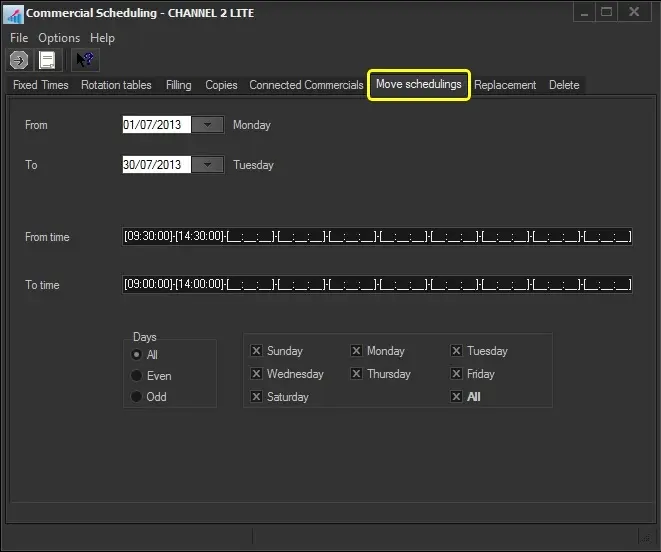
The Move Scheduling function allows you to change the scheduled event time. To start moving a planned commercial, you can search for the commercial using the [Commercial Code] button and then compile the following parameters:
Move_Scheduling
Parameter - From- to
Description: The date range on which the scheduled time of events will be moved.
Parameter - From time -To time
Description: Specify the source time(s) and target time(s) for moving events.
Parameter - Days
Description: Select the days on which events will be moved:
All - On every day of the week, in the period indicated.
Even - Only on even days (e.g. 2-4-6-8...30) in the selected period, independently of the day of the week.
Odd - Only on odd days (e.g., 3-5-7-9...31) in the selected period.
Specific days - Select the weekdays (e.g. Monday and Friday) on which you want the commercial asset to be scheduled.
For instance, if you want to move the events scheduled from 08:30 to 09:30:
1.Enter in the From Time box: 08:30:00 and in the To Time box: 09:30:00,
2. All events scheduled between 08:30:00 and 08:30:59 will be moved to the time slot between 09:30:00 and 09:30:59. For example, an event scheduled at 08:30:01 will be moved to 09:30:01.
Once all parameters have been set, press the [RUN] button to replace the scheduled commercial asset.
 Move_Scheduling