59.2.14 Languages
Under the Languages section, you can enable and configure the languages across Etere for subtitling and spell check and correction.
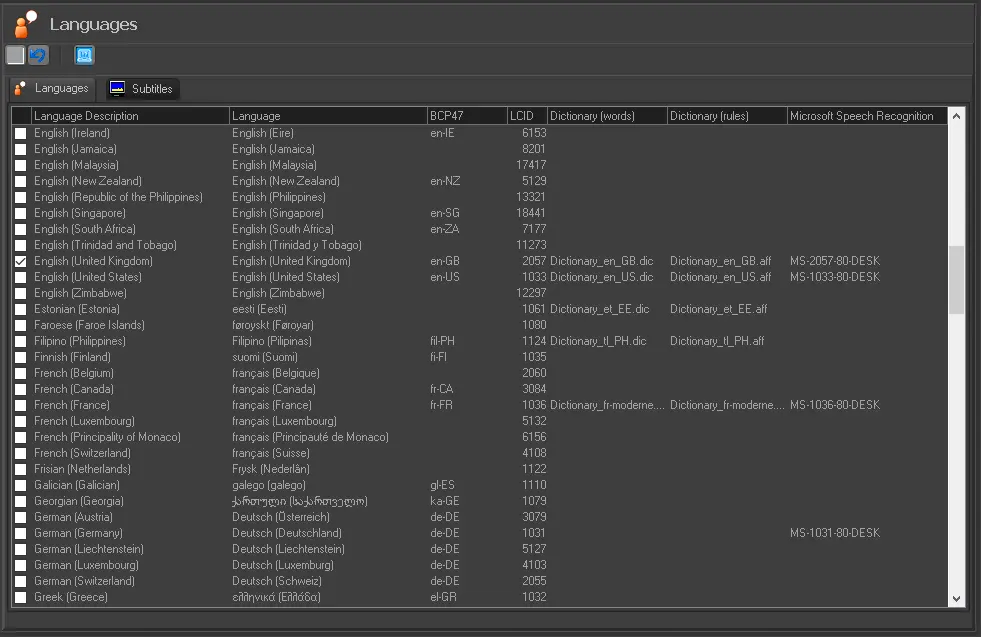
Under the "Languages" section, it is possible to enable the languages to be used for subtitles; the corresponding subtitles will be automatically enabled in the "Subtitles" tab.
Languages
Language description: The western name of the language.
Language: The language name as in its original charset
BCP47: The BCP 47 (Best Current Practice) defined the language codes used by Google Speech Recognition.
LCID: The locale identifier (LCID) for unmanaged code on Microsoft Windows.
Dictionary (words)*: The dictionary file containing the list of words (.dic)
Dictionary (rules)*: The dictionary file containing the list of rules and other options (.aff).
Microsoft Speech Recognition: The Microsoft Speech Recognition Engines are installed on Windows for various languages.
OCR: Shows for which language the data for Optical Character Recognition is present in the database.
* Language dictionaries
Etere provides dictionaries for spell check purposes (e.g. from the Subtitles Tool) for some languages, including:
•Arabic
•Bahasa Indonesia
•Bahasa Malaysia
•Bulgarian
•English (AU)
•English (UK)
•English (US)
•Estonian
•French
•Indonesian
•Italian
•Khmer
•Malaysian
•Nepali
•New English (US)
•Portuguese (Brazil)
•Romanian
•Russian
•Slovenian
•Spanish (Mexico)
•Swahili
•Ukrainian
•Vietnam
•Deaf and Audio Impaired (French)
•Local and Audio
•Original and Audio
To install dictionaries, open the Etere setup, re-install the MAM module, and launch the System maintenance.
 Languages