70.3.5.3 Realignment of Media Pools Contents
This function allows Etere Headquarters to perform the following checks against archived contents (metafiles and memory files):
In wrong media pools - The maintenance time operation will detect all metafiles (and memory files) which are currently stored in a wrong media pool (e.g. due to media pools changed data), that is, in a media pool different as the one(s) set by default. All detected contents which are stored on a wrong media pool will be processed (starting from the tape with more incongruent video clips) differently according to the following cases:
❖All the copies are stored in the correct media pools:
The metafile will be logically deleted from the wrong media pools.
❖All/some copies are missing in the correct media pools AND the metafile is stored on-disk:
The archiving of all the missing copies is requested (queued) for being performed on the correct media pools; then, the metafile is logically deleted from the wrong media pools once the archiving ends.
❖All/some copies are missing in the correct media pools AND the metafile isn't stored on-disk:
The metafile restore is requested, after which the archiving of all the missing copies is requested (queued) for being performed on the correct media pools; then, the metafile is deleted from the wrong media pools.
With missing copies - The maintenance time operation will detect all metafiles which have missing archived copies. All detected contents which lacks of an archived copy will be queued for being archived during the maintenance time.
NB: Once queued, operations remains queued when out of the maintenance time, to be subsequently performed by Etere Data Pump during the maintenance time.
It is suggested to enable the realignment feature in case some changes have been made in the Media Pools section (Etere Configuration | Settings | Basic | Media Pools), in this way the media pools functioning will remain congruent.
For instance, if commercial and trailer contents have been set to be stored into a single media pool, and the operator modify this configuration setting them (i.e. commercials and trailers) to be stored in different media pools, in this case, it's required to launch the realignment of the content of media pools function to keep the system congruent.
How to use it
The "Realignment of the content of media pools" feature can be configured by setting the following parameters:
Parameters - Specify the location (i.e. source path, data pump cache or metadevice) on which video clips will be restored before re-archiving them in the right media pool.
Once the parameters have been set, the [Check] menu will allow to perform the following checks: Use it to visualize the list of the "unaligned" video clips, being possible to select up to four different views:
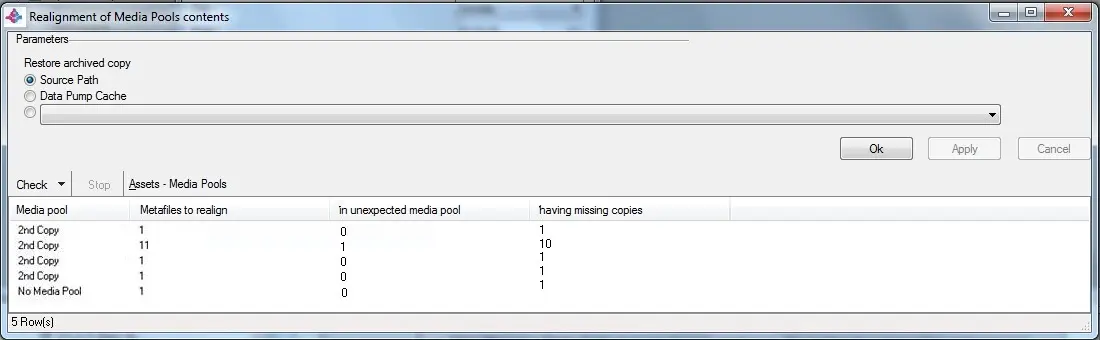
Assets > Media Pools
List all media pools related to assets archived "in wrong media pools" and "with missing copies". For each media pool it will be indicated the number of detected metafiles:
Realignment of media pools contents 1
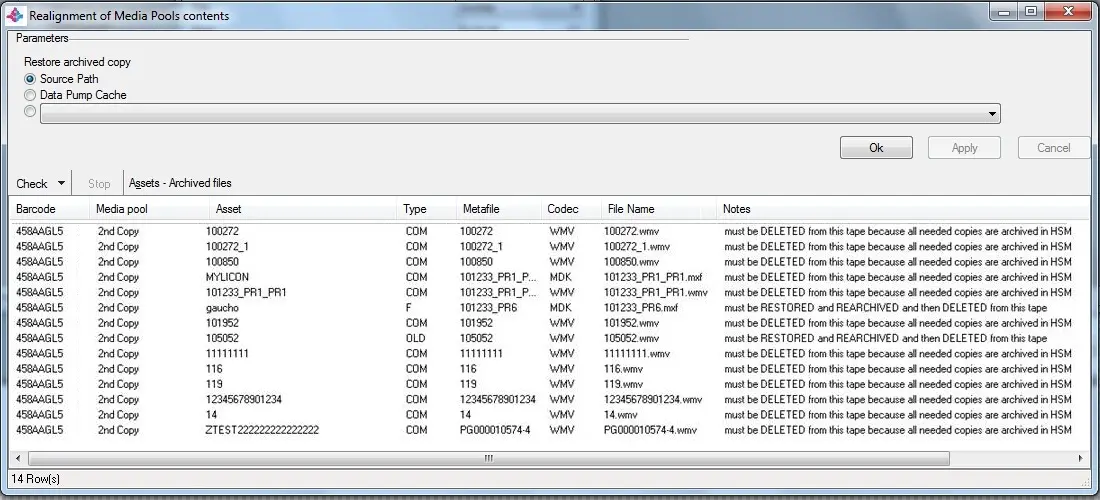
Assets > Archived files
List all archived files related to assets archived "in wrong media pools" and "with missing copies". For each archived file it will be indicated the tape barcode and media pool on which it is archived as well as other info (asset code, type, codec and file):
Realignment of media pools contents 2
Etere Memory > Media Pools
List all media pools related to memory files archived "in wrong media pools". For each media pool it will be indicated the number of unaligned files as well as the correct media pool on which they should be placed (according to their station).
Etere Memory > Archived files
List all archived files related to memory files archived "in wrong media pools" . For each archived file it will be indicated the tape barcode and media pool on which it is archived as well as other info (station, filename, start).
Print
Generates the Realignment of Media Pool Contents report, a document pointing out all the issues related to the archived metafiles, both, present on wrong media pools or missing archived copies.
Etere suggest to firstly consult this report before enabling the "realignment feature" such in a way that the operator will be able to find and determine the video clips which shouldn't be realigned (i.e. they are congruent with the media pool) but rather needs to be set correctly in the Etere Configuration | Settings | Types Editor | Types section.
 Realignment_of_media_pools_contents_1
 Realignment_of_media_pools_contents_2