81.1.1.1 View Program Promo
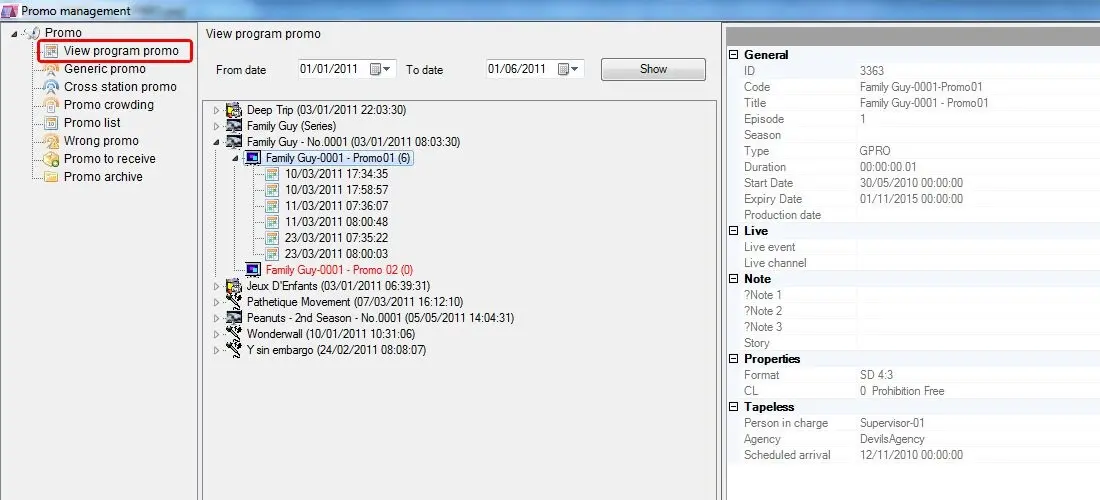
The View Program Promo section allows to view both all programs and tv-season scheduled within the selected period which counts with a valid trailer for the selected period:
4823_Promo_Management
Displaying structure
Trailers will be displayed in a tree view, that is, they will be grouped inside the programs (or season) to which they are linked, and will contain all their scheduled appearances:
- Program A (dd/mm/yyy hh:mm:ss)
-Trailer for A (n. of scheduled times)
- dd/mm/yyy hh:mm:ss
- dd/mm/yyy hh:mm:ss
-Trailer for A (n. of scheduled times)
- Program B (dd/mm/yyy hh:mm:ss)
-Trailer for B (n. of scheduled times)
- dd/mm/yyy hh:mm:ss
- dd/mm/yyy hh:mm:ss
-Trailer for B (n. of scheduled times)
- TV-season C (season)
-Trailer for C (n. of scheduled times)
- dd/mm/yyy hh:mm:ss
Please note that those trailers which have not been yet scheduled (i.e. no. of scheduled times equal to zero) within the given date range will be highlighted with red color and a (0) will be displayed alongside of them.
Inserting trailers in the schedule
It is possible to schedule trailers listed in this section, just make right-click on them and click the 'Insert' option or drag and drop them into the schedule. See the Placing Promos chapter for detailed information on this function.
When inserting trailer to schedule, there are 3 options for insertion:
-Insert: insert the trailer into the current opened schedule.
-Insert top: insert trailer to the top of the schedule.
-Insert bottom: insert trailer at the end of the schedule.
 Promo_Management