208.3.1 Data Processors
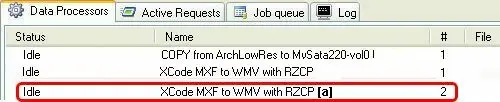
The Data Processors tab lists all the T-workflow actions created in the Media Manager section in the Etere Configuration module. Users can view and manage the T-workflow actions through a simple interface and various functions.
Data Processors
NB: Please note that this section allows only viewing media-manager actions, not configuring or modifying them. For information regarding these tasks, please refer to the proper Etere Configuration Editor chapter.
User Interface
Each data processor (i.e., media manager action) details the action's most relevant properties, including its current Status, Action Name, currently processed File name, Source Device, Destination Device and Action Type. Moreover, actions are coloured according to their state. The possible colours are:
•Blue -: the action is either assigned or currently running.
•White -: the action is available, but it is idle.
•Orange -: the action is offline.
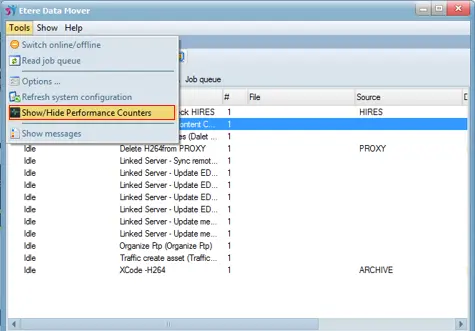
In the Data Mover interface, you can select to Show or Hide the performance counters from the menu bar by clicking on the Tools function bar and selecting "Show/Hide Performance Counters".
Data Mover interface
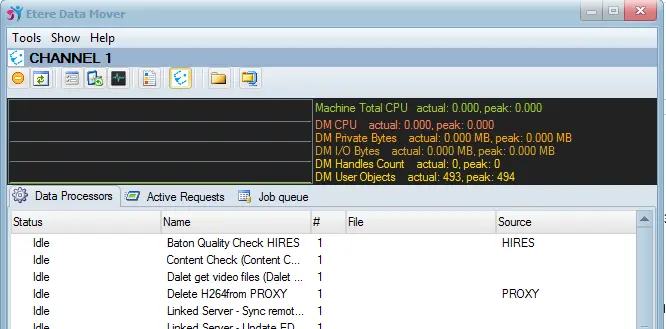
The performance counters display the Data Mover performance factors at a glance:
Data Mover performance
The DM User Objects in performance counters refer to GUI objects used by Data Mover actions. It has a default threshold of 10,000 objects defined by Windows OS to limit the GUI objects allocation, and allocating GUI objects beyond the threshold would impact the system's performance.
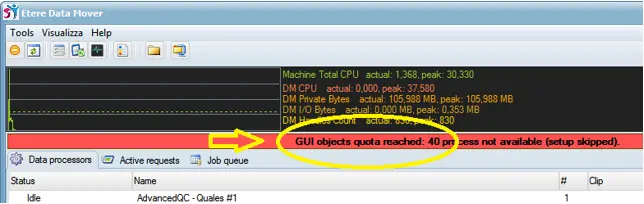
During Startup, Data Mover would check the usage of GUI objects in current status; if the total GUI objects utilized by Data Mover is approximately equal to the GUI object quota defined in configuration settings, the loading of remaining data processors would be halted. The performance counters would display a warning message to alert the operators.
Data Mover GUI objects.
Note:
• To modify the GUI object quota, refer to Data Mover > Configuration > Settings > Options.
Available functions
Functions that could be performed in these tabs are:
•Open display: Shows the T-workflow action to which the data processor is related, including any activity currently running.
•Reset: Reset all the jobs which are currently using this action.
•Abort: Abort all the jobs currently performing the selected action.
•Abort all: Abort ALL the jobs; all currently running actions will be stopped.
•Switch online/offline: Set the currently selected Data Mover action to online (actions will be available) or offline (action won't be available for future requests) depending on their current state. Processes currently running cannot be stopped.
 Data_Processors
 Data_Mover_GUI_objects
 Data_Mover_performance
 Data_Mover_interface