70.2.5.1 Initial Setup
After you had installed the Data Pump application, prior to using the Data Pump to manage tape device operations you need to perform an initial setup of the Data Pump.
First, launch the Data Pump application from the network PC where the application is installed, the Robotics Server must be in “Running” status in order to fulfill the initial setup.
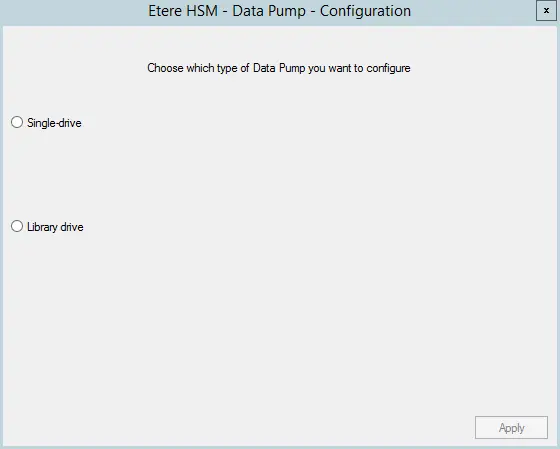
Etere HSM -Data Pump Setup - Configuration 1
From the initial configuration menu, you need to determine whether Data Pump would be used to manage a single drive or a library drive with multiple tape devices. For this instance, both drives would be configured.
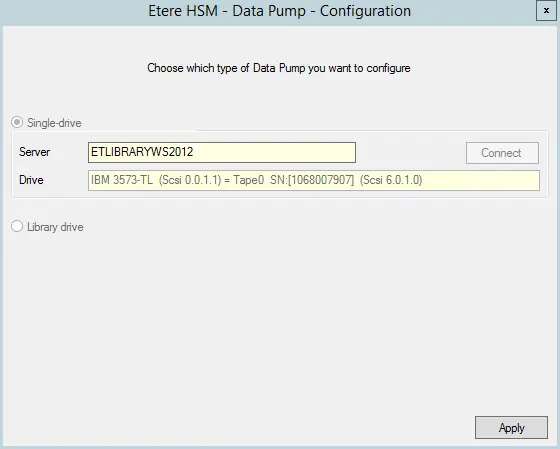
Single-drive setup
Etere HSM -Data Pump Setup - Configuration 2
•Enable the Single-drive option to launch the parameters required to complete the setup
•Specify the Robotics Server name where the network PC is connected and click the <Connect> button to establish the connection to the Server.
•Once connection is established, the tape device to be managed by Data Pump would be reflected in the drive parameter.
(Note: Data Pump detect the tape device by its configured serial number.)
Click <Apply> to confirm the initial setup.
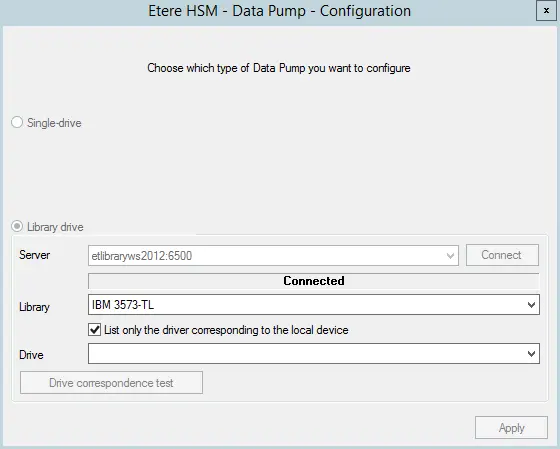
Library-drive setup
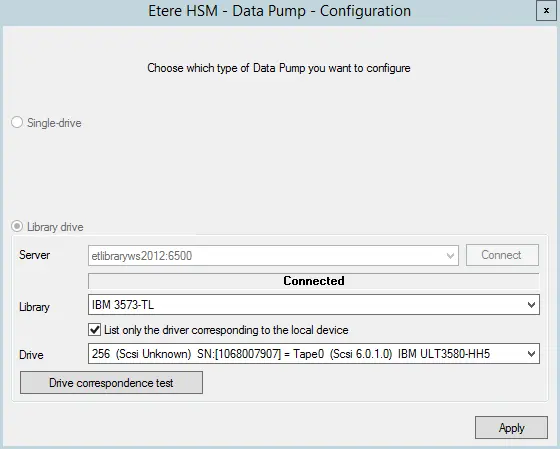
Etere HSM -Data Pump Setup - Configuration 3
•Enable the Library-drive option to launch the required parameters.
•Specify the Robotics Server name and click the <Connect> button to establish connection to the Robotics Server.
•Once the connection is established, select the tape library that manage the tape devices.
•Enable “List only the driver corresponding to the local drive” option to list all drives managed by the selected library.
Etere HSM -Data Pump Setup - Configuration 4
•Select the tape device that connected to the Robotics Server and click <Drive correspondence test> button to run a correspondence test.
(Note: Data Pump detect the tape device by its configured serial number.)
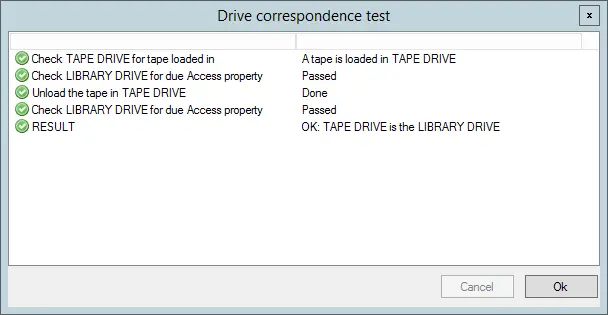
•If there is no error detected during the correspondence test, the test results would be prompted on screen, including the device status from the Single-drive setup.
Drive correspondence test
Click <OK> to close the test window and click <Apply> button to complete the initial setup for Library-drive.
Note: Refer to “Configure Data Pump” chapter to determine the tape device serial number.
 Etere_HSM_-Data_Pump_Setup_-_Configuration_2
 Drive_correspondence_test
 Etere_HSM_-Data_Pump_Setup_-_Configuration_3
 Etere_HSM_-Data_Pump_Setup_-_Configuration_1
 Etere_HSM_-Data_Pump_Setup_-_Configuration_4