70.3.6.3 Predefined HSM archive
In order to create an archiving T-workflow with predefined media pools (e.g. when using federated libraries) it's enough to follow the procedure below:
1. Open "Etere Configuration > Configuration Editor > T-Workflow" and create a new T-workflow (e.g. "Archive DVCPRO to Miami"):
Archive DVCPRO to Miami
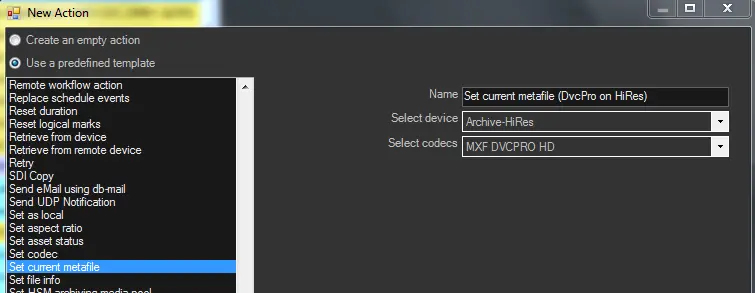
2. Add a "Set current metafile" action that Indicates the device (e.g. LoRes-Miami) and codec (e.g. MP4) of the file to be archived:
LoRes-Miami
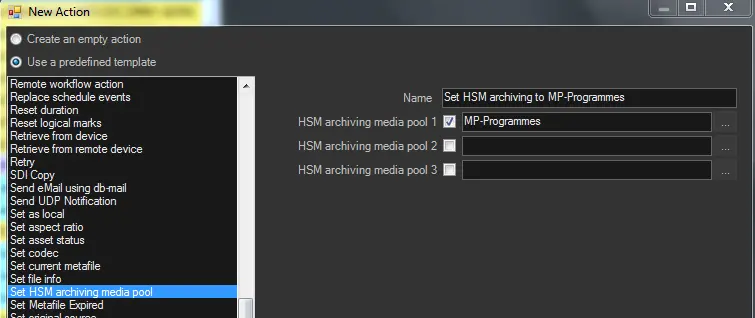
3. Add a "Set HSM archiving media pool" action to indicate the media pools (e.g. MP_Proxy_Miami, MP_Proxy_Sydney and MP_Proxy_London) where files will be archived, specifying a selection priority:
MP_Proxy_Miami, MP_Proxy_Sydney and MP_Proxy_London
For each processed file, this action will store in a metadata (HSM archiving media pool 1,2 and 3) the -up to 3- media pool(s) in which the metafile is expected to be archived:
HSM archiving media pool 1,2 and 3
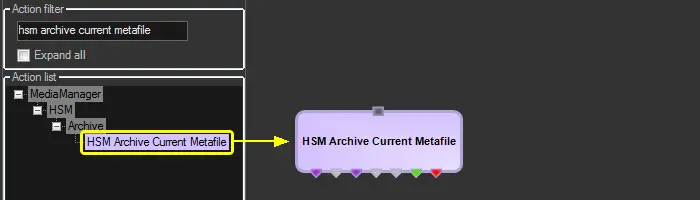
4. Add a "HSM archive current metafile" action to command the HSM Headquarters to archive a file (e.g. MP4 @LoRes-Miami) into a selected media pool (e.g. MP_Proxy_Miami):
NB: This action is a system action ready-for-use, it doesn't need to be created.
HSM archive current metafile
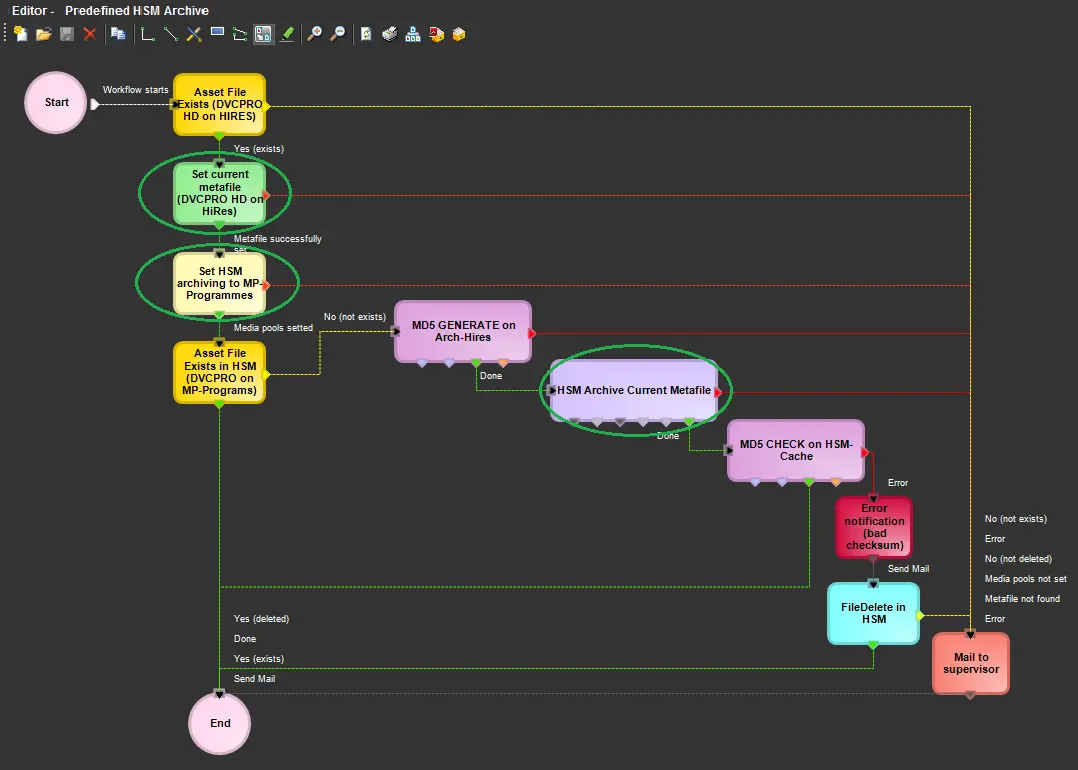
5. Complete the T-workflow by adding other required actions such as:
Other blocks used in this T-workflow:
Asset File Exists (DVCPRO HD on HiRes) - Checks if the DVCPRO file is available in the Archive HiRes
Asset File Exists in HSM (DVCPRO on MP-Programmes) - Checks if the DVCPRO file was previously archived
Mail to supervisor - Sends a notification on the unsuccessful archive
Editor
MD5 Checksum
It's strongly suggested to increase archiving reliability and security by including MD5 actions in your archive T-workflow:
Archive T-workflow:
MD Archive (generate a MD5 before file is archived)>>HSM Cache>>HSM (check the MD5 on cache after file is archived)
Before the file is archived
Use a MD5 Generate action to generate a MD5 file hash (e.g. when the archiving task is approved) on the archive cloud-device (e.g. MD Archive).
After the file is archived
Use a MD5 Check action to verify the MD5 consistency of the file stored in the HSM Cache, taking a decision according to the check result:
•MD5 is ok: The T-workflow can go on normally
•MD5 is not ok: The file can be removed from HSM, and an alert can be sent to the supervisor
NB: The check is done after archiving because deleting a wrong file is faster than waiting for check completion.
5. At this point, every time the "archive T-workflow" is launched, HSM Headquarters will read (from asset metadata) the media pool(s) in which to archive the requested file.
NB: It's worth mentioning that metafiles are archived in tapes along with its metadata (e.g. for Media Pools Realignment).
NB: During the Archive operation, any non-unicode character found in the file name or directory name would be converted to “?” character for archive into database.
NB: From Etere released version 25.2 onwards, all the new tapes will be written in AXF format. If the tapes already contains data written in other formats (e.g. EXF, LTFS) it would continue to be written in existing format (e.g. EXF, LTFS).
 Editor
 Archive_DVCPRO_to_Miami
 MP_Proxy_Miami,_MP_Proxy_Sydney_and_MP_Proxy_London
 LoRes-Miami
 HSM_archive_current_metafile