84.2.2.19 Run "manual" secondary events
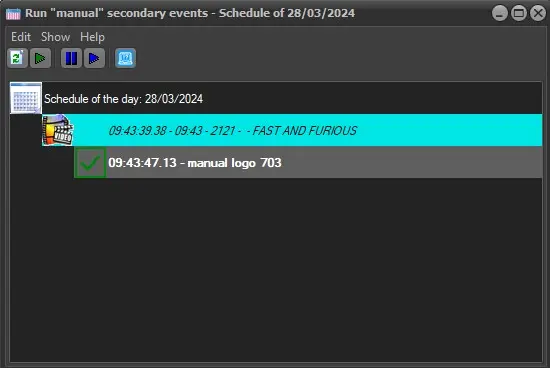
The "Run manual secondary events" function allows users to execute secondary objects specifically configured for manual triggering in STMan:
➢ Secondary events must be scheduled in the currently open or next day
➢ Secondary events must be objects are supported (CTM scripts and Fixed Logos)
➢ Secondary events must be flagged for manual triggering
run_manual_secondary_events
Running objects manually
Use this function to, for example, display (in the current station) a crawl text informing about a breaking weather situation, just by following this procedure:
1. Associate a secondary object to a primary event, enabling the flag "This sec. event will be aired by the operator".
2. Launch [Run manual secondary events] from Tools menu.
3. Select a secondary event and trigger it through any of the following actions:
Play: This button puts the selected secondary event in play.
Preset: This button allows operator to have a graphic preview of the selected secondary event before sending the event on-air.
Take: When the Preset present the correct graphic, click the Take button to send the event on-air.
4. The success of the command execution will be displayed on the run manual sec event main windows.
5. Source Info is displayed next to the description of events.
6. Secondary events can be launched as many times as required, just as detailed in previous steps.
The configured manual secondary event will be displayed, under the Secondary events column, with a little icon on the top-right corner of the logo icon, as shown in the image below:
manual_secevent_icon
 run_manual_secondary_events
 manual_secevent_icon