84.2.4.9 In/Out Markers
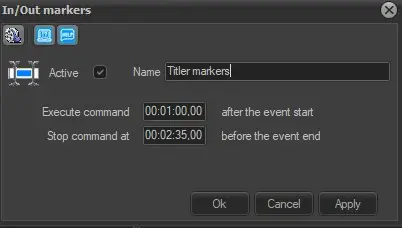
Use the In/Out Markers to dictate the starting and ending point of titling graphics. Etere STMAN has a default start and termination times for titling graphics but with this secondary event it is possible to set new values only for a single event:
4942_In-Out_Markers
Active: Tick off this parameter to enable the secondary event, leave it unchecked to disable it.
Name: Give it a brief descriptive name.
Icon: Make double-click on the default icon to change it with a more suitable one.
Execute command: Set the time (after the event start) at which the secondary event will be executed.
Stop command: Set the time (before the event end) at which the secondary event will be stopped.
4943_Execute-Stop_command
This secondary event permits to assign a different timing to overlay the graphic titles of a certain asset, Etere STMan will generate graphic titles to the asset in question according to the timecode inserted here, without reading the default configuration (set in the Properties | Crawl Logo section).
Media Library [F7]: Open the Media Library clicking on this button on the secondary event's toolbar. It allows to load the asset related to the primary event for which the secondary event is being defined. If there are unsaved changes, before opening Media Library a message will be prompted, asking to save or not the modifications to the secondary event.
 4943_Execute-Stop_command
 in-out_markers