84.2.4.12 Logo
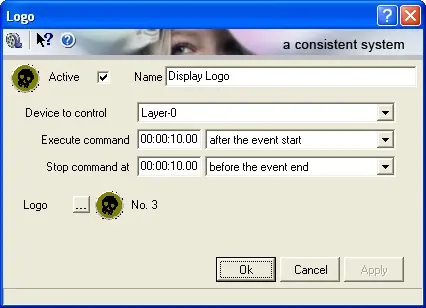
The Logo secondary event allows to execute a specific logo (e.g.: channel brand, thematic brand, etc) on a certain device. The following parameters needs to be compiled in order to correctly configure this function:
4947_Logo
Active: Check this parameter to enable the secondary event, leave it unchecked to disable it.
Name: Give it a brief descriptive name.
Icon: Make double-click on the default icon to change it with a more suitable one.
Device to control: Indicate the Logo Generator that will overlay the logo.
Execute/Stop command: Set the time at which the secondary event will start and stop the logo overlaying, possible values are:
4946_Execute-Stop_command
➢ after the event start (SOM),
➢ before the event start (SOM),
➢ at the event start (SOM),
➢ before the event end (EOM),
➢ after the event end (EOM),
➢ at the event end (EOM).
Logo: Indicate the Logo that will be overlaid by the selected device.
Media Library [F7]: Open the Media Library clicking on this button on the secondary event's toolbar. It allows to load the asset related to the primary event for which the secondary event is being defined. If there are unsaved changes, before opening Media Library a message will be prompted, asking to save or not the modifications to the secondary event.
 4947_Logo
 4946_Execute-Stop_command