56.1.7.1 GPI
GPI INPUTS
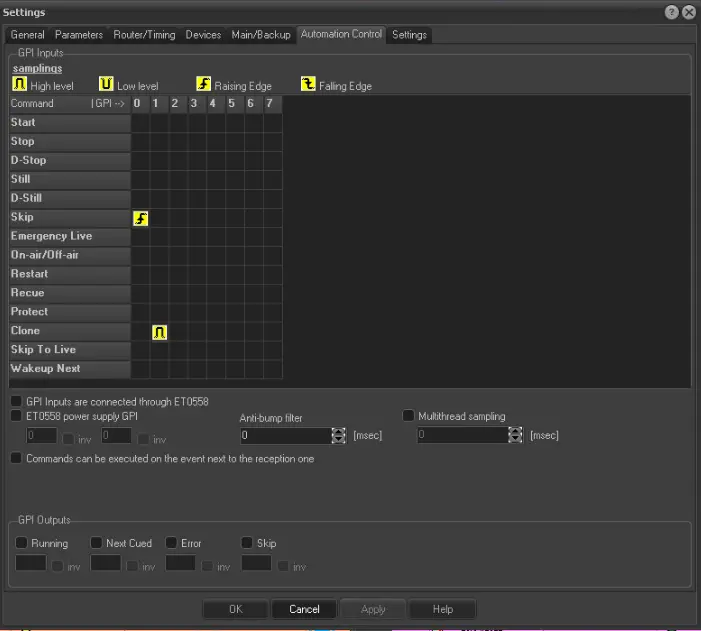
Set here the commands to be executed when specific GPI signals are received:
Samplings: It is possible to set the automation commands to be triggered each time a specific GPI input is received with a certain signal by setting the grid according to the following information.
•GPI numbers: Represented by the grid columns, indicate the GPI input (0, 1, 2, 3) through which the signal will be received and the command will be executed.
•Automation commands: Represented by the grid rows, indicate the command (e.g. start, stop, pause, etc.) to be executed when the GPI signal is received. For information on supported commands, please refer to the automation commands chapter.
•Signal types: Represented by the square between a GPI and a command, it indicates the signal type expected through a GPI for executing a command. Supported signals include:
High Level: Commands will be executed on the up signal edge and activate if the signal remains high (i.e. 1). When the signal level goes down, the command will be deactivated.
Low Level: Commands will be executed on the down signal edge and activate if the signal remains down (i.e. 0). When the signal level goes up, the command will be deactivated.
Raising Edge: Commands will be executed on the up signal edge (i.e. at each positive transition, for example, 0 -> 1).
Falling Edge: Commands will be executed on the down signal edge (i.e. at each negative transition, for example, 1 -> 0).
WARNING: The high and low levels are suggested for continuous signals, for example, heartbeats, whereas the rising and falling edges should be used for intermittent signals, for example, triggering.
For instance, setting a Falling signal between the GPI 1 and the Clone command means that each time a down transition is received from the GPI one, the automation will be switched to clone mode.
Or, for example, setting the Low signal between the GPI 2 and the Emergency live command means that each time a low level is verified on the GPI two, the emergency live channel will be switched.
Note1: Not all commands support both levels and edges samplings. For instance, the stop command can be executed only at an edge level (rising/falling) but not at a continuous level (high/low).
Note2: Please note that GPI signals can also be defined for specific assets, as explained in the Media Library > GPI chapter.
GPI inputs are connected through ET558 - Enable this option if the main automation receives the GPI inputs through ET0558. This way, the main automation will forward all received commands to the clone.
Otherwise, if this option is disabled, the main automation will assume that all GPI inputs are also connected to the clone automation, and therefore no forward is needed.
ET0558 power supply GPI: The two checkboxes included on this option relate to the GPI input (e.g. 1, 2, 3...) received from the first and second ET0558 power supplies indicators. In case this parameter is enabled, it will be possible to set the "invert" option in the following circumstances:
If disabled (default), the "high level" sampling method will be used, and the expected GPI signal will be "1" if a "0" signal is received, an SNMP warning message will be automatically sent to notify a power supply malfunctioning.
If enabled, the "low level" sampling method will be used, and the expected GPI signal will be "0" if a "1" signal is received, an SNMP warning message will be automatically sent to notify a power supply is malfunctioning.
WARNING: SNMP messages managed by this parameter are sent with an hourly frequency.
Anti-bump filter: Set a value greater than zero to enable the anti-bump filter on the GPI inputs (default value is 50 ms). If enabled, GPI inputs will be detected only if active for the duration set here. This function is suggested to avoid false GPI pulses. To disable this function, leave this value to zero.
WARNING: Currently, this feature is only supported for Advantech boards using the BioDAQ driver.
Commands can be executed on the event next to the reception one - If disabled, GPI commands received during an event (n) will not be performed during the next event (n+1). For instance, when a "skip" command is received close to a clip change (i.e. the EOM of an event), its execution will be omitted if this parameter is disabled.
If enabled (default), GPI commands received during an event (n) will be allowed to execute on the next event (n+1). For instance, when a "skip" command is received close to a clip change (i.e. the EOM of an event), its execution will be queued after the next event.
GPI OUTPUTS
Set here the signals to be sent via GPI in case a certain automation status is verified
GPI Outputs - Indicate the GPI output (i.e. 1, 2, 3) to be used for sending a signal in case the automation is in one of the following states:
Running - The automation playback has been started.
Next cued - The event after the current one has been cued for playback.
Error - The automation playback has encountered an error.
Skip - The current playing event has been skipped.
Moreover, for each automation status, it will be possible to set the "invert" option in the following cases:
Aut_autcheck_02 - If disabled (default), the "rising edge" sampling method will be used. Each time a certain automation status occurs (e.g. playback running), the GPI output signal will change positively (i.e. 0 -> 1).
Aut_autcheck_01 - If disabled (default), the "falling edge" sampling method will be used. Each time a certain automation status occurs (e.g. playback running), the GPI output signal will change negatively (i.e. 1 -> 0).
Multithread sampling (msec) - If enabled, the automation will sample GPI signals using a separated thread based on the frequency specified here (in milliseconds).
 gpi_tab