65.1.2.9 Configuring NDI
What is NDI
NDI stands for Network Device Interface, it is a standard protocol developed by NewTek in order to enable video-compatible products to communicate, receive and deliver broadcast quality video through multiple channels in a high quality, low latency manner, and it is frame-accurate and suitable for switching in a Live Production environment. NDI protocol is supported on Windows, Linux and Mac OS.
Configure NDI resource
The NDI configuration process in Etere ETX is basically the same as configuring an SDI environment. The principles are basically the same by considering them as Inputs or Outputs renderers.
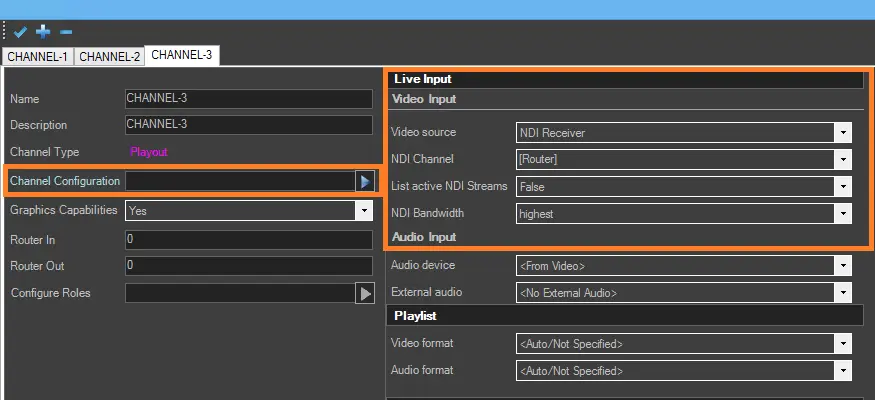
In order to configure NDI resource, we need to launch Etere Configuration module and access to Resource Editor feature. In Resource Editor, double-click on the Etere PC where it is intended to configure the ETX channel that will use NDI protocol. Then open the channels configuration section as explained in the previous chapters and configure the NDI resource as per following instructions:
4968_etx_ndi_config
- Video input
Video source: Select “NDI Receiver” to use NDI protocol and launch the properties settings.
For Live streaming, you can use UDP by specifying a valid URL stream (e.g. Add url="udp://127.0.0.1:5000")
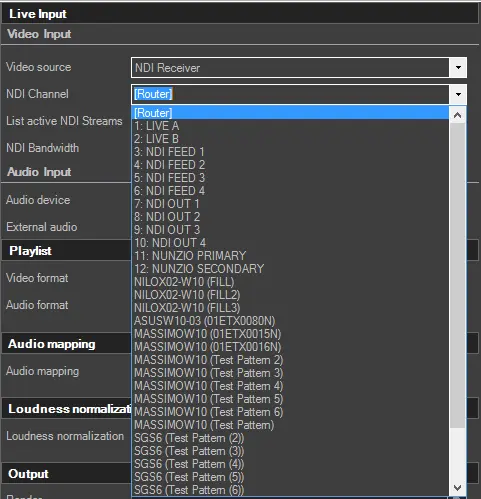
NDI channel: Specify one of the option when sending data: - Select [Router]
By selecting [Router], the NDI stream would be set by the caller’s application program.
- Select an available NDI channel from the list, which corresponds to the channels set in Etere Configuration > Settings > Video routers.
Note: When selecting NDI router, only the router’s source name is displayed, the router IP address and port number would be invisible.
4969_etx_ndi_config_active
Enter a text code: For instance, for debug purposes, enter code “01ETX0001N”, where
- 01=index of Etere IP router
- ETX=Fixed value
- 0001=router port number
- N=Fixed value
Etere Mediacore application would search the active NDI stream set in router assignment for code matched the entered value.
- List active NDI stream: A list of current active NDI stream is added in the “NDI Channel” field, if set to True.
- NDI bandwidth: Select the higher or lower bandwidth to be used by NDI Receiver.
- Video Output
In order to use NDI protocol for video output, browse to the output section of the channel, set "NDI renderer" and select an NDI channel, as already done for the video input. In the case of Etere ETX, to use NDI in Etere’s Automation, Ad Insertion, Playout and Master Control, 2 new fields are added to the Etere router IP resource (driver=ETEREIP): - URL
- Parameters URL & Parameters
With these 2 new fields, Etere applications can use the IP input without major changes.
 URL_&_Parameters
 4969_etx_ndi_config_active
 4968_etx_ndi_config