72.2.3.8 Archive Manager
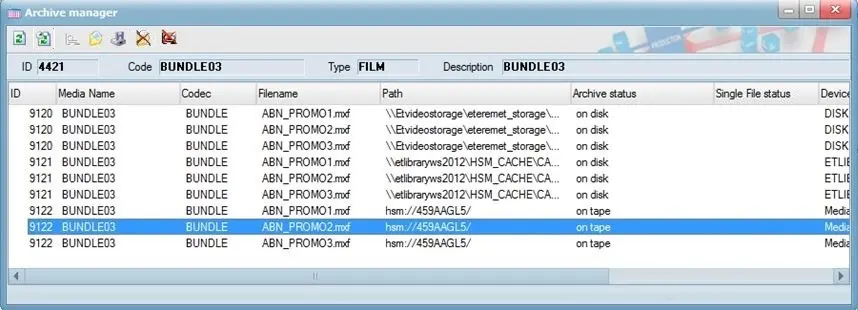
The Archive Manager tool shows all the media files (HiRes and Proxy) associated with the current asset, which are stored on disks. Selecting one of the files and clicking on the relevant icon in the toolbar allows you to:
Archive Manager
Function - Refresh
Description: Updates the list of video files,
Function - Auto Refresh
Description: Constantly update the file status.
Function - Backup
Description: The archived file is copied on disk using Etere HSM into the data tape (long-term archive). An XML file will also be archived in the same data tape; it will contain its primary information (i.e., ID, code and description) as well as all asset data stored in the Etere database tables (e.g., FSerie, FInterruzioni, etc.).
Function - Restore
Description: Restores the file from the data tape (long-term archive) to the disk (short-term archive),
Function - Restore a single file
Description: Use this function to restore a single file (or part of a bundle asset) to a dedicated destination path in the network without using the T-workflow action.
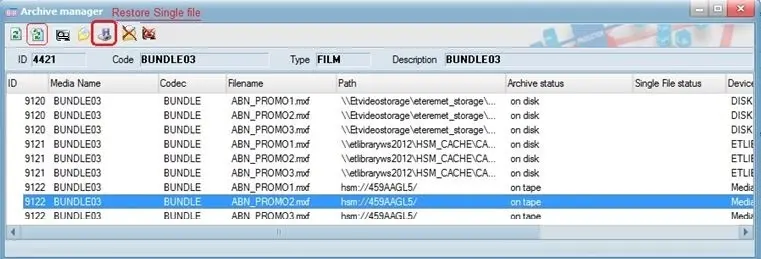
Restore single file
In Archive Manager, select the file to be restored, click on the "Restore single file" icon, and enter a designated path to which the file will be converted. HSM Headquarters would manage the submitted restore operation; you must specify a UNC path as the destination.
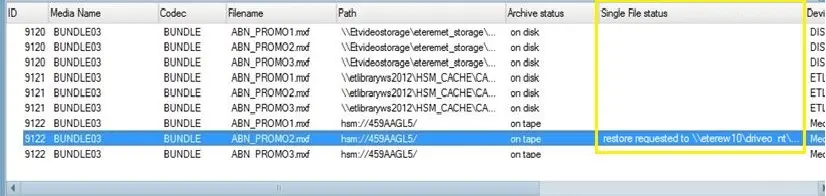
Once the restoration is started, you can monitor the process from the same platform; the single file restore is reflected under the "Single File Status" column in Archive Manager.
Single File Status
Moreover, you can use the "Auto Refresh" icon in Archive Manager to update the restoration process's status constantly.
Upon restoration, HSM Data Pump would rebuild the restored file's original sub-directory in the database and retain the original file name and path after restoration. In Archive Manager, new columns "Original filename" and "Original path" would be inserted upon restoration to identify the restored file quickly.
You can select a single, multiple, or all files in the bundle asset and trigger the "Restore Single File" function. HSM Headquarters will manage the requests by restoring one file at a time.
Function - Delete the archive file on disk
Description: Physically deletes the archived file in question from the device on which it is stored.
NB: This function is only available if the "Video Server Erase" rights are set to "Allowed" in Etere Rights Management.
Function - Delete archived file on tape
Description: Physically deletes the archived file in question only from the tape on which it is stored.
 Restore_single_file
 Single_File_Status
 Archive_Manager