59.2.42.4 Payments
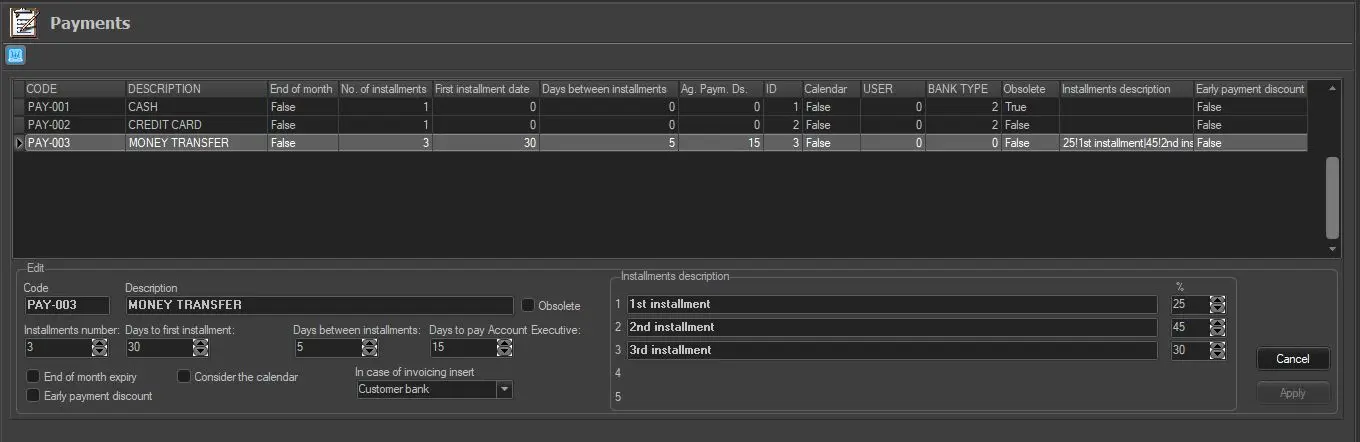
The Payments section allows configuring the payment methods used in commercial orders. Other than the user-defined code and description, specific information about the payment method can be specified:
Payments
You can right-click on each line of data and select "Edit" to edit the settings:
Code: Indicate the code to identify the payment within the system.
Description: Give a brief description of the payment.
Obsolete: Enable this flag to set the current payment method as no longer used by the station. Obsolete payment methods won't be available (displayed and user) across Etere modules (e.g. sales proposals, purchase orders, personal data, etc.).
Installments number: Indicate the number of instalments the payment is divided. One deadline will be created for each instalment. When entering the instalment amount for each divided payment, you must also enter the indicative percentage (%) for each divided payment in the "%” column.
Days to first installment: Indicate the number of days that must be passed (since the payment day) to set the first instalment deadline. See the About the payment of commissions chapter.
Days between installments: Indicate the difference in days for setting deadlines.
Days to pay Account Executive: Indicate the number of days passed after the payment date to mature the account executive commissions. See the About the payment of commissions chapter.
End of month expiry: If enabled, deadlines will be shifted to the end of the month.
Consider the calendar: If enabled, the deadlines will be created based on the Deadlines Calendar. See the accounting Settings chapter.
In case of invoicing insert: Indicate the bank to which payments would be assigned, e.g. my bank, customer bank, or no bank.
Early Payment Discount: If enabled, this gives an early payment discount.
Press the [Apply] button to save the new payment in the database.
 Payments