59.3.12.9 Active Directory Integration - User Interface
The graphical interface of the Active Directory Integration tool is composed of the following sections:
3753_Active_Directory
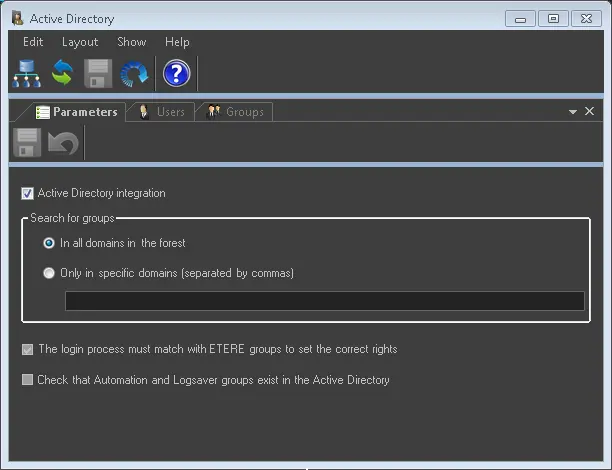
PARAMETERS
Here the criteria can be defined with which the [Scan] toolbar function will retrieve groups from the Active Directory:
Active Directory integration - Enable this option to define the rights structure automatically by importing the domain group and users from the Microsoft Active Directory of the organization.
NB: You can enable this option to prevent the global settings "global.ini / SETTINGS / DomainPrefixActive" from reset to "0" (disabled) when the Configuration module is restarted or when Active Directory is launched.
Search for groups - Specify the domains from which groups and users should be retrieved; available options include:
▪In all domains: Groups and users will be retrieved from all domains in the network.
▪Only in specific domains (separated by commas): Group and domains will be retrieved only from the specified domains. Commas must separate domains (,) just as follows: Rome.MyTV.com, Milan.MyTV.com, London.MyTV.com
The login process must match with Etere groups to set the correct rights - When this option is enabled, when a user login to Etere via Active Directory (AD), the login process would match the AD Groups with Etere User Groups and assign a user to the appropriate Group in Etere.
NB: This function is applied to Etere desktop applications (32-bit and 64-bit) and EtereWeb.
Check that Automation and LogSaver groups exist in the Active Directory. If enabled, a warning will be displayed (e.g. during an UpdateWorkstation) in case the Automation or LogSaver groups don't exist in the Active Directory structure.
If disabled, no check will be performed, and no warning will be displayed.
USERS
All users are present in the Etere Permissions structure (e.g. imported from the AD).
The format with which usernames are imported depends on the installed Etere version (see User Permissions).
GROUPS
All groups are currently in the Etere Permissions structure (e.g. imported from the AD).
All above sections are managed (i.e. visualized, selected and imported) through the functions present in the Toolbar.
 Active_Directory