68 Etere Multiviewer 64-bit
Etere Multiviewer 64 bit
From Etere version 33.1, Etere developed a new Multiviewer, which provides an improved way to manage displays, monitors and configurations.
Such improvements come with the introduction of a separate executable file available in Etere versions, Etere Multiviewer 64-bit Layout Designer.
Splitting the Multiviewer module into 2 different .exe files allows the module to be more stable and reduces the impact on the overall system's performance:
- Etere Multiviewer 64 bit Layout Designer (Etere.Multiviewer64.LayoutDesigner.exe)
- Etere Multiviewer 64 bit (Etere.Multiviewer64.exe)
These two executables can be launched one from another, to make the start up faster.
Select File > Open Multi Viewer from Layout Designer, to launch Etere Multiviewer 64 bit.
Right click on the main Multi viewer 64 bit window and select Open Multi Viewer Designer, to launch Etere Multiviewer 64 bit Layout Designer.
In the following chapters, we'll see how the user can manage displays and monitors and how to configure every element of Etere Multiviewer 64-bit.
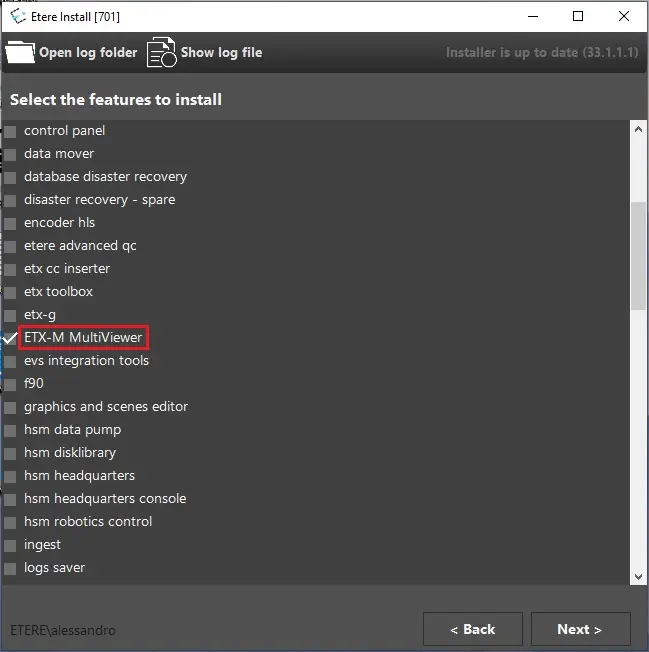
How to install Etere Multiviewer 64 bit
Etere Multiviewer 64-bit installation does not change.
The Etere Update's feature to select is still the same. Both .exe files will be installed in the workstation.
MV64_installation
 MV64_installation