84.5.1 What is it and what is it for?
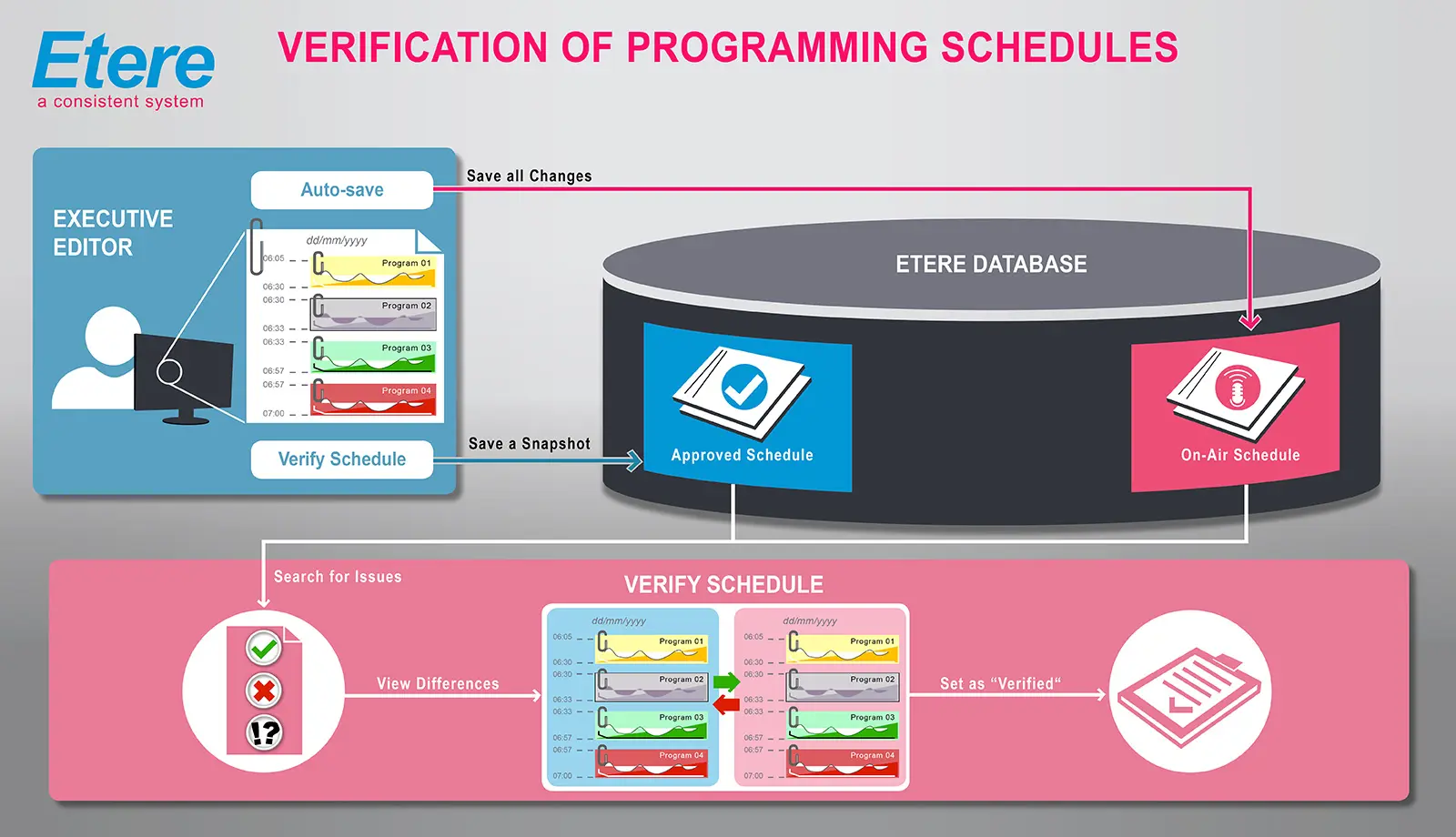
The Schedule Verification module has been created to solve one of the most common issues during the scheduling process, that is, determine if a broadcasted schedule corresponds to the programmed one by comparing them in a simple and automatic way, just as illustrated in the following diagram:
Sched_certification_flowchart
As shown, in the diagram above, the verify schedule function (available from Executive Editor) allows operators to save a daily schedule in the Etere's database to subsequently compare it against the broadcasted schedule using the Verify Schedule function. The certification process is based on two scheduling levels, these levels are:
•Approved schedule: The schedule saved by Etere Scheduling to be used afterwards for verification,
•On-Air schedule: The schedule that Etere Automation will transmit.
Important considerations
It is important to note that before starting to verify a schedule, the following considerations must be taken into consideration:
•The operator must have supervisor rights, otherwise it will not possible to save the approved schedules,
•Only one 'approved schedule' can be saved for each day, therefore, each time a schedule is 'verified', the previous saved schedule will be overwritten,
•The broadcasting report takes into account all the modifications performed during the broadcasting process and all technical errors occurred on it as well,
•Some configurations must be set under the Etere Configuration module, as explained in the next chapter
 5315_Sched_certification_flowchart