65.1.2.5 Ingest channel
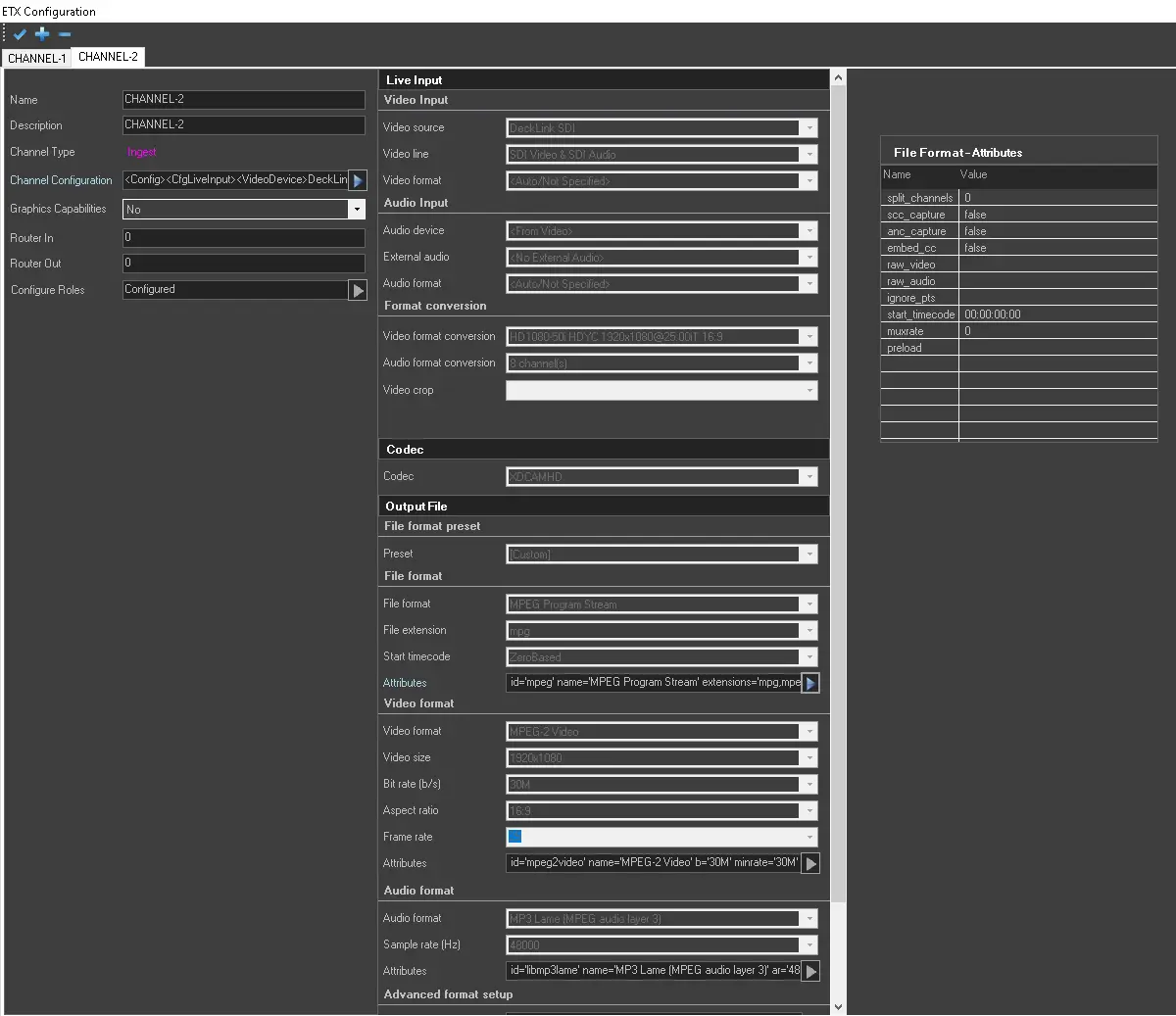
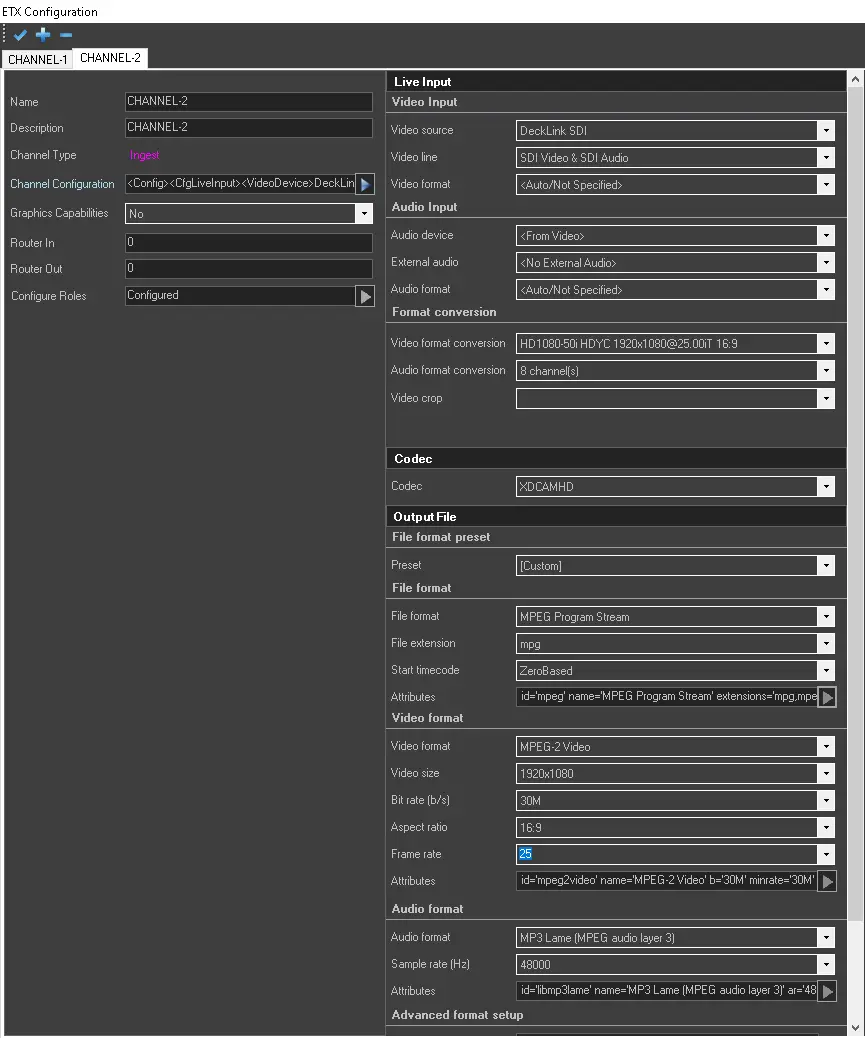
To start the Etere Ingest Channel Configuration, take into consideration the following essential Parameters:
4895_ingest_ch_config
4896_ingest_ch_config_ext
-----------------------------------------------------------------------------------------------------------------------------------------
Live Input - Video Input
Video Source: Select the video source for ingest.NDI Channel: Allows the selection of any NDI input feed as Live Input for Etere Ingest.
List active NDI Stream: It allows listing any active NDI stream within the network. They will be displayed in the NDI Channel field.
NDI Bandwidth: Select the proper bandwidth to use, depending on the Network capabilities, Highest or Lowest.
Live Input - Audio Input
Audio device: Select an audio format or default to the video card.
External audio: Select any available external audio, or leave it as default if there is no external audio.Audio format: Select the incoming audio format, i.e. frequency, channels, bit, etc.
Live Input - Format conversion
Video format conversion: Select an appropriate conversion type to convert the video format. The conversion works efficiently with the Video crop setting to optimize video files.
Audio format conversion: Select the conversion type to convert the audio format. Video crop: Specify the value to optimize the visibility of the ingest video file. Examples of these values are:
"10,10,10,10" (in pixels)""2.5%, 2.5%, 2.5%, 2.5%" (in percentage)
-----------------------------------------------------------------------------------------------------------------------------------------
Codec: Select an available codec to be used. If this parameter is left blank, codec type "UNK" (Unknown) will be set.
-----------------------------------------------------------------------------------------------------------------------------------------
Output File - File format preset
Preset: Select a predefined profile for the file encoding or select "Custom" to set the profile manually, through the following parameters.
Output File - File format
File format: Select a file format for the output file, e.g. MXF, MPEG, MOV, etc.
File extension: Choose the extension for the resulting file. This parameter will be auto-updated once the file format is selected.
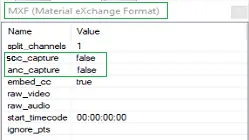
WARNING: In the format settings below, the "scc_capture" and "anc_capture" settings are set to False by default during Etere installation and updates. If MXF file format is specified for the ingest channel, the application would not auto-create output file with extensions ".scc" and ".anc" unless the settings are changed to "True". Moreover, to include non-live events in the VANC (On-air Assets) report, the "scc_capture" attribute must be set to "True".
Ingest_channel_mxf_false
Start timecode: Select an option to start timecode during ingest. If set to "ZeroBased", the file will start from tc 00:00:00.00. If set to "FromSource" the start timecode will be taken from the source signal. Attributes: This parameter would be auto-compiled once the above parameters are fulfilled. It's possible to open the Attributes panel to set additional parameters related to the file format.
Note: This field is editable and the panel can be opened only when configuring a custom preset.
Output File - Video format
Video format: Select the video format of the resulting file among the ones in the list.
Video size: Select the displayed size of the resulting file among the ones in the list.
Bit rate (b/s): Select the bit rate of the resulting file.
Aspect ratio: Select the aspect ratio ("16:9" or "4:3").
Frame rate: Set a frame rate in the ingest file. If the parameter is left blank, the frame rate from the input source would remain unchanged.
Attributes: This parameter would be auto-compiled once the above parameters are fulfilled. In addition, by clicking on the browse icon on the right, you can set the scan type as progressive or interlaced when creating the ingest file, as well as set additional attributes related to the video format.
Note: For better performance and to prevent loss of frames during registration, you can set the "sc_threshold" attribute to "1000000000" and set the "threads" attribute to "auto" or a relatively higher number (default is 4) depending on the number of CPU on the machine, e.g. set to 16 if the machine has 24 computing units. This field is editable and the panel can be opened only when configuring a custom preset.
Output File - Audio format
Audio format: Select the audio format of the resulting file.
Sample rate (Hz): Select a sample audio rate from the list.
Attributes: This parameter would be auto-compiled once the above parameters are fulfilled. You can click the arrow button and define additional attributes.
Note: This field is editable and the panel can be opened only when configuring a custom preset.
Output File - Advanced format setup
Overall attributes: The attributes defined in file, video, and audio formats will be displayed here.
Additional attributes: Specify any other attribute to be defined for the output file, that is not among the ones above.Output File - Properties
Embed CC from source: Use this option to embed closed captions from source input (set to "True") or disable the function by setting it to "False".
WARNING: When using ETX resource for ingest, the channel's existence would be checked before executing ingest.
-----------------------------------------------------------------------------------------------------------------------------------------
Multiple ingest on the same path
If more than one ingest channel is available in the ETX resource on the same volume, you can assign multiple ingests to be recorded on the same path.
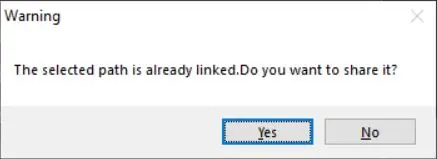
A warning message would pop-up to alert the operator before accepting the configuration.
Warning
Click <Yes> to confirm the same path used for ingest and close the message.
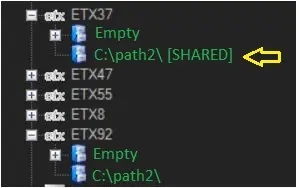
In the cloud device, the path with the shared volume path is indicated with the suffix [SHARED] on the path name.
SHARED
If an ingest station mapped to the shared volume is changed or removed, its main volume will not be affected.
If the volume is removed, the shared path will also be removed from all associated devices if no file is linked.
WARNING: A warning message will be prompted if the configuration GUI is closed (using the "X" button) without saving the settings.
WARNING: Etere recommends disabling the Antivirus on Ingest station to avoid video freezing problems.
 Ingest_channel_mxf_false
 Warning
 SHARED
 4896_ingest_ch_config_ext
 4895_ingest_ch_config