72.7.3.9 Configuring DVB Subtitles
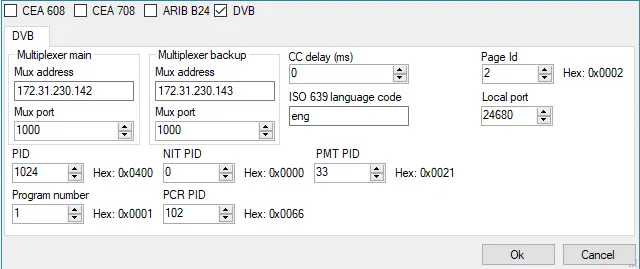
The configuration of DVB subtitles is similar to ARIB B24 Subtitles, the properties settings includes the following:
ARIB B24 Subtitles
Multiplexer Main:
•Mux address: Specify the IP address of the Main Multiplexer receiving the DVB transport stream.
•Mux port: Specify the port number used to send the DVB transport stream to Main multiplexer.
Multiplexer Backup:
•Mux address: Specify the IP address of the Backup Multiplexer receiving the DVB transport stream.
•Mux port: Specify the port number used to send the DVB transport stream to Backup multiplexer.
Others
•CC delay (ms): Specify the delay (in millisecond) in synchronizing the subtitles and video file.
•ISO 639 language code: Enter the 3 letter code of International Standard for language code to be used in subtitles, e.g. ita (Italian), eng (English), zho (Chinese), fra (French), etc.
•PID: Enter the transport Packet Identifier (PID) generated from the transport stream. The subtitles transport stream consists of a sequence of packets of one or more elementary stream multiplexed into one common stream. All packets are tagged with a PID.
•NIT PID: Enter the Network Information Table PID (NIT PID) generated from the transport stream. NIT provides a grouping of Transport Stream and the relevant tuning information.
•PMT PID: Enter the Program Map Table (PMT PID) generated from the transport stream. The PMT is an index for an individual program indicating which elementary stream belong to the program, it contains general information for both elementary stream and the program.
•Program Number: Enter the Program number. In the program association table (PAT) contains an index of all programs that present in the transport stream, all programs are assigned with program number (and PID) indicating where the program’s PMT can be found.
•PCR PID: Enter the Program Clock Reference (PCR PID) associated in the PMT. The PCR value is used to generate a "system_timing_clock" in the decoder to provide a highly accurate time base that used to synchronize audio and video elementary stream. If this is unused, it is set to “0x1FFF”.
•Page ID: Enter the Page ID of the subtitle page. Within a subtitle stream, a page ID value is assigned to each segment. A subtitle page contains one or more regions, a region is used as the background structure into which graphical objects are placed. An object may represent a character, a word, a line of text or an entire sentence.
•Local Port: Specify the local port number used to receive the transport stream.
NB: For DVB subtitles, it does not support “Roll Up” and “Paint On” closed captions style in Live Subtitling, only “Pop On” style is available. To display DVB subtitles, capture the UDP transport stream in CC server and save output file as “.ts” format, open the “.ts” file with VLC and select DVB subtitles to view the closed captions.
 ARIB_B24_Subtitles