84.4.4.17 STANDARD > GENERIC > XML
Export Scope
The XML Export function allows to export multiple schedules in a XML file, in order to export schedules in XML format, just compile the relative fields.
During export, if there are 2 or more identical SMPTE data linked to an asset, only the first SMPTE data would be exported.
In the exported file, the “MOVIES.AUDIO” and “MOVIES.AUDIO_LANGUAGE” field data are exported in clear text as “VIDEO_AUDIO” and “VIDEO_AUDIO_LANGUAGE” respectively to facilitate the relative Import Standard Generic XML.
NB: If the export is launched by F90, you can stop the export process without interfere the currently running process. Instead, the stop command would prevent subsequent import/export processes to be triggered automatically when the current export process ends.
Export Parameters
In order to use this export function the following fields must be compiled:
5081_Export_standard_generic_xml
Export tab
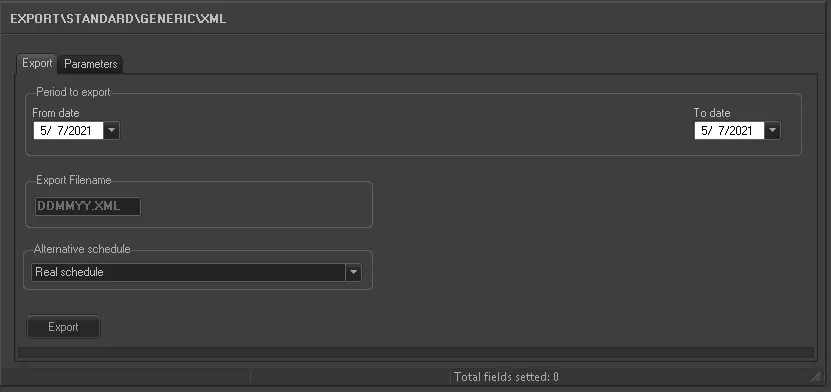
Period to export - Specify a period over which you wish all schedules to be exported. Each day will be exported into a different file, saved in the 'Export Path' specified.
Export filename - Indicates the filename of the exported file, this value is locked and its default value is DDMMYY.XML (indicating the Day,Month and Year of the schedule).
Alternative Scheduling - If you wish to import an alternative schedule, select one of the ten available alternative schedules from the list. Else, you must select “Real schedule” to import the real schedule.
5080_Export_standard_generic
Parameters tab
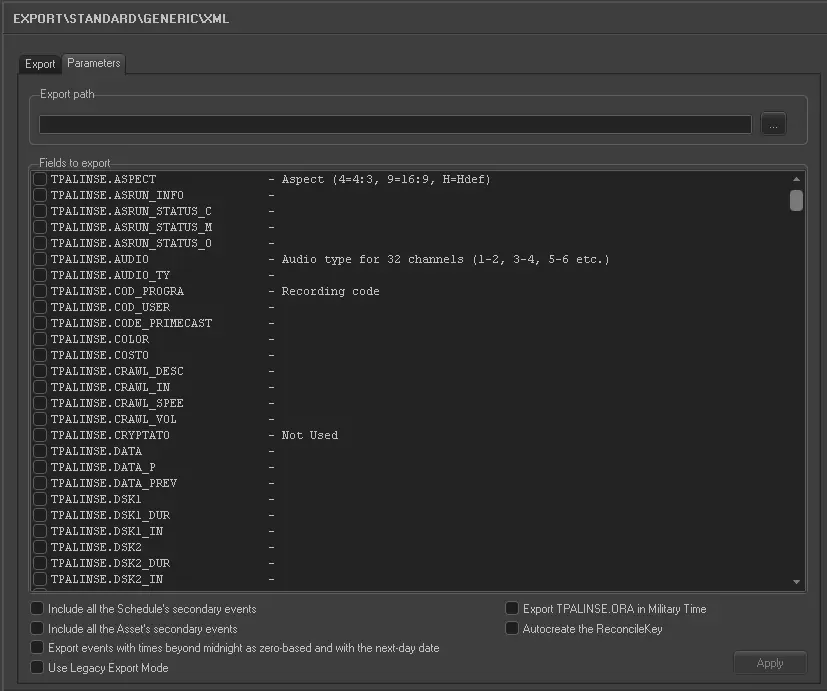
Export path - Browse and select the directory on which exported XML files will be stored.
Fields to export - Select all the fields you intend to export on the XML file(s).
Note: Data can be exported from tables Filmati, TPalise and Anagraf.(cod_conto and Rag_Social).
Include all the schedule's secondary events¹ - If enabled, the export will also include the secondary events eventually associated to the asset across the playlists on which it's scheduled within the given period.
Include all the asset's secondary events¹ - If enabled, the export will also include the secondary events eventually associated to the asset in the Media Library.
Export events with times beyond midnight as zero-based and with the next-day date - If this option is enabled, events with time exceed midnight are export with next-day date and timecode as zero-based.
All those events scheduled beyond the 24:00:00 will be exported featuring a continuous time (e.g. 24:10:37, 25:23:41, 26:12:45) and keep the exported television day (e.g. 06/12/2011). Instead, if enabled, they will be exported featuring a zero-based time (e.g. 00:10:37, 01:23:41, 02:12:45) and a date belonging to the next television day (e.g. 07/12/2011).
It is suggested to enable this parameter only in case the system on which the exported schedule will be used is not based on the 24-hour day format (e.g. 26 hour day format).
Use Legacy Export Mode - Select this option to export using the old export mode to export including the secondary events.
Export TPALINSE.ORA in Military Time - If enabled, the time code would be export in military format as “HH:MM:SS.FF”
Autocreate the Reconcile Key - If enabled, the export function would automatically create a reconcile key in the AsRun text file. This reconcile key would be used during import of AsRun file to identify the discrepancies between the transmitted programs and received programs. The reconciled results would enable a better management of programs scheduling. In general, there are 3 types of discrepancies:
•Event shifted over the scheduled time
•Event has been removed from schedule
•New event added to schedule
¹ Secondary events
Secondary events related to scheduled events (TSEC) and assets (FSEC) are exported into a <Secondary_Event> node as described in the chapter "Secondary events on XML" according to the following overall structure:
<Secondary_Event>
<TSec>
<Name>AST</Name>
...
</TSec>
<TFSec>
<Name>FADE</Name>
...
</TSec>
<Secondary_Event>
Launch the export
Once the export has been configured, it can be started just by pressing the <Export> button.
Sample exported file
160212.xml
<?xml version="1.0" encoding="UTF-8" standalone="yes"?>
<data datetime="2012-07-26 12:05">
<TPALINSE lastrevision="2012-07-26 12:05"
description="Station=CHANNEL 1 (Level=0) Date Exported=26/07/2012 User=1">
<row>
<!-- ****************SCHEDULED EVENT (tpalinse) ********************* -->
<ASPECT>4</ASPECT>
<ASRUN_INFO>
</ASRUN_INFO>
<AUDIO>1234</AUDIO>
<AUDIO_TY>S</AUDIO_TY>
<COD_PROGRA>1</COD_PROGRA>
<COD_USER>1</COD_USER>
<CODE_PRIMECAST>1</CODE_PRIMECAST>
<COLOR>FF000005</COLOR>
<COSTO>0</COSTO>
<CRAWL_DESC>[Crawl]
LogoEffect=leCustom
[Aspect Conversion]
Code=4P
</CRAWL_DESC>
<CRAWL_IN>
</CRAWL_IN>
<CRAWL_SPEE>
</CRAWL_SPEE>
<CRAWL_VOL>
</CRAWL_VOL>
<CRYPTATO>
</CRYPTATO>
<DATA>26/07/2012</DATA>
<DATA_P>26/07/2012</DATA_P>
<DATA_PREV>01/01/1900</DATA_PREV
<DSK1>NN</DSK1>
<DSK1_DUR>
</DSK1_DUR>
<DSK1_IN>1</DSK1_IN>
<DSK2>NN</DSK2>
<DSK2_DUR>
</DSK2_DUR>
<DSK2_IN>
</DSK2_IN>
<DSK3>NN</DSK3>
<DSK3_DUR>
</DSK3_DUR>
<DSK3_IN>
</DSK3_IN>
<DSKA>NA 0000000000000000</DSKA>
<DSKB>NA 0000000000000000</DSKB>
<DSKC>NA 0000000000000000</DSKC>
<DURATION>5884</DURATION>
<DURATION_P>5250</DURATION_P>
<ERRORCODE>
</ERRORCODE>
<EVENT>100000031780</EVENT>
<EVENT_P>100000031780</EVENT_P>
<EVENT_TYPE>T</EVENT_TYPE>
<EXPECTEDDURATION>
</EXPECTEDDURATION>
<EXTERNALID>
</EXTERNALID>
<EXTERSTRID>
</EXTERSTRID>
<GPI>000000000</GPI>
<GPI2>000000000</GPI2>
<GPID1>
</GPID1>
<GPID2>
</GPID2>
<ICON>TYPE_T</ICON>
<ID_DOCUMENT>
</ID_DOCUMENT>
<ID_FATTURAAGENZIA>
</ID_FATTURAAGENZIA>
<ID_FATTURAEMITTENTE>
</ID_FATTURAEMITTENTE>
<ID_FILMATI>1</ID_FILMATI>
<ID_SPLIT_START>
</ID_SPLIT_START>
<ID_SUPPORT>
</ID_SUPPORT>
<ID_TPALINSE>31780</ID_TPALINSE>
<ID_TPALINSE_APP>
</ID_TPALINSE_APP>
<LASTUPDATE>26/07/2012 12:05:40</LASTUPDATE>
<LASTUPDATETIME>26/07/2012 12:05:39</LASTUPDATETIME>
<LIVELLO>
</LIVELLO>
<MEDIA_ID>
</MEDIA_ID>
<MEDIA_TY>
</MEDIA_TY>
<NEWTYPE>CLIP</NEWTYPE>
<NOTE>
</NOTE>
<ORA>540000</ORA>
<ORA_P>540000</ORA_P>
<ORA_PREV>
</ORA_PREV>
<ORDINALE>
</ORDINALE>
<OUTPUT_M>
</OUTPUT_M>
<PART>
</PART>
<PROVENIENZA>
</PROVENIENZA>
<RECORDABLE>
</RECORDABLE>
<RIMAND>
</RIMAND>
<RIMAND_IN>
</RIMAND_IN>
<RIMAND_VOL>
</RIMAND_VOL>
<SCHEDULE_CHECKSUM>284688464</SCHEDULE_CHECKSUM>
<SPLIT>
</SPLIT>
<SPLIT_LENGTH>
</SPLIT_LENGTH>
<STATUS>I</STATUS>
<STATUS_CA>
</STATUS_CA>
<STATUS_MM>
</STATUS_MM>
<STATUS_RC>
</STATUS_RC>
<SUBTITLE>
</SUBTITLE>
<SUPPORTO>0MTX 1</SUPPORTO>
<SUPPORTOB>
</SUPPORTOB>
<SUPPORTORC>
</SUPPORTORC>
<TIMECODE_I>125</TIMECODE_I>
<TIMECODE_O>6008</TIMECODE_O>
<TIPO_TC>C</TIPO_TC>
<TITLE>Wonderwall</TITLE>
<TITLER>
</TITLER>
<TITLER_DUR>
</TITLER_DUR>
<TITLER_IN>1</TITLER_IN>
<TRAFFICID>31780</TRAFFICID>
<TRANS>CT</TRANS>
<TRANS_DUR>
</TRANS_DUR>
<TRF_EVENTLEVEL>
</TRF_EVENTLEVEL>
<TVGUIDE>NN000</TVGUIDE>
<TYPE>T</TYPE>
<VISIONATO>
</VISIONATO>
<VOICEOVR_A>
</VOICEOVR_A>
<VOICEOVR_B>
</VOICEOVR_B>
<VOICEOVR_C>
</VOICEOVR_C>
<VOICEOVR_D>
</VOICEOVR_D>
<XORDER>
</XORDER>
<!-- ****************ASSET (filmati) ********************* -->
<ANNO_P>
</ANNO_P>
<ANNULLATO>
</ANNULLATO>
<ARCHIVIATO>
</ARCHIVIATO>
<ASPECT>4</ASPECT>
<AUDIO>UUUU</AUDIO>
<AUDIO_LANGUAGE>
</AUDIO_LANGUAGE>
<BIANCONERO>
</BIANCONERO>
<BITRATE>
</BITRATE>
<BPM>113</BPM>
<CAD_APPROVAL>CAD00056</CAD_APPROVAL>
<CLIP_SIZE>
</CLIP_SIZE>
<CLOCK>
</CLOCK>
<COD_PROGRA>1</COD_PROGRA>
<COMUN_GRAT>
</COMUN_GRAT>
<COMUN_PREV>
</COMUN_PREV>
<CONTROL_CODE>
</CONTROL_CODE>
<COPIA_ANAL>
</COPIA_ANAL>
<COPIA_DIGI>
</COPIA_DIGI>
<CREATIONDATE>31/03/2009 09:52:22</CREATIONDATE>
<CRYPTATO>
</CRYPTATO>
<CTL_LQ>-59</CTL_LQ>
<DATA_ACQUI>
</DATA_ACQUI>
<DATA_ANNULL>
</DATA_ANNULL>
<DATA_ARRIVO>04/07/2010</DATA_ARRIVO>
<DATA_DIGIT>14/06/2012 10:58:58</DATA_DIGIT>
<DATA_INIZIO_VALIDITA>01/01/2008</DATA_INIZIO_VALIDITA>
<DATA_MISU>01/01/1900</DATA_MISU>
<DATA_PROD>01/12/1994</DATA_PROD>
<DATA_QUALITA>07/06/2012 17:42:59</DATA_QUALITA>
<DATA_SCAD>31/12/2012</DATA_SCAD>
<DATA_TRASM>
</DATA_TRASM>
<DESCRIZIO>Wonderwall</DESCRIZIO>
<DESCRIZIO_1>Oasis - Wonderwall (Live at MTV Unplugged 1996).</DESCRIZIO_1>
<DESCRIZIO_2>testing EPG of wonderwall !!</DESCRIZIO_2>
<DUR_FISICA>6009</DUR_FISICA>
<DURATA>5884</DURATA>
<DURATA_PUB>5250</DURATA_PUB>
<ENABLEDDAYS>1111111</ENABLEDDAYS>
<EXPORT>
</EXPORT>
<EXTERNALID>
</EXTERNALID>
<FADEIN>
</FADEIN>
<FADEOUT>
</FADEOUT>
<FILELQ>
</FILELQ>
<FLAG_NON_UDENTI>1</FLAG_NON_UDENTI>
<FLAGS>BC</FLAGS>
<HIDDEN>
</HIDDEN>
<ID_ASPECTRATIOCONV>1</ID_ASPECTRATIOCONV>
<ID_FILMATI>1</ID_FILMATI>
<ID_FORNITORE>
</ID_FORNITORE>
<ID_PROG_COLLE>
</ID_PROG_COLLE>
<ID_PROG_RIFERI>
</ID_PROG_RIFERI>
<ID_PROMOSOURCE>
</ID_PROMOSOURCE>
<ID_REGMASTER>12</ID_REGMASTER>
<ID_RESPONSABILE>
</ID_RESPONSABILE>
<ID_SERIE>2983</ID_SERIE>
<ID_TRAFFICDEPRECIATION>
</ID_TRAFFICDEPRECIATION>
<ID_VIRTUALDOCUMENT>11</ID_VIRTUALDOCUMENT>
<INF_DIGIT>0</INF_DIGIT>
<INF_LQ>502</INF_LQ>
<INFO_PROGR>
</INFO_PROGR>
<INSTALLATION>701</INSTALLATION>
<INTRO>
</INTRO>
<JINGLEIN>
</JINGLEIN>
<LASTUPDATE>23/07/2012 16:09:27</LASTUPDATE>
<LINGUA>eng</LINGUA>
<LIVE_ID>
</LIVE_ID>
<LOC_NAZ>
</LOC_NAZ>
<MAGAZZINO>
</MAGAZZINO>
<MESI>
</MESI>
<NEWTYPE>CLIP</NEWTYPE>
<NIELSEN>
</NIELSEN>
<NONTRASMISSIBILE>
</NONTRASMISSIBILE>
<NOTE_A>EPG1 sample information.</NOTE_A>
<NOTE_AMM>
</NOTE_AMM>
<NOTE_B>EPG2 sample information</NOTE_B>
<NOTE_C>EPG3 sample information</NOTE_C>
<NOTE_COMM>[Crawl]
LogoEffect=leCustom
[Titler]
Inizio=1
[Dsk1]
Inizio=1
[Evento]
Icona=TYPE_T
</NOTE_COMM>
<OPENER>1</OPENER>
<OPERATORE>sa@</OPERATORE>
<OPERATORE_REC>sa/EMANUELA</OPERATORE_REC>
<ORDER_REFERENCE>AO-CUY0081</ORDER_REFERENCE>
<OUTRO>
</OUTRO>
<PARENT_RATE>G</PARENT_RATE>
<PERC_AUTOP>
</PERC_AUTOP>
<POS_FIN>6008</POS_FIN>
<POS_INI>125</POS_INI>
<PRIORITA>
</PRIORITA>
<PROD_INDIPENDENTE>
</PROD_INDIPENDENTE>
<PRODUZIONE>
</PRODUZIONE>
<PUNTATA>1</PUNTATA>
<QUALITA>
</QUALITA>
<RECFLAG>5</RECFLAG>
<ROTAZIONE>
</ROTAZIONE>
<SCH_DAYS>
</SCH_DAYS>
<SCH_HOURS>
</SCH_HOURS>
<SCH_MONTHS>
</SCH_MONTHS>
<SCHEDULE_CHECKSUM>284688464</SCHEDULE_CHECKSUM>
<SETT>
</SETT>
<SOSPESO>
</SOSPESO>
<SPLITS>
</SPLITS>
<SPONS_DES>
</SPONS_DES>
<SPONS_DUR>7500</SPONS_DUR>
<SPONS_FROMBEGIN>S</SPONS_FROMBEGIN>
<STATUS_MM>
</STATUS_MM>
<STATUS_RC>
</STATUS_RC>
<TEMPO_INT>
</TEMPO_INT>
<TIPO>T</TIPO>
<TIPO_TC>C</TIPO_TC>
<TRAMA>Oasis, according to the fans, is the best rock band in the world!</TRAMA>
<TRASCODING_FLAG>
</TRASCODING_FLAG>
<VIDEOAPPROVAL>VA-00062</VIDEOAPPROVAL>
<VIRTUAL>
</VIRTUAL>
<!-- ****************SECONDARY EVENTS********************* -->
<SECONDARY_EVENT>
<TSEC>
<NAME>AST</NAME>
<Active>1</SOM>
<SOM>50</SOM>
<ICON>>*T_WORL</ICON>
<EOM>0</EOM>
<PARAMS>50</PARAMS>
<CODE>1</CODE>
<CODETYPE>C</CODETYPE>
<INT1>0</INT1>
<INT2>0</INT2>
<INT3>0</INT3>
<INT4>0</INT4>
<INT5>0</INT5>
<STR1>N</STR1>
<STR2>A</STR2>
<STR3> </STR3>
<STR4> </STR4>
<STR5> </STR5>
<Description>Logo news</Description>
<Provenienza> </Provenienza>
<ExternalID> </ExternalID>
<XMLParams> </XMLParams>
<OUTPUT>
<output.info>
<virtual.device>LOGO6</virtual.device>
</output.info>
<OUTPUT>
</TSEC>
<FSEC>
<NAME>AST</NAME>
<SOM>375</SOM>
<EOM>250</EOM>
<ICON>*T_SP02</ICON>
<PARAMS>And now, sports time</PARAMS>
<CODE>2</CODE>
<CODETYPE>C</CODETYPE>
<INT1>0</INT1>
<INT2>0</INT2>
<INT3>0</INT3>
<INT4>0</INT4>
<INT5>0</INT5>
<STR1>N</STR1>
<STR2>A</STR2>
<STR3> </STR3>
<STR4> </STR4>
<STR5> </STR5>
<Description>Secondary Object (Logo Sports)</Description>
<Provenienza></Provenienza>
<ExternalID></ExternalID>
<OUTPUT>
<output.info><virtual.device/
><virtual.device.simulcast/
><logo.off>0</
logo.off><fade.in>0</
fade.in><fade.out>0</
fade.out></
output.info>
<OUTPUT>
<XMLPARAMS/>
</FSEC>
</SECONDARY_EVENT>
<!-- **************** PERSONAL DATA (anagraf) ********************* -->
<COD_CONTO>
</COD_CONTO>
<RAG_SOCIAL>
</RAG_SOCIAL>
</row>
</TPALINSE>
</data>
 5081_Export_standard_generic_xml
 5080_Export_standard_generic