84.4.5.83 CUSTOM > VTV > ASSET XML
Import Scope
The "VTV Asset XML" import allows reading an XML file to retrieve information (metadata and segments) related to one asset intended to be imported into the Etere database system.
Required configuration
The following elements must exist in Etere's flexi-metadata structure (in "Configuration > Settings > MAM > Flexi-metadata"):
Element name - TENCM
Element type : string
Element name - MADVSX
Element type : string
Element name - TENDVSX
Element type : string
Element name - NGUOISX
Element type : string
Element name - DTNGUOISX
Element type : string
Element name - GHICHU
Element type : string
Element name - PRODUCTION_NOTE
Element type : string
Element name - EDITOR_NAME
Element type : string
Element name - TRANGTHAI
Element type : integer
Element name - NGUOITH
Element type : string
Element name - NGAYTH
Element type : datetime
Element name - HTPS
Element type : integer
Element name - LUU
Element type : integer
Element name - KIEU
Element type : integer
Element name - DOHOA
Element type : string
Element name - KENHPS
Element type : string
Element name - DUYET
Element type : boolean
Element name - LUUTULIEU
Element type : boolean
Element name - NGUONTULIEU
Element type : boolean
Element name - QC
Element type : boolean
Element name - SOLANQC
Element type : integer
¹ : Boolean data must be specified as either "1" or "true" (not case sensitive)
² : Date time data must contain a data in the format "dd/mm/yyyy".
Import with ActiveSync
In case this import is enabled in Etere ActiveSync, every time a new video file is detected ActiveSync will also search for a related XML descriptive file named according to the following convention:
[VideoFileName]_[Version].xml
▪VideoFileName: The name of the related video file.
▪Version: The progressive version of the descriptive file (e.g. 1000_2.XML , 1000_3.XML, etc).
¹ : If no XML descriptive file is found the video file is not imported.
² : If the XML descriptive file is a superior version (2 or greater) it will be imported even if the video file is not found.
3 : If the encoding is missing, it implies UTF-8.
In order to be imported, XML descriptive files must be valid, that it's, they must meet the following requirements:
✓The file version is correct number and not a string (e.g. 1000_1a.xml).
✓The file contain a COD_PROGRA tag and it's not empty.
✓The file's related asset exist in the ETERE database. If no asset matches the COD_PROGRA the file is skipped.
If a descriptive file is Invalid it's renamed adding the .ERR suffix (e.g. truyenhinhquando_1a.xml.err)
If the file is valid, metadata and segments are imported into the matched asset (title, code and other fields are ignored).
Once the file is imported, it is automatically renamed appending the ".done" suffix (e.g. 1000_1.xml.done). After then files are copied in the path specified in the "Path where to move files once imported" parameter.
Import parameters
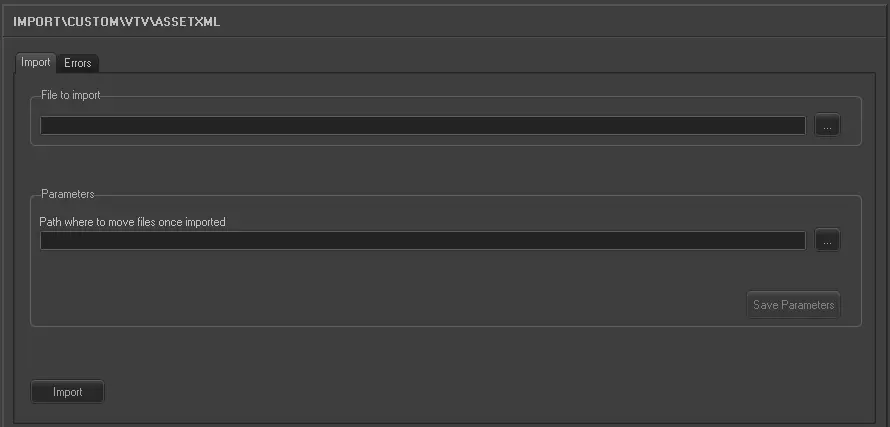
Once all parameters have been correctly set, just press the <Import> button to launch the import operation.
Import_custom_vtv_asset_xml
•File to import: Specify the directory from where XML files will be retrieved for the import. Files are named as follows:
[VideoFileName]_[Version].xml
e.g.
truyenhinhquandoi_1.xml
•Path where to move files once imported: Specify the path where XML files will be moved after the import, thus preventing them to be processed again.
Sample file to import
The file to be imported using this method will have to the following structure in order to be correctly imported:
<?xml version="1.0" encoding="UTF-8"?>
<Titles>
<row>
<status>TX Ready</status> <externid>truyenhinhquandoi</externid>
<COD_PROGRA>truyenhinhquandoi</COD_PROGRA>
<DESCRIPTION>Truyá»n hình Quân Ä‘á»™i</DESCRIPTION>
<Season_ID/>
<Season_Name/>
<Episode/>
<Season/>
<HD_flag>0</HD_flag>
<TIMECODE_I>0</TIMECODE_I>
<TIMECODE_O>1992</TIMECODE_O>
<duration>1993</duration>
<NEWTYPE/>
<DATA>2014-08-23</DATA>
<ORA>52199000</ORA>
<TENCM>Truyá»n hình Quân Ä‘á»™i</TENCM>
<MADVSX/>
<TENDVSX/>
<NGUOISX/>
<DTNGUOISX/>
<NGUOISX>1</NGUOISX>
<NGUOITH/>
<NGAYTH/>
<HTPS>0</HTPS>
<LUU/>
<DOHOA/>
<GHICHU> </GHICHU>
<KIEU>0</KIEU>
<SOLANOC>0</SOLANOC>
<KENHPS/>
<DUYET>0</DUYET>
<LUUTULIEU>1</LUUTULIEU>
<NGUONTULIEU>0</NGUONTULIEU>
<QC>1</QC>
<PRODUCTION_NOTE> </PRODUCTION_NOTE>
<Editor_Name/>
<Segment>
<SOM>179</SOM>
<EOM>223</EOM>
<duration>45</duration>
<Description>PART1</Description>
<Number>1</Number>
</Segment>
<Segment>
<SOM>368</SOM>
<EOM>543</EOM>
<duration>176</duration>
<Description>PART2</Description>
<Number>2</Number>
</Segment>
<Segment>
<SOM>681</SOM>
<EOM>962</EOM>
<duration>282</duration>
<Description/>
<Number>3</Number>
</Segment>
</row>
</Titles>
 5298_Import_custom_vtv_asset_xml