69.1.1.7 IBMS SKY ASRUN
Export Scope
The IBMS SKY TXT CSV export allows the generating of a text file containing only the commercials scheduled within a given date frame. The F90 export launches the "playlist of transmitted commercials only" export type, which exports only the Sky commercials transmitted by the station, representing an As Run of the broadcast. Commercials exported are only those originally imported by the IBMS SKY CSV function and contain the "IMPORTGENERIC" string in their source field. The file format is. TXT, each line represents an event and includes nine fields separated by Tabs.
Moreover, exporting only assets that begin in a certain way or of a particular type is possible.
Export parameters
This export allows the following parameters to be set:
Filename - The structure of the filename is cccYYYYMMDD.txt, where 'ccc' is the IBMS code of the channel and YYYYMMDD is the date of the exported playlist.
Export Path - Indicate the path on which the exported file would be placed.
Data for the file transfer via FTP - Click on the Configure button and define the FTP parameters described in the Configure Data File Transfer via FTP chapter.
Export data - Open the Configure Export window to specify the days to be exported and the export frequency.
Launch the export
Once all parameters are correctly set, press the 'Export' button to launch the export operation.
Scheduling related export
This automatic export is based on Etere Scheduling's manual export called IBMS SKY ASRUN; therefore, the required parameters that are not available here must be taken from the manual export.
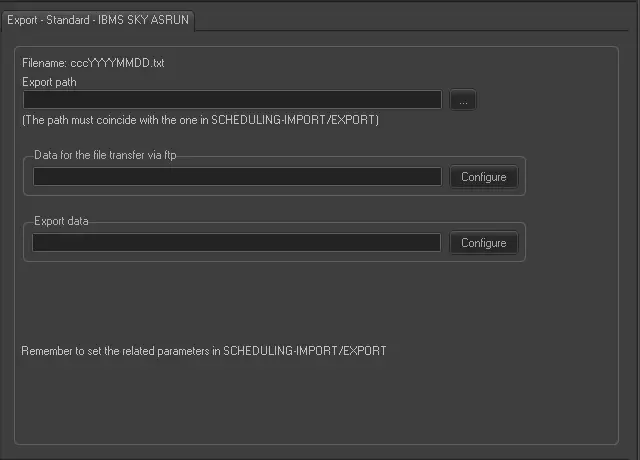 Export_-_Standard_-_IBMS_SKY_ASRUN