84.2.4.7 EPG
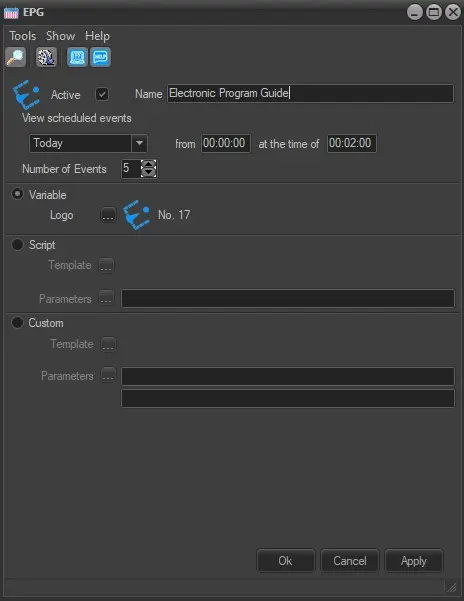
The EPG secondary event is used to, for example, promote upcoming events. Each asset intended to be featured on the TV guide must have its EPG property (Secondary events | Dsk | EPG) enabled and its EPG 1 Metadata properly compiled. Required parameters that can be set under this section are following specified:
4938_EPG_1
Active: Tick off this parameter to enable the secondary event, leave it unchecked to disable it.
Name: Give it a brief descriptive name.
Icon: Make double-click on the default icon to change it with a more suitable one.
View Scheduled Events: It allows to compile the following parameters:
- Day: Specify if the day that will appear as 'promoted' in the EPG is the current day (today) or the day after (tomorrow).
- Time interval: Indicate the schedule's time range on which events to be included in the EPG will be searched.
- Number of Events: Set how many events will be promoted in the EPG.
Select and configure any of the three following modes for the EPG display:
Variable: If selected, a Logo Generator will be used to display the EPG.
Script: Use this mode to simply send a script file (based on certain parameters) containing all EPG information. Please refer to the Script Strings chapter of the Etere Configuration user-guide for information regarding how to manage script formats.
Custom: This option is identical to the Script mode, but allows to use scheduled event's properties as parameters. Please refer to the Next Event Configuration Wizard chapter of the Etere STMan user-guide for information about how to use this option.
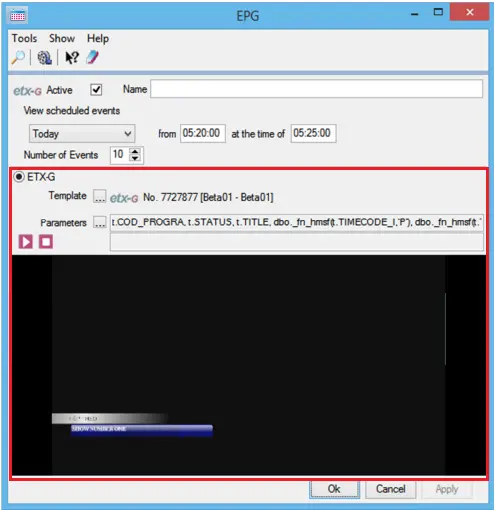
View ETX-G Secondary Event
If the workstation is installed with ETX-G license, an ETX-G section is displayed in the EPG pane where you can preview ETX-G secondary event by selecting the event from the network path or specifying the event name in the parameter and clicking the <Play> button to start the preview.
4939_EPG_2
Toolbar
In the top part of the window is positioned a toolbar containing some key functions for improving the management of secondary events:
Media Library [F7]: Open the Media Library, loading the asset related to the primary event for which the secondary event is being defined. If there are unsaved changes, before opening Media Library a message will be prompted, asking to save or not the modifications to the secondary event.
Search Scheduled Events: Display a preview of the events to be included in the EPG.
 4939_EPG_2
 EPG_1
EPG_1