84.4.5.37 STANDARD > SNELL MORPHEUS PLAYLIST EVF
Import Scope
The import Snell Morpheus Playlist EVF import an .evf file containing one day schedule.
The import would search for asset’s descriptions in database matches the asset descriptions in the EVF file and update the assets. If asset’s descriptions are not found, the import would search the asset’s CLIPID and update the assets. When importing the asset description into database, the quotation marks at the starts and ends of the "Description" fields would be removed.
When searching CLIPID, the following rules apply:
- If the asset type is not Promo (seasons or Programs), the import read the description of the CLIP ID as the asset title to import the asset.
- The default asset type is set for all event types other than Promo, if the asset type is new, or set as “0000” (unknown), the type remains unchanged if it is presented in Etere system.
Import Parameters
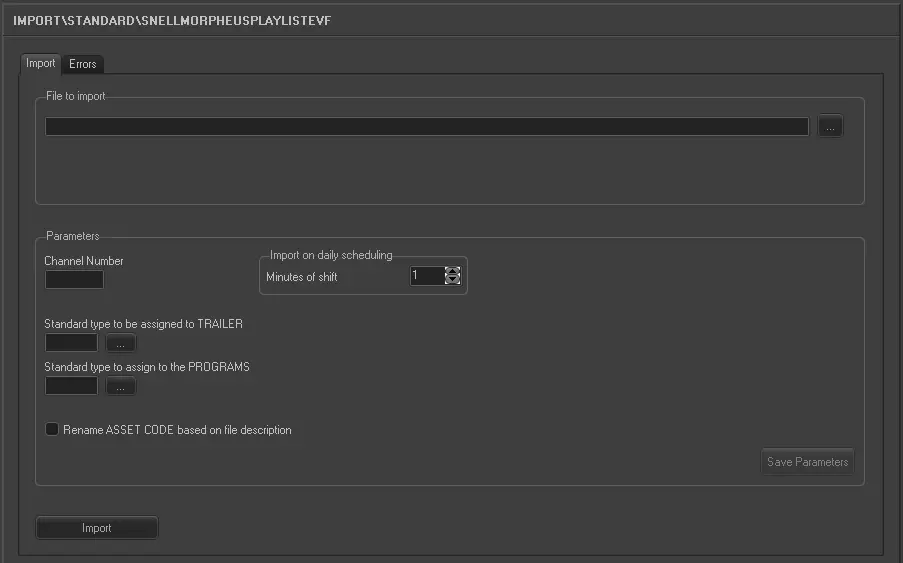
Import_standard_snell_morpheus_playlist_evf
File to import
Specify the name of the EVF file to be import. You can click on the browse button to locate the file in network drive.
The file name format is: yyyy_mm_dd_TAxxxx_x.evf
Parameter
•Channel Number: Specify the channel number assigned to the user.
•Standard type to be assigned to PROMO: Click the browse button to select the asset type to be assigned to PROMO. If the asset is not presented in Etere, specify the asset type in the text box.
•Standard type to be assigned to PROGRAMS: Click the browse button to select the asset type to be assigned to PROGRAMS. If the asset is not presented in Etere, specify the asset type in the text box.
•Rename the Asset Code based on the description in the file: If enabled, the import would check for asset without the asset code but having the same asset description, if found, the asset code would be updated with asset description. (To incorporate with this feature, the quotation marks at the starts and ends of asset description had been removed.)
Import on daily scheduling
• Minutes of shift: If the EVF file is to be import on current date, specify the minutes between imports.
Click the <Save Parameter> to confirm the parameters settings.
Launch the Import
Once the EVF file has been locate, click the <Import> button to start the import process.
 5248_Import_standard_snell_morpheus_playlist_evf