208.4.1.2 DataMover Agents
What is a DataMover Agent?
The DataMover Agents is a feature of using an independent agent for each data transfer, allowing stations to exploit high computing resources using a single workstation to perform multiple transfers. The use of DataMover Agents enhanced the reliability of the media management process as well as an improved overall server performance.
Etere DataMover allows executing multiple simultaneous DataMover Agents to perform media tasks (i.e. transferring or transcoding) individually, thus avoiding concurrency errors and operational bottlenecks.
When to use DataMover Agents?
Etere suggest use DataMover Agents in cases of higher concurrency (i.e. concurrent execution of processes), in this scenario, the use of separate agents would distribute all media transferring/transcoding requests across independent processes, reducing the workload managed by Etere DataMover and avoiding bottlenecks.
How to enable DataMover Agents?
The use of separate agents is enabled for each single Media Manager action (i.e. transferring and transcoding) under the Etere Configuration > Configuration Editor > Media Manager Actions section,by simply enable the checkbox under the 'basic settings' tab:
Enable the checkbox
Once enabled, Etere DataMover would launch the current action using a separate DataMover agent. Please note that separate agents can be used for all process types provided by Etere DataMover including transcoding, multistep copy, FTP copy, VDCP archive and restore, etc.
Moreover, in Etere DataMover, action instances executed by separate agents would be displayed with an [a] in the Data Processors list. (i.e. starting at #2 since the #1 is always performed by Etere DataMover itself):
Data Processors
Is there any interface for DataMover Agents?
A DataMover Agent (EtereMM9ag.exe) is a slim version of Etere DataMover (EtereMM9.exe) able to perform requested media tasks (i.e. transferring or transcoding) independently of the main module.
Each time Etere DataMover executes an action using a DataMover Agent it is initially present as an icon in the Windows system tray (see figure below), move the mouse over this icon to view the following information. The icon would be removed from system tray once the action is completed.
DataMover Agent
•Agent PID (e.g. 4564) : It is the process identifier assigned by windows to the agent's process.
•Job ID (e.g. 1332) : The ID of the T-workflow job performed by the agent.
•Related asset (e.g. 70) : Referred to the asset form for which the job is performed.
•Current status : Indicates if the job is idle, running, or failed.
•Progress indicator (e.g. 58% - step 4/4) : Displays the processing percentage of the job and it current processing steps.
•Job type: indicate the type of job the agent is performing (i.e. copy, transcoding, etc).
Moreover, by double-click on the DataMover Agent system tray icon to launch the main interface, it provide complete detailed record of all jobs currently processing and completed jobs:
DataMover Agent 1
In the toolbar located at the top of the window, the following functions are available:
•Show info: It display all job info on the left panel.
•Kill process: Use it to close the agent and terminate the currently assigned job, even it is not completed.
•Run test job: It simply assign a job to the agent to test its functioning.
NB: Please notice that when a job is killed, the processor that performing the job is terminated (i.e. Exit Code = 0xFCE2DEAD and Exit Msg = -52240723) without reversing all partially performed actions (e.g. incomplete transfers), thus potentially leaving incomplete or inconsistent data.
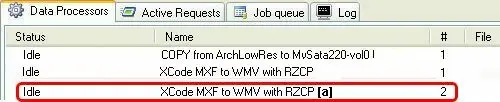 Data_Processors
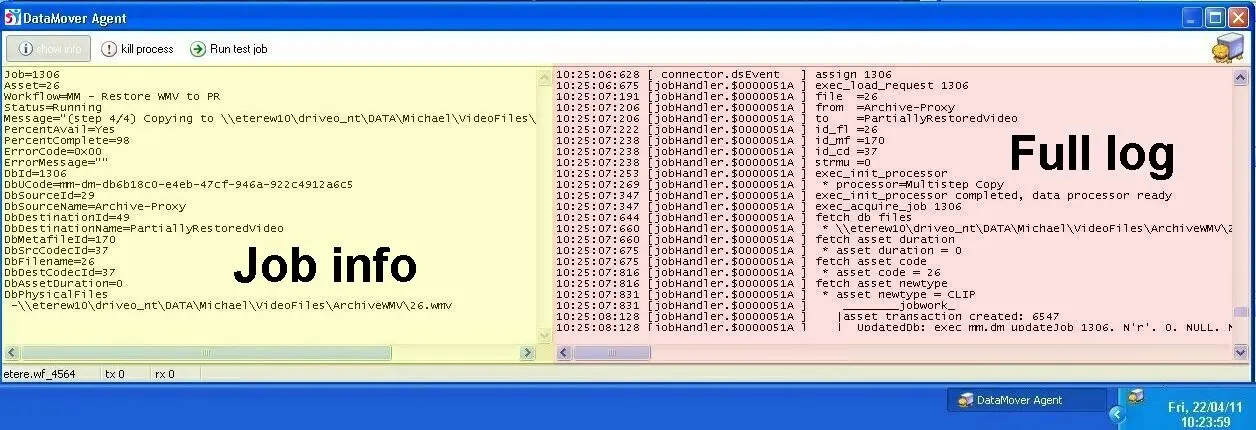 DataMover_Agent_1
 DataMover_Agent
 Enable_the_checkbox