84.4.5.45 CUSTOM > CH-9 > EXACT TIME
Import scope
The custom EXACT TIME import is able to read a .XML file containing the duration of the blocks and segments that make up the on-air schedule of the concerned day.
Etere will use this import to update the duration of the blocks and segments within the daily schedule, Etere will search in the on-air schedule the program code and the segment number within the block, and if it does exists it will change the duration of the segments containing the commercials as well as the duration of the program.
In the import file, the asset code would be managed when the episode number is greater than “999” episode:
•Episode number between "1 – 999" : Create a type code "TODAY10: 057"
•Episode number between "1000 – 9999" : Create a type code "TODAY10: 1234"
•Episode number between "10000 – 99999" : Create a type code "TODAY10: 12345"
•Episode number between "100000 – 999999": Create a type code "TODAY10: 123456"
NB: Please notice that in order to use this import function, a valid commercial structure (i.e.: blocks and segments) must exist in the system for the days intended to be imported. Moreover, once the CH9 - Exact time import is completed, the 'Recalculate basic times structure' function is automatically launched, restoring the timings of commercial blocks and segments to their default values and compacting their durations to eliminate empty spaces between segments.
Import parameters
This import module requires the following parameters to be set in order to be correctly used:
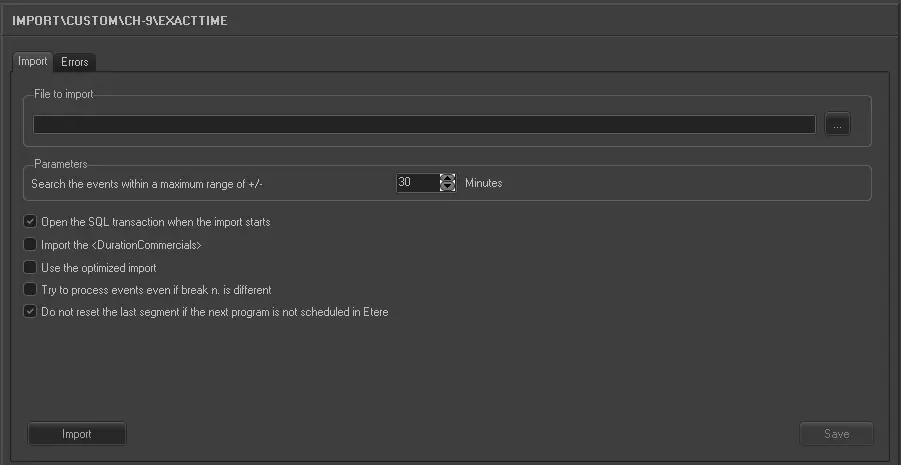
Import_custom_ch-9_exact_time
•File to import: Browse for the file from which data will be imported, only .XML files will be displayed since they are the only supported.
Parameters:
•Search the events within a maximum range of +/- : Indicate the time interval (in minutes) on which programs will be searched based on th start time specified in the imported file.
For example, if the maximum-time-interval is set to 30min and the expected-start-time is 09:30, programs will be searched in the on-air schedule in the 09:00-10:00 interval.
❑Open the SQL transaction when the import starts: When import starts, display the SQL transaction information on screen.
❑Import the <DurationCommercials>: If enabled, the duration in the <DurationCommercials> tag would be imported.
❑Use the optimized import: Use optimized mode to import the schedule.
❑Try to process events even if break n. is different: Enable this option to ignore the different in break number and import the events.
❑Do not reset the last segment if the next program is not scheduled in Etere: Use this option to manage the duration of previous event, if enabled, when the next program is not scheduled in Etere, the duration would not be reset to zero (0). Instead the duration would be set to 1 minute to allow recalculation to correct the duration in the segment.
Sample file to import
The file to be imported using this method will have to the following structure in order to be correctly imported:
<?xml version="1.0" encoding="UTF-8"?>
<Report ReportHeading="Break Times Report - Mon Aug 9, 2010, TCN SD">
<ReportTable SegmentDurationHeading="Segment Duration" RollFillDurationHeading="Roll/Fill" BreakTimeHeading="Break Time" BreakNoHeading="Break No." BreakLengthHeading="Break Length" ProgrammingHeading_1="Programming" CommercialsHeading_1="Commercial" PromotionsHeading_1="Promotion" TotalCommercialAndPromotionsHeading_1="Total Commercial + Promotion" BillboardsHeading_1="Billboard" CSAHeading_1="CSA" ExemptPromotionHeading="Exempt Promotion">
<ReportTable_Group1_Collection>
<ReportTable_Group1 TotoalRollFillDuration="" ProgramStartTime="06:00:00" EpisodeDescription="TODAY10: TODAY (Ep. #157, Ver. #1)" Classification="NA">
<Details IsContentMarker="CM" SegmentDuration="15:00" RollFillDuration="" BreakTime="06:15:00" BreakNo="1" BreakLength="3:50" DurationProgramming="" DurationCommercials="3:00" DurationPromotions="40" DurationCommercialsAndPromotions="3:40" DurationBillboards="10" DurationCommunityServiceAnnouncements="" DurationExemptPromotions="">
</Details>
<Details IsContentMarker="" SegmentDuration="8:00" RollFillDuration="" BreakTime="06:26:50" BreakNo="2" BreakLength="3:40" DurationProgramming="" DurationCommercials="3:00" DurationPromotions="30" DurationCommercialsAndPromotions="3:30" DurationBillboards="" DurationCommunityServiceAnnouncements="" DurationExemptPromotions="10">
</Details>
<Details IsContentMarker="" SegmentDuration="7:00" RollFillDuration="" BreakTime="06:37:30" BreakNo="3" BreakLength="3:40" DurationProgramming="30" DurationCommercials="2:30" DurationPromotions="30" DurationCommercialsAndPromotions="3:00" DurationBillboards="10" DurationCommunityServiceAnnouncements="" DurationExemptPromotions="">
</Details>
<Details IsContentMarker="" SegmentDuration="8:00" RollFillDuration="" BreakTime="06:49:10" BreakNo="4" BreakLength="3:40" DurationProgramming="" DurationCommercials="3:00" DurationPromotions="40" DurationCommercialsAndPromotions="3:40" DurationBillboards="" DurationCommunityServiceAnnouncements="" DurationExemptPromotions="">
</Details>
Some of the most important parameters imported during the operation includes:
- ProgramStartTime : Indicates the time at which the program is expected to start,
- EpisodeDescription : It contains the brief description of the program episode,
- Classification : It can specify the parental guidance classification of the program,
- SegmentDuration : It indicates the total duration of the segment,
- BreakTime : It indcates the exact time at which the commercial break should start,
- BreakNo : Indicate the -progressive- number of the segment within the block,
- BreakLength : Indicate the duration of the commercial break within the segment. It is the total duration for Programming, Commercials, Promotions, Billboards, CommunityServiceAnnouncements, and ExemptPromotions.
 5255_Import_custom_ch-9_exact_time