72.2.2.26 Annotations - Project Folder Import
The Project folder import function allows importing all files within a local/network directory into a metadevice using unique filenames and conserving their original information (path, sub-path and filename). This function also support zipped folder import, where all files in the zipped folder and its sub-folders would be copied to the destination path and linked to the asset by one video file containing all files.
External storage (source)
Original path: \\NLE\Projects\P521\
Original sub-path: Audio\
Original filename: 521_Track1-2.wav
Etere archive (target)
Target path: \\Archive\MFiles\
Target unique name: 02BD00000000000002C1
Metafile: 68431
External storage (source)
Original path: \\NLE\Projects\P521\
Original sub-path: Audio\
Original filename: 521_Track3-4.wav
Etere archive (target)
Target path: \\Archive\MFiles\
Target unique name: 02BD00000000000002C2
Metafile: 68431
External storage (source)
Original path: \\NLE\Projects\P521\
Original sub-path: Docs\
Original filename: 521_Notes.pdf
Etere archive (target)
Target path: \\Archive\MFiles\
Target unique name: 02BD00000000000002C3
Metafile: 68431
External storage (source)
Original path: \NLE\Projects\P521\
Original sub-path: Pics\
Original filename: 521_poster.mov
Etere archive (target)
Target path: \\Archive\MFiles\
Target unique name: 02BD00000000000002C4
Metafile: 68431
External storage (source)
Original path: \\NLE\Projects\P521\
Original sub-path: Video\
Original filename: 521.mov
Etere archive (target)
Target path: \\Archive\MFiles\
Target unique name: 02BD00000000000002C5
Metafile: 68431
External storage (source)
Original path: \\NLE\Projects\P521\
Original sub-path: Video\
Original filename: 521_uncut.mov
Etere archive (target)
Target path: \\Archive\MFiles\
Target unique name: 02BD00000000000002C6
Metafile: 68431
As shown above, multiple files belonging to a project can be loaded in the Etere system as a single metafile, keeping and moving all them together when requested, being also possible to export them restoring their original structure (path, sub-path, filename).
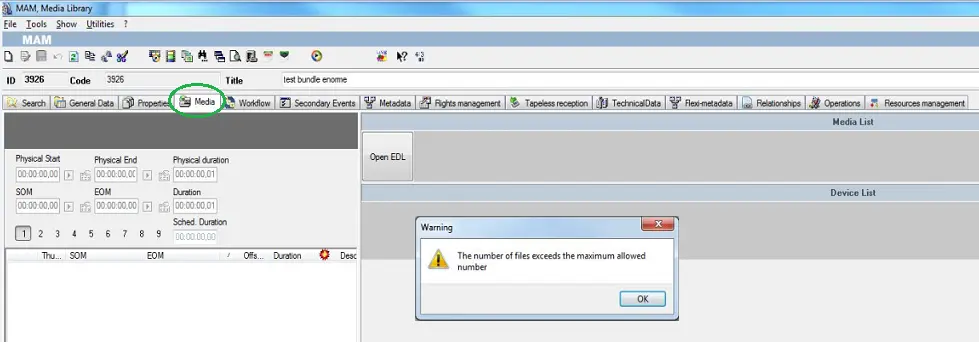
During import, it check the number of files set in the “Maximum number of files to be managed” parameter in Configuration > Settings > Media Asset Management > MAM Parameters, if the number of files exceed the defined value, warning message would be popup and the import process would be disabled.
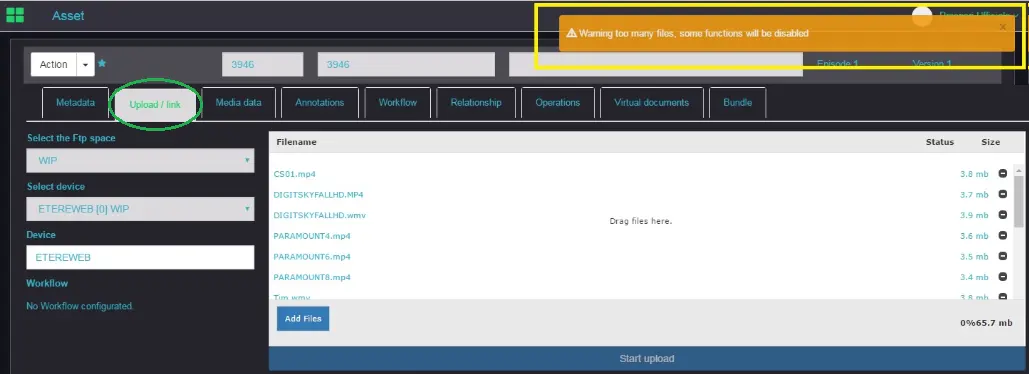
If you are access the Media Library module via EtereWeb, the same restriction would applied when you attempt to "Upload / link" file exceeding the maximum number of files allowed.
Note:
In order to be active, this function needs a T-workflow to be set in "Etere Configuration > Configuration Editor > Default T-workflows > After asset project folder import".
 Media_Library
 Media_Library__via_EtereWeb