10.1 Audience
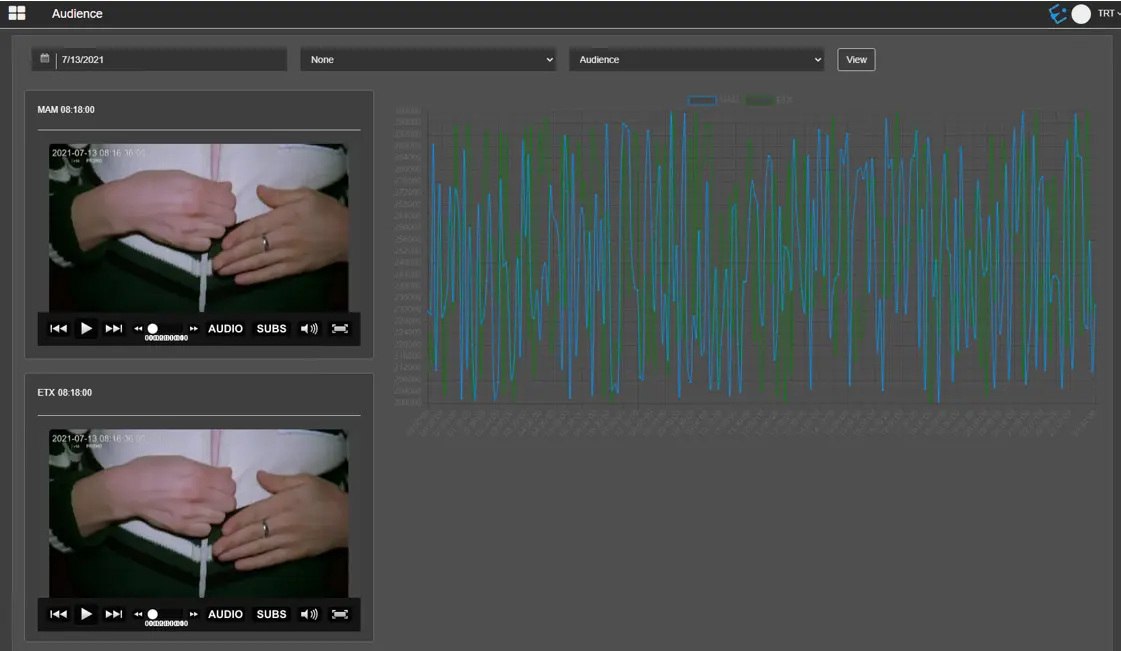
It presents a chat audience wizard related to the video content recorder by Etere Memory, which simplifies the understanding of audience composition.
First, the audience’s users must be selected in the Memory Options settings in User Preferences. Otherwise, no graphics and no players would be displayed on this page.
Then, set the three parameters at the top of the page. They are described in the table below.
Audience
- Date: Select a date from the calendar to display the audience composition;
- Audience Area: Select one option from the list, e.g. Mega, Meter, or Suburbs. Or leave the default as “none”;
Areas can be configured in Etere Configuration > Settings > Coding Areas Audience.
- Variations: Select one of the following variations to display on the char:
- Audience: Calculate the number of audiences reached for a specific station;
- Loudness: Calculate and display the loudness information of the video files, which could be used to analyse loudness variations between events. The loudness information is computed in hourly basic;
- Share (%): Calculate the percentage of the audience reached against the target audience.
Once all the parameters have been fulfilled, click the <View> button to present the Audience composition.
Above the chart, a legend shows which colour is associated with the stations enabled for the audience. If you click on the coloured rectangle next to the station name, it’s possible to hide and show the related chart line.
It’s also possible to select a specific time within the selected date and play the related Memory file if present. A player window is displayed for each station enabled in the Memory options.
If the Memory video file can’t be found, a warning will alert the user:
Note: The audience data are imported via Air Sales Utility Menu. Hence Air Sales license must be installed in the workstation. See Import Audience chapter for more information about how to import audience data.
 Audience