72.19.2 Advanced QC Architecture
This chapter describe various components in Advanced QC architecture.
System Requirements
In order for Advanced QC to function properly after installation, the system requirements listed below must be fulfilled.
•You can install Advanced QC on physical machine or virtual machine
•Advanced QC runs on Microsoft Windows platform, it support:
•32-bit or 64-bit versions of Windows Operating System
•Windows Server: 2008 R2 or later
•Windows Client: Windows 7 or later
•Dongle access, it support
•Physical attached
•Network access via LAN or WAN
•Other access methods
You can install Advanced QC in Single node or Multi node.
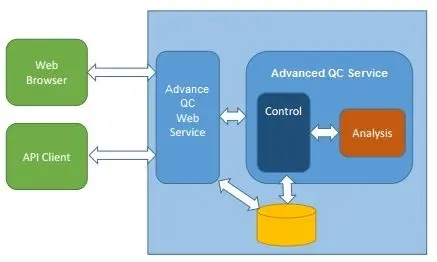
Single Node architecture
Single Node architecture
In Single Node, the Firewall settings for various Windows services are as follow:
•Advanced QC Web Service
•This service uses port 8080 for Web access and API client access.
•Advanced QC Service
•This service uses port 9980 for internal access or closed access.
•Sentinel LDK License Manager
•For licensing and distribution, the Sentinel LDK License Manager uses port 1947 for internal access and closed access
After installed, you can view the services under the Administrator Tools > Services.
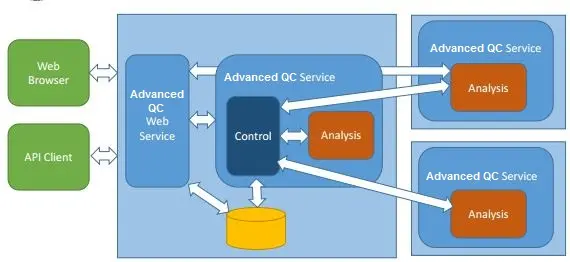
Multi Node architecture
Multi Node architecture
In Multi Node, the Firewall settings for various Windows services are as follow:
Central node
•Advanced QC Web Service
•Advanced QC Web Service
•This service uses port 8080 for Web access and API client access
•Advanced QC Service
•This service uses port 9980 for internal access or closed access.
•Sentinel LDK License Manager
•For licensing and distribution, port 1947 is used for nodes accessing via Net Dongle.
Nodes
•Advanced QC Service
•Port 9980 is used to access to the Central Node
•Sentinel LDK License Manager
•For licensing and distribution, the Sentinel LDK License Manager uses port 1947 for internal access and closed access
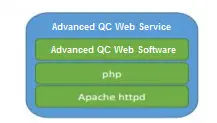
Advanced QC Web Service
Advanced QC Web Service
As illustrated above, the Advanced QC Web service support the following protocol:
•Apache httpd (Apache HTTP Server Daemon).
•PHP FastCGI (FastCGI is a variation on the earlier Common Gateway Interface, it reduce the overhead associated with interfacing the Web Server and CGI programs.
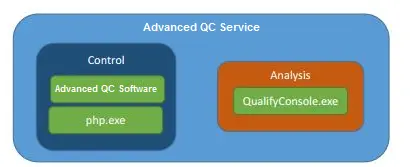
Advanced QC Service
Advanced QC Service
The Native Process (32-bits) consists of 2 different tasks:
•Interface with pure analysis/decoding (QualifyConsole.exe)
•Interface with periodic tasks, e.g. file discovery, analysis start, etc.
Sentinel LDK License Manager
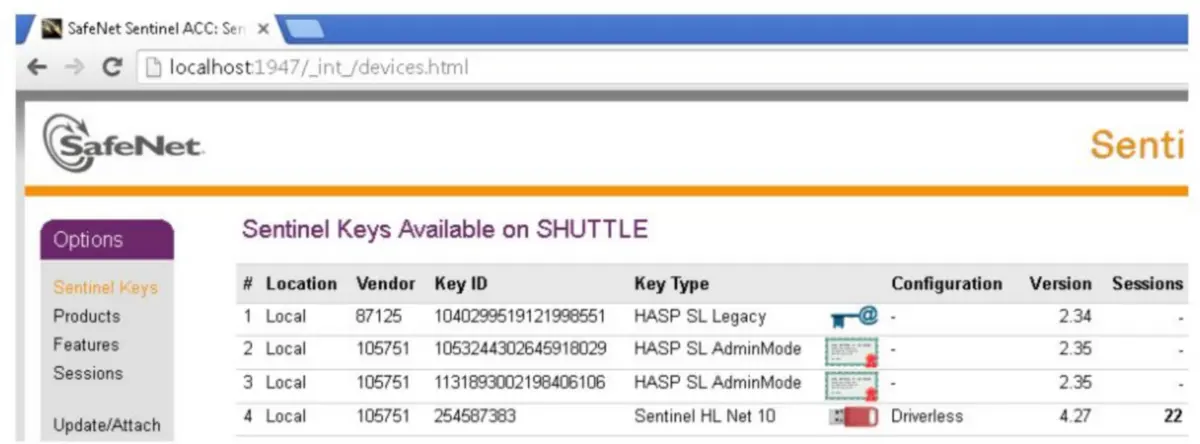
The Sentinel LDK License Manager by Aladdin/safenet/gemalto support access using
•Dongles: it support hardware or software protection dongles, can be connect locally or remotely
•TCP port: use port 1947 for local host access, e.g. http://localhost:1947
After connected as local host, you can view various available license keys.
Send project files to Etere
Advanced QC Database
You can install and setup Advanced QC on one of the SQL database listed below:
•SQLite
SQLite is a software library that provides a relational database management system, it does not require configuration and it does not require a physical server. It location path is “<install dir>\Advanced QC\httpd\htdocs\app\Vendor\Database\database.db”.
•MySQL
MySQL is an open-source relational database management system, it support web-based and data-based applications, and require a physical server to house the database.
Accessing to remote folders
To manage user accessing to Advanced QC, there are 2 ways to secure the folders:
•Create a remote repository for storing user IDs and passwords
It require creation of additional set of user IDs and passwords, this method is less recommended due to password exposure or misplaced.
•Grant user access in Windows
Use the Services.msc in Windows Operating System to manage user accessing to Advanced QC, you can stop, start the services, or set it to automatic or manual during the program Startup.
Storage requirements
•Database storage
From version 2.9 onwards, a larger storage space is required.
•Analysis Results
- You can analyse nodes and central system
The analysis results are created in <install dir>\Advanced QC\Out\<ID> folder
-Version 2.8 require more space for file analysis, it requires approximately 150 MB per file for 1h30m at 30fps.
- From version 2.9 onwards, less storage space is required.
•Reports
Analysis reports are generated in <install dir>\Advanced QC\cache folder.
Logs locations
The logs are created in respective folders for respective services, you can remove the logs at any time:
•Advanced QC Service
Logs are created in <install dir>\Advanced QC\qapi\log\ folder
You can access the logs via web at http://localhost:8080/log
•Apache httpd
Logs are created in <install dir>\Advanced QC\httpd\logs\ folder
•Advanced QC/PHP
Logs are created in <install dir>\Advanced QC\httpd\htdocs\app\tmp\logs folder
Rebranding
•From version 2.7 onwards, the favicon icon and image files would not be overwritten during upgrade. These files are stored in <install dir>\Advanced QC\httpd\htdocs\app\webroot\img\logo.
•The PHP files are stored in <install dir>\Advanced QC\httpd\htdocs\app\Config\name.php
•Avoid using Unicode for encoding
File states
Refer to the self-explanatory diagram below.
File states
Project states
Refer to the self-explanatory diagram below.
Project states
 Single_Node_architecture
 Advanced_QC_Service
 Send_project_files_to_Etere
 Multi_Node_architecture
 Advanced_QC_Web_Service
 File_states
 Project_states