71.11 Videotape copy
The "Videotape Copy" module allows you to ingest video files stored in Video Servers into video tapes, permitting you also to insert both blacks and colour bars at the start/end of the tape. This application is specially useful for example, to create a backup tape containing specific video files.
After configuring the source (Video Server) and destination (VTR) (VideoTapeCopy Parameters) in the 'Parameters' module, you just have to follow the instructions described below:
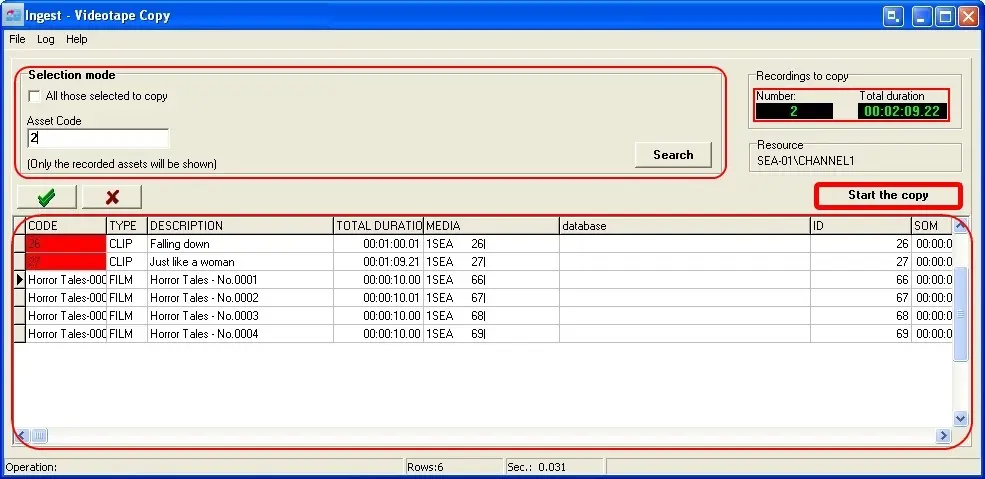
Videotape Copy 1
1.Set the search filters depending on your preferences, you can search only all those assets that have been selected to be copied or specify a string that must be contained in the code of the assets you intend to record.
(*) The search will be performed exclusively amongst those assets which have a video file in the selected Video Server.
2.Proceed with searching for assets by clicking on 'Search'.
3.Therefore, from the list, select the assets you wish to copy (by making double-click on them) and click on the 'Start to Copy' button.
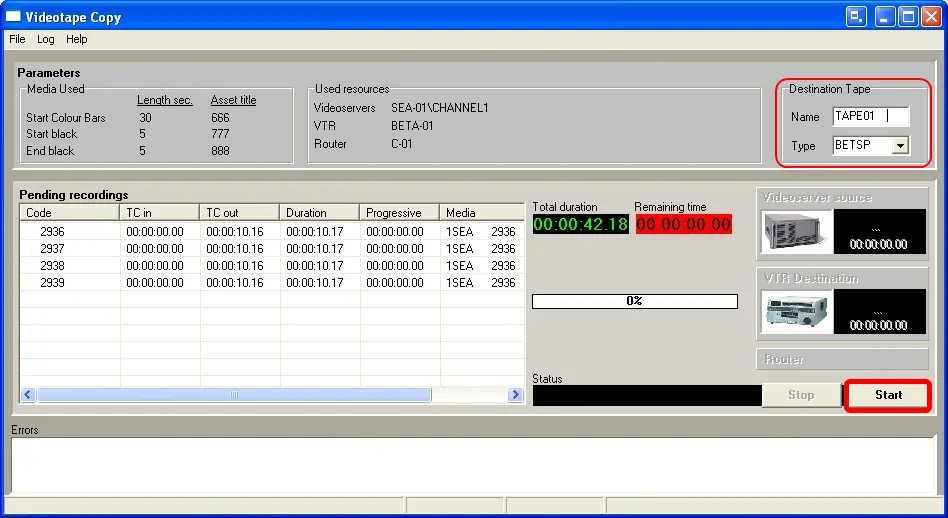
4.You will be taken to a new window where you will see a list containing all the previously selected assets, as well as information regarding defined colour bars and blacks to be inserted. At this point just enter a name for the tape and press the 'Start' button.
Videotape Copy 2
Remember that the ingest process can be stopped at any moment by pressing the 'Stop' key
 Videotape_Copy_1
 Videotape_Copy_2