59.5.7.22 Themes Log Sheet
Report Description
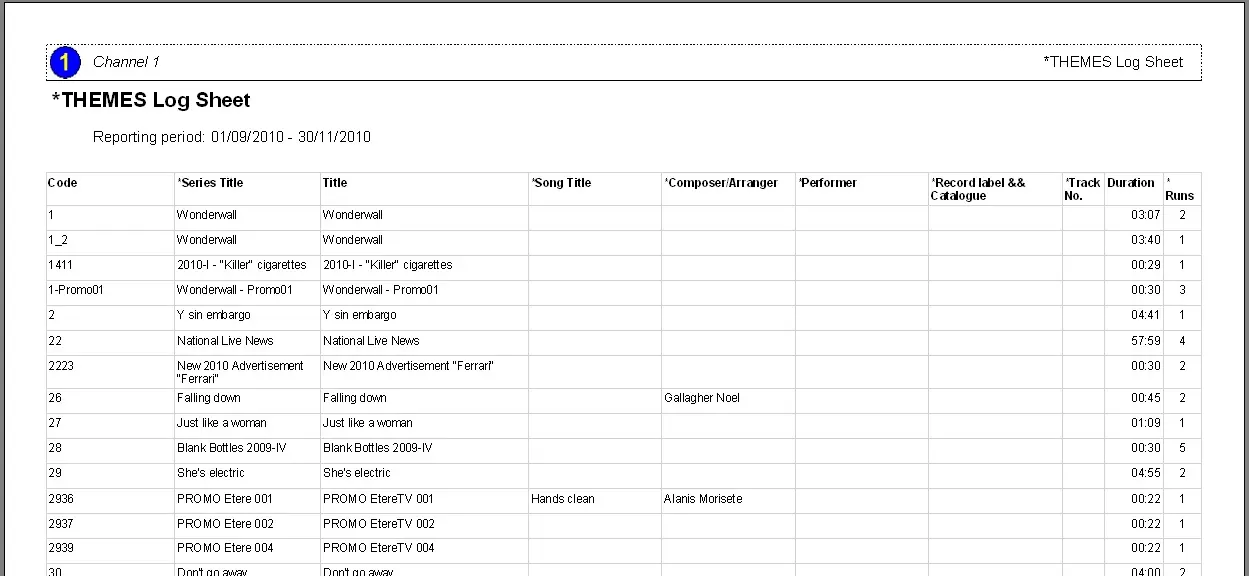
The 'Themes Log Sheet' report permits stations to generate a report containing all the events programmed on the on-air schedules of a specific date range.
Notice that this report will be based on the 'local time' (i.e., the station local time zone) and NOT in the 'main time' (i.e., the primary reference time zone) of the station, which is set in the Etere Configuration module under the Settings | Basic | System section, please refer to the Main and local times chapter for detailed information on how to set the station local and central times.
Report Filters
All the parameters that permit a detailed report generation have been spread across seven different tabs to allow a more manageable configuration. By default, all filters are disabled (i.e., either blank or unselected); to enable them, it is enough to configure at least one parameter inside. Available filters include:
•Reporting Period: Indicate the date interval from which data to be included in the report will be retrieved, that is, the date range on which events must have been scheduled to be taken into account.
•Types: Select the asset types in the report; by default, ALL asset types are included.
Report Preview
The [Settings] permits to configure the page layout of the outgoing document; once filters and settings have been set, it will be possible to select between displaying a preview using the related [Preview] button or printing the document directly using the [Report] button. Please note that some reports permit the export of the generated document in the most common formats (pdf, CSV, doc, xls, XML, etc) just by using the [Export] button.
assets_themes_log_sheet_preview
 assets_themes_log_sheet_preview