68.3.3 EtereChannel
EtereChannel
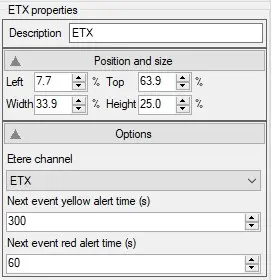
This control allow to place a plugin showing information about the automation channel of a specific station. Its behaviour is defined by the following properties:
eterechannel_props
Description: allows changing the control description from the default one.
Position and size: allows positioning and sizing of the control on the layout.
Options
In this section the following properties can be set:
• Etere channel: Specify here the station intended to be monitored with this control.
• Next event yellow alert time (s): Specify the amount of remaining seconds until the next event, after which the bars on the control will turn yellow.
• Next event red alert time (s): Specify the amount of remaining seconds until the next event, after which the bars on the control will turn red.
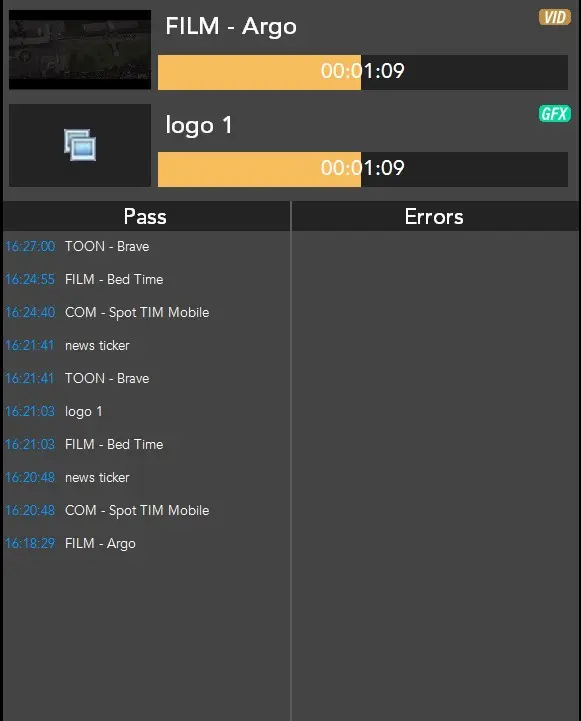
This control is made by three main sections:
eterechannel_MV
Next event and next graphic bars: In this area, two bars are present. The upper one shows how much time remains until the next event. The other one shows how much time remains until the next graphic in schedule. Both of them change colour from green to yellow to red, according to the value set in the properties Next event yellow\red alert time.
Above the bars, the text shows the descriptions of the next event and the next graphic.
Pass column: All the events and graphics marked as transmitted will be listed under this column.
Errors column: All the events and graphics with errors or not transmitted, will be listed under this column.
Note: if an event is not marked as transmitted and there's no error on it (e.g.: skipped), it will not appear under the columns at all.
 eterechannel_props
 eterechannel_MV