201.13.3 Search tab
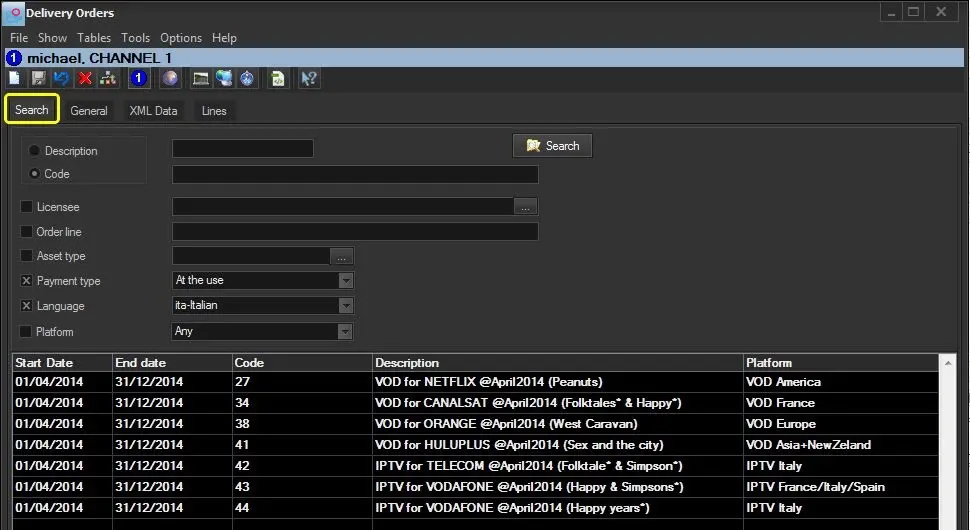
The "Search" tab is used to locate an existing Delivery Order, view and modify its information. Searches can be performed using a variety of filters including the following ones:
Bms_ott_search
Search by:
Description - Specify the starting characters of the description of the order(s) to be filtered.
Code - Specify the starting characters of the code of the order(s) to be filtered.
Order line - Specify the starting characters of the description of the order line(s) to be filtered.
Other filters:
Asset type - Narrow the search to orders related to a certain asset type (e.g. TV season).
Payment - Narrow the search to orders with a certain type of payment (i.e. any, at the use or prepaid).
Language - Narrow the search to orders related to assets of a certain language (e.g. English, Italian)
Station - Narrow the search to orders related to a certain station (e.g. channel 03).
Platform - Narrow the search to orders related to a certain platform (e.g. IPTV Italy).
Once all filters are compiled, press the [Search] button to retrieve all matching orders; double-click on an order would load it's information compiled in General tab automatically.
Note
Depending on whether the user have the "BMS\OrdersForAllStations" rights, it allows to retrieve and edit Delivery Orders related to other stations (e.g. channel 03, channel 03) different from the current one (e.g. channel 01).
 Bms_ott_search