59.3.9.23 Conforming Videofiles Check
Action Description
The "Conforming video files check" action checks that all files required for a conforming operation (i.e. asset segments, head and tail) are available in the source device and with the source codec specified in a conforming profile, restoring them if necessary.
In case one or more files are missing, the default "restore" T-workflow is attached to all assets related to missing files, making it possible to choose between either waiting until all files are restored or continuing with the execution of the main T-workflow in the meanwhile.
Note
This action must not be placed in the same T-workflow along with the Conform Version, as it will result in a looped processing.
Suggestion
▪This kind of action is beneficial to allow the default "conforming" T-workflow to know if the files to be conformed are available or need to be restored.
▪For further details on the conforming process, please refer to the "Conforming" section of the Configuration Editor chapter.
Action Parameters
To create this action, complete the following data:
General info
Name - Enter a self-descriptive name for the action (e.g. Conform check with 5 minutes waiting)
If files are missing for conforming - Specify the action to be taken in case one or more EDL segment's files are missing:
If files are missing for conforming - Launch a restore T-workflow and wait - Launch the Restore for conforming T-workflow and wait (up to a given timeout) until all files are restored.
If files are missing for conforming - Launch a restore T-workflow and continue - Launch the Restore for conforming T-workflow and proceed with the execution of the Conforming T-workflow (set in default T-Workflows).
Timeout in seconds - In case it's selected to "launch a restore T-workflow and wait", set here the maximum amount of time that the conforming T-workflow should wait for the restore before exiting with a "missing files" output.
Profile - Select the conforming profile upon which the file check will be performed; that is, the action will check that conforming materials (i.e. asset segments, head, tails) are available source devices with the source codec.
Depending on the success of the requested operation, one of the following results will be returned by the action:
Done (all files are available)
Missing (some files are missing)
How to use it
To check and restore all files missing for a conforming (e.g. from the News Story Creator module), it is first required to include the "Conforming Video Files Check" action into a T-workflow using the T-Workflow Designer:
Conforming_Video_Files_Check
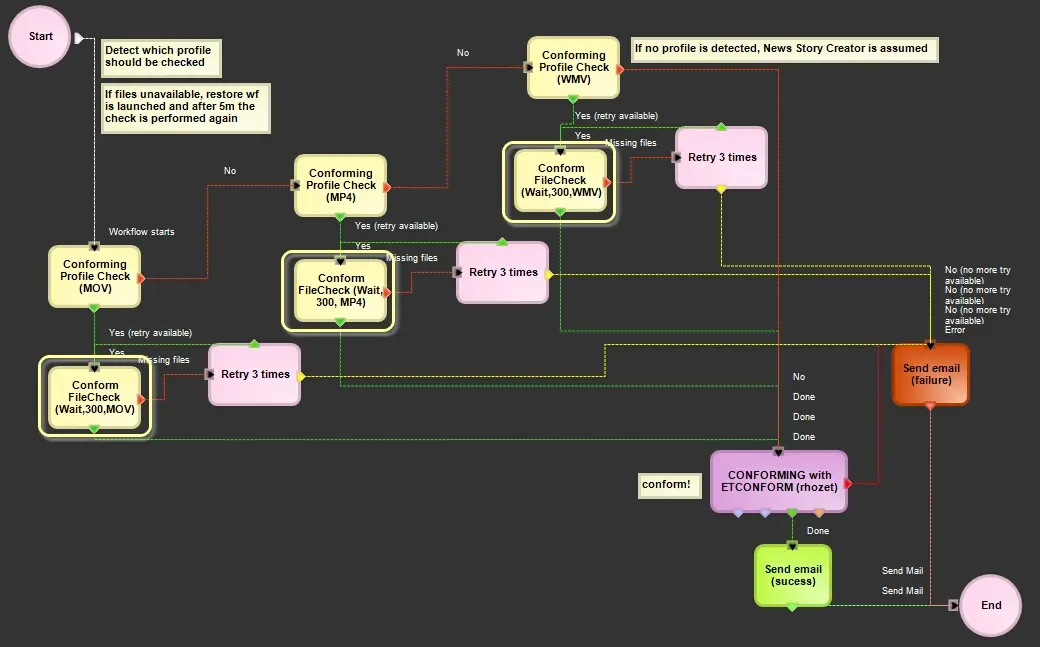 Conforming_Video_Files_Check